

Carter organizes ASP.NET Core Minimal API endpoints into self-registering modules: each feature defines its routes in an ICarterModule class, AddCarter() discovers the modules, and app.MapCarter() maps them at startup.
That convention is a natural fit for Vertical Slice Architecture, where each feature already owns its handler and validator.
Here is how I combine the two, from installation to integration tests.
Minimal APIs are great until Program.cs hits 500 lines.
What Is Carter?
Carter is a library that adds convention-based routing to ASP.NET Core Minimal APIs. It lets you define endpoints in self-contained modules instead of one giant Program.cs.
Combined with Vertical Slice Architecture, Carter gives each feature its own endpoint module, handler, and model in one place.
Setting Up Carter
Install the package:
dotnet add package Carter
Register it:
var builder = WebApplication.CreateBuilder(args);

builder.Services.AddCarter();

builder.Services.AddMediatR(config =>
{
    config.RegisterServicesFromAssembly(typeof(Program).Assembly);
    config.AddOpenBehavior(typeof(ValidationBehavior<,>));
});

builder.Services.AddValidatorsFromAssembly(typeof(Program).Assembly);

var app = builder.Build();

app.MapCarter();
app.Run();
AddCarter() automatically discovers all ICarterModule implementations and registers them in DI, and MapCarter() maps each module's routes.
ValidationBehavior is the FluentValidation pipeline behavior that runs each slice's validator before the handler and returns failures as a failed Result.
I break it down in validation in Vertical Slice Architecture.
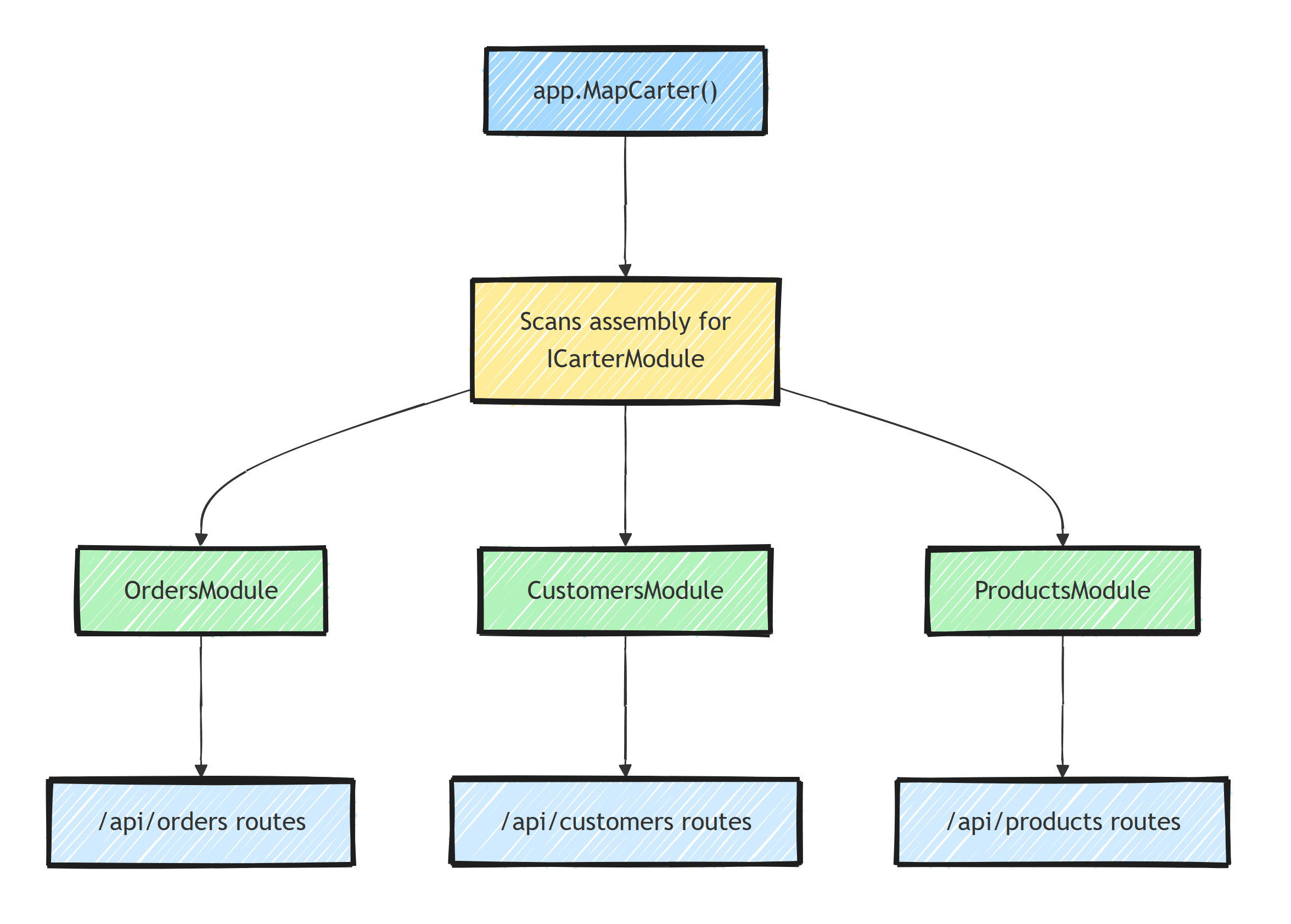
A Feature Slice With Carter
Here's a complete feature slice for placing an order:
// Features/Orders/PlaceOrder.cs
public static class PlaceOrder
{
    public sealed record Command(
        Guid CustomerId,
        List<OrderItemRequest> Items) : IRequest<Result<Guid>>;

    public sealed record OrderItemRequest(Guid ProductId, int Quantity);

    public sealed class Validator : AbstractValidator<Command>
    {
        public Validator()
        {
            RuleFor(x => x.CustomerId).NotEmpty();
            RuleFor(x => x.Items).NotEmpty();
            RuleForEach(x => x.Items).ChildRules(item =>
            {
                item.RuleFor(x => x.ProductId).NotEmpty();
                item.RuleFor(x => x.Quantity).GreaterThan(0);
            });
        }
    }

    public sealed class Handler : IRequestHandler<Command, Result<Guid>>
    {
        private readonly ApplicationDbContext _db;

        public Handler(ApplicationDbContext db) => _db = db;

        public async Task<Result<Guid>> Handle(
            Command request, CancellationToken ct)
        {
            var customer = await _db.Customers
                .FirstOrDefaultAsync(c => c.Id == request.CustomerId, ct);

            if (customer is null)
            {
                return Result.Failure<Guid>(
                    new Error("Customer.NotFound", "Customer not found."));
            }

            var order = new Order
            {
                Id = Guid.NewGuid(),
                CustomerId = request.CustomerId,
                Items = request.Items.Select(i => new OrderItem
                {
                    ProductId = i.ProductId,
                    Quantity = i.Quantity
                }).ToList(),
                CreatedAt = DateTime.UtcNow
            };

            _db.Orders.Add(order);
            await _db.SaveChangesAsync(ct);

            return order.Id;
        }
    }
}
Now the Carter module:
// Features/Orders/OrdersModule.cs
public class OrdersModule : ICarterModule
{
    public void AddRoutes(IEndpointRouteBuilder app)
    {
        var group = app.MapGroup("/api/orders")
            .WithTags("Orders");

        group.MapPost("", async (
            PlaceOrder.Command command,
            ISender sender,
            CancellationToken ct) =>
        {
            var result = await sender.Send(command, ct);

            return result.IsSuccess
                ? Results.Created($"/api/orders/{result.Value}", result.Value)
                : result.ToProblemDetails();
        });

        group.MapGet("{id:guid}", async (
            Guid id,
            ISender sender,
            CancellationToken ct) =>
        {
            var result = await sender.Send(new GetOrder.Query(id), ct);

            return result.IsSuccess
                ? Results.Ok(result.Value)
                : result.ToProblemDetails();
        });

        group.MapGet("", async (
            int page,
            int pageSize,
            ISender sender,
            CancellationToken ct) =>
        {
            var result = await sender.Send(
                new GetOrders.Query(page, pageSize), ct);

            return Results.Ok(result.Value);
        });
    }
}
ToProblemDetails() is a small extension method that maps a failed Result to Results.Problem or Results.ValidationProblem, so every endpoint returns consistent Problem Details responses.
Project Structure
Features/
  Orders/
    PlaceOrder.cs
    GetOrder.cs
    GetOrders.cs
    CancelOrder.cs
    OrdersModule.cs
  Customers/
    RegisterCustomer.cs
    GetCustomer.cs
    CustomersModule.cs
  Products/
    CreateProduct.cs
    GetProducts.cs
    ProductsModule.cs
Each feature folder contains:
- One file per use case (command/query + handler + validator)
- One Carter module for routing all endpoints in that domain
Everything for orders lives in Features/Orders/. No jumping between Controllers, Services, Models, and Repositories folders.
Route Groups and Common Configuration
Carter modules support route groups with shared configuration:
public class OrdersModule : ICarterModule
{
    public void AddRoutes(IEndpointRouteBuilder app)
    {
        var group = app.MapGroup("/api/orders")
            .WithTags("Orders")
            .RequireAuthorization();

        group.MapPost("", HandlePlaceOrder);
        group.MapGet("{id:guid}", HandleGetOrder);
        group.MapDelete("{id:guid}", HandleCancelOrder)
            .RequireAuthorization("Admin");
    }

    private static async Task<IResult> HandlePlaceOrder(
        PlaceOrder.Command command,
        ISender sender,
        CancellationToken ct)
    {
        var result = await sender.Send(command, ct);
        return result.IsSuccess
            ? Results.Created($"/api/orders/{result.Value}", result.Value)
            : result.ToProblemDetails();
    }

    private static async Task<IResult> HandleGetOrder(
        Guid id,
        ISender sender,
        CancellationToken ct)
    {
        var result = await sender.Send(new GetOrder.Query(id), ct);
        return result.IsSuccess
            ? Results.Ok(result.Value)
            : result.ToProblemDetails();
    }

    private static async Task<IResult> HandleCancelOrder(
        Guid id,
        ISender sender,
        CancellationToken ct)
    {
        var result = await sender.Send(new CancelOrder.Command(id), ct);
        return result.IsSuccess
            ? Results.NoContent()
            : result.ToProblemDetails();
    }
}
Extract handler methods to keep AddRoutes readable.
Endpoint Filters
If you'd rather handle cross-cutting concerns at the HTTP boundary instead of inside the MediatR pipeline, use endpoint filters. Here's a validation filter that resolves the slice's FluentValidation validator from DI:
public class ValidationFilter<TRequest> : IEndpointFilter
{
    public async ValueTask<object?> InvokeAsync(
        EndpointFilterInvocationContext context,
        EndpointFilterDelegate next)
    {
        var request = context.Arguments
            .OfType<TRequest>()
            .FirstOrDefault();

        if (request is null)
        {
            return await next(context);
        }

        var validator = context.HttpContext.RequestServices
            .GetService<IValidator<TRequest>>();

        if (validator is not null)
        {
            var result = await validator.ValidateAsync(request);
            if (!result.IsValid)
            {
                return Results.ValidationProblem(result.ToDictionary());
            }
        }

        return await next(context);
    }
}
The filter is generic over the request type, so you apply it per endpoint:
group.MapPost("", HandlePlaceOrder)
    .AddEndpointFilter<ValidationFilter<PlaceOrder.Command>>();
Pick one place to validate (pipeline behavior or endpoint filter), not both.
Testing Carter Modules
Because Carter modules are just Minimal API routes, they test like any other endpoint through WebApplicationFactory:
public class OrdersModuleTests
    : IClassFixture<WebApplicationFactory<Program>>
{
    private readonly HttpClient _client;

    public OrdersModuleTests(WebApplicationFactory<Program> factory)
    {
        _client = factory.CreateClient();
    }

    [Fact]
    public async Task PlaceOrder_WithInvalidBody_ReturnsProblemDetails()
    {
        var response = await _client.PostAsJsonAsync("/api/orders", new
        {
            CustomerId = Guid.Empty,
            Items = Array.Empty<object>()
        });

        response.StatusCode.Should().Be(HttpStatusCode.BadRequest);
    }
}
AddCarter() and MapCarter() run during test host startup, so all modules are discovered exactly as in production. No special test setup for Carter itself.
Why Carter + VSA Works
What the combination buys you:
- Auto-discovery: Carter finds modules automatically, no manual registration in
Program.cs - Feature isolation: each module encapsulates a bounded set of endpoints
- Clean Program.cs: just
app.MapCarter()instead of dozens ofMapGet/MapPostcalls - Route grouping: share authorization, filters, and tags across related endpoints
- Testability: each handler is independent and easily unit-tested
Carter vs. Plain Minimal APIs
Without Carter, endpoints pile up in Program.cs or require manual extension methods:
// Without Carter - gets messy fast
app.MapPost("/api/orders", HandlePlaceOrder);
app.MapGet("/api/orders/{id}", HandleGetOrder);
app.MapGet("/api/orders", HandleGetOrders);
app.MapPost("/api/customers", HandleRegisterCustomer);
app.MapGet("/api/customers/{id}", HandleGetCustomer);
// ... 50 more lines
With Carter, each module owns its routes. Program.cs stays clean.
Carter isn't the only way to get there. You can build the same auto-discovery yourself with an IEndpoint interface and assembly scanning, which I showed in automatically registering Minimal APIs. Choose Carter if you want the convention ready-made and don't mind a third-party dependency in your API layer; roll your own if you'd rather own those 30 lines of reflection.
Summary
Carter doesn't change what a vertical slice is.
It standardizes how a slice exposes its routes: each feature folder gets a module, each module owns its endpoints, and Program.cs shrinks to app.MapCarter().
If you want that convention ready-made, use Carter.
If you'd rather avoid the dependency, the IEndpoint approach gets you the same result for 30 lines of your own code.
Either way, if you're building with Minimal APIs and vertical slices, put each feature's endpoints inside its slice.
Thanks for reading, and stay awesome!
Frequently Asked Questions
What is Carter in .NET?
Carter is an open-source library that organizes ASP.NET Core Minimal API endpoints into modules. Each class implementing ICarterModule defines its own routes, AddCarter() discovers and registers all of them automatically, and app.MapCarter() maps their routes.
Do I need Carter to use Vertical Slice Architecture?
No. You can achieve the same organization with extension methods per feature or a small IEndpoint abstraction with assembly scanning. Carter just gives you the module convention and auto-discovery out of the box.
Does Carter work with MediatR?
Yes, and it is a common pairing: the Carter module maps HTTP routes and delegates to MediatR commands and queries via ISender, so the endpoint layer stays thin.
Is Carter production-ready?
Yes. Carter is a thin convention layer over Minimal APIs, so at runtime your endpoints are plain ASP.NET Core route handlers with the same performance and middleware behavior.


