

A good unit test is fast, isolated, repeatable, and self-validating, and it verifies one logical behavior of code you own. To get there, structure tests as Arrange, Act, Assert, name them after the scenario and expected outcome, use builders for test data, mock only external boundaries, and test behavior instead of implementation details.
Bad unit tests rarely cause problems on day one. The problems show up six months in, when a simple rename breaks 40 tests that were all asserting implementation details, and the team starts treating red builds as noise.
What Makes a Good Unit Test?
A good unit test has four properties:
- Fast: runs in milliseconds, not seconds
- Isolated: doesn't depend on databases, file systems, or external services
- Repeatable: produces the same result every time
- Self-validating: passes or fails without manual inspection
Developers skip tests that take minutes to run, stop trusting tests that fail randomly, and stop writing new tests when the existing ones are hard to maintain.
The AAA Pattern
Structure every test with Arrange, Act, Assert:
[Fact]
public void Order_AddLineItem_IncreasesTotalAmount()
{
    // Arrange
    var order = Order.Create(Guid.NewGuid());
    var price = Money.Create(25.00m, "USD");

    // Act
    order.AddLineItem(Guid.NewGuid(), price, quantity: 2);

    // Assert
    order.TotalAmount.Amount.Should().Be(50.00m);
}
Setup, execution, and verification stay separate, so you can see what's being tested at a glance.
Name Tests Clearly
Test names should describe the scenario and expected outcome:
// Bad - what does this tell you?
[Fact]
public void Test1() { }

// Bad - too vague
[Fact]
public void OrderTest() { }

// Good - describes the behavior
[Fact]
public void Cancel_WhenOrderIsShipped_ReturnsFailure() { }

[Fact]
public void AddLineItem_WithValidProduct_IncreasesTotal() { }

[Fact]
public void Create_WithEmptyEmail_ReturnsValidationError() { }
Use the pattern: Method_Scenario_ExpectedResult or Given_When_Then. Pick one convention and use it consistently across your project.
Test One Behavior Per Test
Each test should verify one logical behavior, even if that takes more than one assertion.
// Bad - testing multiple behaviors
[Fact]
public void PlaceOrder_WorksCorrectly()
{
    var order = Order.Create(customerId);
    order.AddLineItem(productId, price, 2);
    order.Complete();

    order.LineItems.Should().HaveCount(1);
    order.TotalAmount.Should().Be(Money.Create(50, "USD"));
    order.Status.Should().Be(OrderStatus.Completed);
    order.DomainEvents.Should().ContainSingle(e => e is OrderCompletedDomainEvent);
}

// Good - one behavior per test
[Fact]
public void AddLineItem_IncreasesLineItemCount()
{
    var order = Order.Create(customerId);
    order.AddLineItem(productId, price, 2);

    order.LineItems.Should().HaveCount(1);
}

[Fact]
public void Complete_RaisesOrderCompletedEvent()
{
    var order = CreateOrderWithItems();
    order.Complete();

    order.DomainEvents.Should().ContainSingle(e => e is OrderCompletedDomainEvent);
}
When a test fails, you immediately know which behavior broke.
Use Domain-Specific Assertions
Assertion libraries like FluentAssertions make tests more readable. FluentAssertions v8 moved to a paid license for commercial use, and Shouldly and AwesomeAssertions are free alternatives. The FluentAssertions alternatives comparison covers the licensing and API trade-offs in detail:
// Without FluentAssertions
Assert.Equal(OrderStatus.Completed, order.Status);
Assert.True(result.IsSuccess);
Assert.NotNull(customer);

// With FluentAssertions
order.Status.Should().Be(OrderStatus.Completed);
result.IsSuccess.Should().BeTrue();
customer.Should().NotBeNull();
For domain-specific assertions, create extension methods:
public static class ResultAssertionExtensions
{
    public static void ShouldBeSuccess<T>(this Result<T> result)
    {
        result.IsSuccess.Should().BeTrue(
            $"Expected success but got failure: {result.Error}");
    }

    public static void ShouldBeFailure<T>(
        this Result<T> result, Error expectedError)
    {
        result.IsFailure.Should().BeTrue();
        result.Error.Should().Be(expectedError);
    }
}
[Fact]
public void Cancel_WhenDraft_ReturnsSuccess()
{
    var order = CreateDraftOrder();
    var result = order.Cancel();

    result.ShouldBeSuccess();
}
Use Test Data Builders
Constructing test objects inline makes tests brittle and noisy:
// Brittle - if Customer constructor changes, every test breaks
[Fact]
public void Test()
{
    var customer = new Customer(
        Guid.NewGuid(),
        "John Doe",
        Email.Create("[email protected]").Value,
        Address.Create("123 Main St", "NYC", "NY", "10001", "US").Value,
        false);
}
Use a builder:
public class CustomerBuilder
{
    private Guid _id = Guid.NewGuid();
    private string _name = "John Doe";
    private Email _email = Email.Create("[email protected]").Value;
    private bool _isVip = false;

    public CustomerBuilder WithName(string name) { _name = name; return this; }
    public CustomerBuilder WithEmail(string email) { _email = Email.Create(email).Value; return this; }
    public CustomerBuilder AsVip() { _isVip = true; return this; }

    public Customer Build() => Customer.Create(_id, _name, _email, _isVip);
}
[Fact]
public void VipCustomer_GetsDiscount()
{
    var customer = new CustomerBuilder().AsVip().Build();
    var discount = _discountService.CalculateDiscount(customer);

    discount.Should().Be(10);
}
Builders isolate your tests from constructor changes and make the test's intent clear. I go deeper on this pattern (composition, factory methods, combining with Bogus) in test data builders in C#.
Don't Test Implementation Details
Tests that verify internal state or call order are brittle, so test observable behavior instead.
// Bad - testing implementation details
[Fact]
public void PlaceOrder_CallsRepositoryAdd()
{
    _mockRepository.Verify(r => r.Add(It.IsAny<Order>()), Times.Once);
}

// Good - testing observable behavior
[Fact]
public async Task PlaceOrder_ReturnsOrderId()
{
    var result = await _handler.Handle(new PlaceOrderCommand(...), CancellationToken.None);

    result.IsSuccess.Should().BeTrue();
    result.Value.Should().NotBeEmpty();
}
The first test breaks if you rename the repository method. The second test passes as long as the behavior is correct, regardless of how it's implemented. The focused guide to testing CQRS handlers applies this rule to success paths, validation failures, and persistence boundaries.
When to Use Mocks (and When Not To)
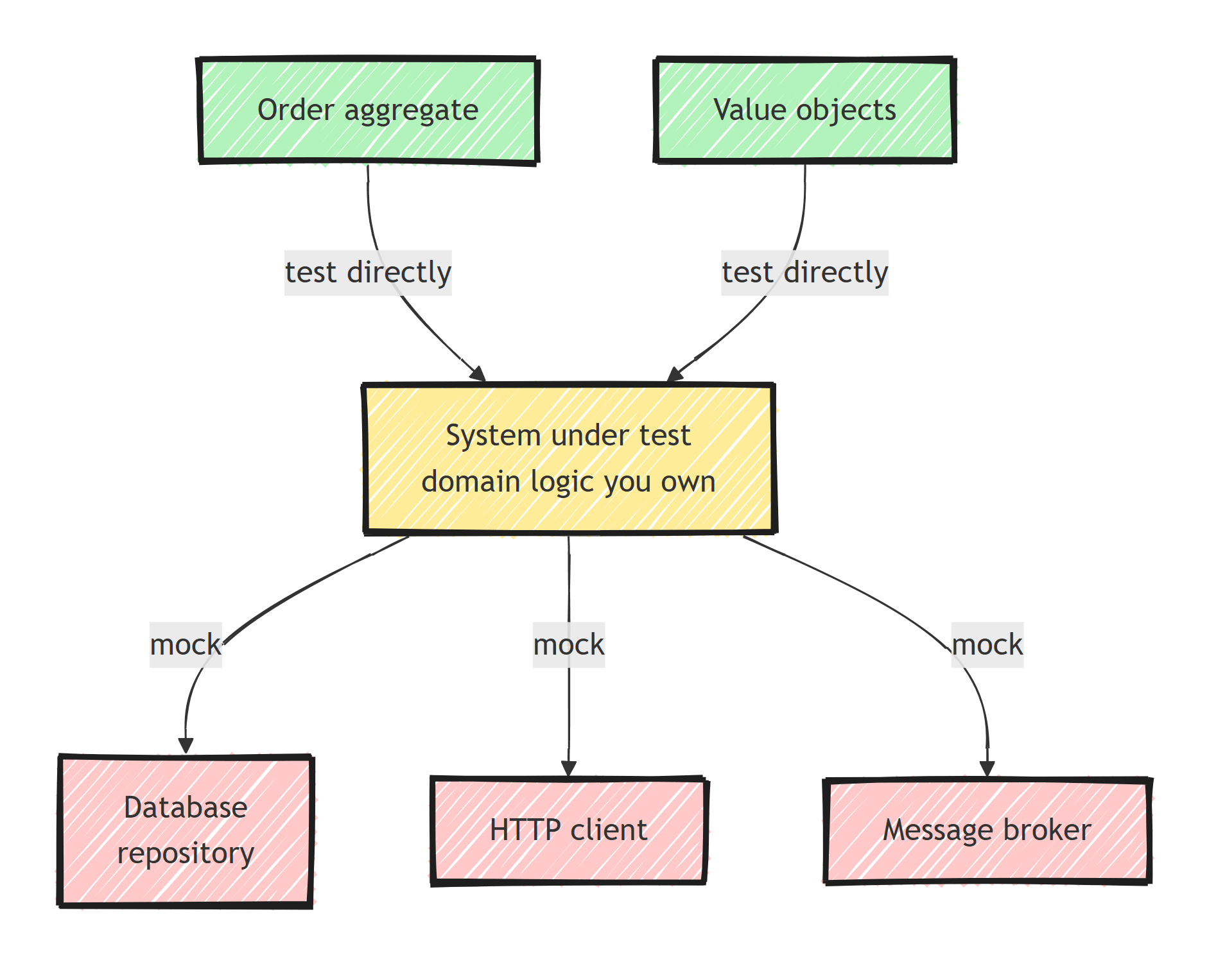
Mock external dependencies at the system boundary:
- Database repositories
- HTTP clients
- Email services
- Message brokers
- Time providers
Don't mock domain objects. Test them directly:
// Don't mock the Order - test it directly
[Fact]
public void Order_Cancel_WhenShipped_Fails()
{
    var order = CreateShippedOrder();
    var result = order.Cancel();

    result.IsFailure.Should().BeTrue();
    result.Error.Should().Be(OrderErrors.AlreadyShipped);
}
If you find yourself mocking too many things, your class has too many dependencies. Consider refactoring.
Mocks, stubs, fakes, and spies are different tools with different failure modes. I break down when to use each test double separately.
Parameterized Tests
Use [Theory] with data sources to test multiple scenarios without duplicating code. I covered data-driven tests with xUnit in detail, and here is the basic form:
[Theory]
[InlineData("", false)]
[InlineData("not-an-email", false)]
[InlineData("[email protected]", true)]
[InlineData("[email protected]", true)]
public void Email_Create_ValidatesFormat(string input, bool shouldSucceed)
{
    var result = Email.Create(input);
    result.IsSuccess.Should().Be(shouldSucceed);
}
For complex test data, use [MemberData]:
public static IEnumerable<object[]> InvalidOrderData =>
    new List<object[]>
    {
        new object[] { Guid.Empty, new[] { Guid.NewGuid() }, "Customer ID is required" },
        new object[] { Guid.NewGuid(), null, "Items are required" },  // null items
    };

[Theory]
[MemberData(nameof(InvalidOrderData))]
public void PlaceOrder_WithInvalidData_Fails(Guid customerId, Guid[]? productIds, string errorMessage)
{
    // ...
}
Test Domain Logic, Not Frameworks
Focus your unit tests on code you own: domain entities, value objects, and domain services.
Don't unit test:
- EF Core configurations (use integration tests instead)
- ASP.NET Core middleware
- Third-party library behavior
- DTOs and simple mappings
// Worth unit testing - domain invariant
[Fact]
public void Order_AddLineItem_WhenNotDraft_ThrowsDomainException()
{
    var order = CreateCompletedOrder();
    var act = () => order.AddLineItem(productId, price, 1);

    act.Should().Throw<DomainException>()
       .WithMessage("Cannot modify a non-draft order.");
}

// NOT worth unit testing - it's just EF Core
[Fact]
public void DbContext_CanSaveOrder()
{
    // This tests EF Core, not your code. Use integration tests.
}
Organize Tests to Mirror Source
tests/
  Domain.UnitTests/
    Orders/
      OrderTests.cs
      OrderLineItemTests.cs
    Customers/
      CustomerTests.cs
      EmailTests.cs
  Application.UnitTests/
    Orders/
      PlaceOrderCommandHandlerTests.cs
      CancelOrderCommandHandlerTests.cs
Mirror the source project structure so tests are easy to find.
Key Takeaways
Good unit tests protect your domain logic and give you confidence to refactor.
Follow these practices:
- Use AAA structure consistently
- Name tests descriptively
- Test behaviors, not implementation details
- Use builders for test data
- Mock only external boundaries
- Prefer parameterized tests for multiple scenarios
Unit tests can't tell you the system works end to end, which is why I don't chase the classic test pyramid shape.
Frequently Asked Questions
What is the AAA pattern in unit testing?
AAA stands for Arrange, Act, Assert: set up the objects and data, execute the behavior under test, then verify the outcome. Structuring every test this way makes it obvious what is being tested and why a failure matters.
How should I name unit tests in .NET?
Use a convention that states the method, the scenario, and the expected result, such as Cancel_WhenOrderIsShipped_ReturnsFailure. The exact convention matters less than applying it consistently.
What should you not unit test?
Skip framework behavior (EF Core, ASP.NET Core internals), third-party libraries, trivial DTOs, and simple mappings. Unit tests should focus on domain logic and code you own; infrastructure belongs in integration tests.
How many assertions should a unit test have?
As many as it takes to verify one logical behavior. Asserting three properties of the same outcome is fine; verifying two unrelated behaviors is not.


