

Test vertical slices by feature, not by layer. Unit test the validator and handler directly for fast feedback, then run the whole slice end to end (routing, validation, handler, database) with WebApplicationFactory and Testcontainers. Here is how I structure that, from validator unit tests to full integration tests.
Layered architectures produce layered tests: repository tests, service tests, controller tests, and a mock for every seam between them. Vertical slices collapse those seams, so the tests change shape too.
Testing Slices, Not Layers
In Vertical Slice Architecture, each feature is self-contained: request, handler, validation, persistence. So organize your tests by feature too.
Instead of:
OrderRepositoryTestsOrderServiceTestsOrderControllerTests
You write:
PlaceOrderTestsGetOrderTestsCancelOrderTests
Each test covers one slice from input to output.
Unit Testing a Handler
The simplest test targets the handler directly:
public class PlaceOrderTests
{
    private readonly ApplicationDbContext _db;
    private readonly PlaceOrder.Handler _handler;

    public PlaceOrderTests()
    {
        _db = CreateInMemoryDbContext();
        _handler = new PlaceOrder.Handler(_db);
    }

    [Fact]
    public async Task Should_Create_Order_With_Valid_Request()
    {
        // Arrange
        var customer = new Customer { Id = Guid.NewGuid(), Name = "John" };
        _db.Customers.Add(customer);
        await _db.SaveChangesAsync();

        var command = new PlaceOrder.Command(
            customer.Id,
            [new PlaceOrder.OrderItemRequest(Guid.NewGuid(), 2)]);

        // Act
        var result = await _handler.Handle(command, CancellationToken.None);

        // Assert
        result.IsSuccess.Should().BeTrue();
        var order = await _db.Orders.FirstAsync();
        order.CustomerId.Should().Be(customer.Id);
        order.Items.Should().HaveCount(1);
    }

    [Fact]
    public async Task Should_Fail_When_Customer_Not_Found()
    {
        var command = new PlaceOrder.Command(
            Guid.NewGuid(),
            [new PlaceOrder.OrderItemRequest(Guid.NewGuid(), 1)]);

        var result = await _handler.Handle(command, CancellationToken.None);

        result.IsSuccess.Should().BeFalse();
        result.Error.Code.Should().Be("Customer.NotFound");
    }

    private static ApplicationDbContext CreateInMemoryDbContext()
    {
        var options = new DbContextOptionsBuilder<ApplicationDbContext>()
            .UseInMemoryDatabase(Guid.NewGuid().ToString())
            .Options;

        return new ApplicationDbContext(options);
    }
}
This tests business logic without HTTP, serialization, or middleware.
One caveat: the in-memory DbContext keeps these tests fast, but it doesn't enforce constraints or translate real SQL. That's an acceptable trade for handler logic tests. For query-heavy slices, prefer the Testcontainers approach below (I compare the options in testing EF Core repositories).
Testing Validation
Test validators separately. They're fast and don't need infrastructure:
public class PlaceOrderValidatorTests
{
    private readonly PlaceOrder.Validator _validator = new();

    [Fact]
    public void Should_Fail_When_CustomerId_Is_Empty()
    {
        var command = new PlaceOrder.Command(
            Guid.Empty,
            [new PlaceOrder.OrderItemRequest(Guid.NewGuid(), 1)]);

        var result = _validator.Validate(command);

        result.IsValid.Should().BeFalse();
        result.Errors.Should().Contain(e =>
            e.PropertyName == nameof(PlaceOrder.Command.CustomerId));
    }

    [Fact]
    public void Should_Fail_When_Items_Empty()
    {
        var command = new PlaceOrder.Command(Guid.NewGuid(), []);

        var result = _validator.Validate(command);

        result.IsValid.Should().BeFalse();
    }

    [Fact]
    public void Should_Pass_With_Valid_Command()
    {
        var command = new PlaceOrder.Command(
            Guid.NewGuid(),
            [new PlaceOrder.OrderItemRequest(Guid.NewGuid(), 3)]);

        var result = _validator.Validate(command);

        result.IsValid.Should().BeTrue();
    }
}
Integration Testing With WebApplicationFactory
For end-to-end slice testing, use WebApplicationFactory:
public class PlaceOrderEndpointTests
    : IClassFixture<WebApplicationFactory<Program>>
{
    private readonly WebApplicationFactory<Program> _factory;
    private readonly HttpClient _client;

    public PlaceOrderEndpointTests(
        WebApplicationFactory<Program> factory)
    {
        _factory = factory.WithWebHostBuilder(builder =>
        {
            builder.ConfigureServices(services =>
            {
                // Replace real DB with test container or in-memory
                services.RemoveAll<DbContextOptions<ApplicationDbContext>>();
                services.RemoveAll<IDbContextOptionsConfiguration<ApplicationDbContext>>();
                services.AddDbContext<ApplicationDbContext>(options =>
                    options.UseInMemoryDatabase("test"));
            });
        });

        _client = _factory.CreateClient();
    }

    [Fact]
    public async Task PlaceOrder_Returns_Created()
    {
        // The handler rejects unknown customers, so seed one first
        var customerId = await SeedCustomerAsync();

        var request = new
        {
            CustomerId = customerId,
            Items = new[]
            {
                new { ProductId = Guid.NewGuid(), Quantity = 2 }
            }
        };

        var response = await _client.PostAsJsonAsync(
            "/api/orders", request);

        response.StatusCode.Should().Be(HttpStatusCode.Created);
    }

    [Fact]
    public async Task PlaceOrder_Returns_BadRequest_For_Empty_Items()
    {
        var request = new
        {
            CustomerId = Guid.NewGuid(),
            Items = Array.Empty<object>()
        };

        var response = await _client.PostAsJsonAsync(
            "/api/orders", request);

        response.StatusCode.Should().Be(HttpStatusCode.BadRequest);
    }

    private async Task<Guid> SeedCustomerAsync()
    {
        using var scope = _factory.Services.CreateScope();
        var db = scope.ServiceProvider
            .GetRequiredService<ApplicationDbContext>();

        var customer = new Customer { Id = Guid.NewGuid(), Name = "Test" };
        db.Customers.Add(customer);
        await db.SaveChangesAsync();

        return customer.Id;
    }
}
This tests the full HTTP pipeline: routing, model binding, validation, handler, persistence, and response serialization.
Since EF Core 9, AddDbContext also registers an IDbContextOptionsConfiguration<ApplicationDbContext> that holds the app's provider setup.
Remove it along with the options, or the app's provider and the test provider both get registered and resolving the DbContext throws.
Integration Testing With Testcontainers
For realistic tests against a real database, use Testcontainers:
public class OrderApiTests : IAsyncLifetime
{
    private readonly PostgreSqlContainer _postgres = new PostgreSqlBuilder()
        .WithImage("postgres:16-alpine")
        .Build();

    private WebApplicationFactory<Program> _factory = null!;
    private HttpClient _client = null!;

    public async Task InitializeAsync()
    {
        await _postgres.StartAsync();

        _factory = new WebApplicationFactory<Program>()
            .WithWebHostBuilder(builder =>
            {
                builder.ConfigureServices(services =>
                {
                    services.RemoveAll<DbContextOptions<ApplicationDbContext>>();
                    services.RemoveAll<IDbContextOptionsConfiguration<ApplicationDbContext>>();
                    services.AddDbContext<ApplicationDbContext>(options =>
                        options.UseNpgsql(_postgres.GetConnectionString()));
                });
            });

        _client = _factory.CreateClient();

        // Apply migrations
        using var scope = _factory.Services.CreateScope();
        var db = scope.ServiceProvider
            .GetRequiredService<ApplicationDbContext>();
        await db.Database.MigrateAsync();
    }

    [Fact]
    public async Task Full_Order_Lifecycle()
    {
        var customerId = await SeedCustomerAsync();

        // Place order
        var placeResponse = await _client.PostAsJsonAsync(
            "/api/orders",
            new
            {
                CustomerId = customerId,
                Items = new[]
                {
                    new { ProductId = Guid.NewGuid(), Quantity = 2 }
                }
            });
        placeResponse.StatusCode.Should().Be(HttpStatusCode.Created);

        var orderId = await placeResponse.Content
            .ReadFromJsonAsync<Guid>();

        // Get order
        var getResponse = await _client.GetAsync(
            $"/api/orders/{orderId}");
        getResponse.StatusCode.Should().Be(HttpStatusCode.OK);

        // Cancel order
        var cancelResponse = await _client.DeleteAsync(
            $"/api/orders/{orderId}");
        cancelResponse.StatusCode.Should().Be(HttpStatusCode.NoContent);
    }

    private async Task<Guid> SeedCustomerAsync()
    {
        using var scope = _factory.Services.CreateScope();
        var db = scope.ServiceProvider
            .GetRequiredService<ApplicationDbContext>();

        var customer = new Customer { Id = Guid.NewGuid(), Name = "Test" };
        db.Customers.Add(customer);
        await db.SaveChangesAsync();

        return customer.Id;
    }

    public async Task DisposeAsync()
    {
        await _factory.DisposeAsync();
        await _postgres.DisposeAsync();
    }
}
xUnit creates a new instance of the test class for every test, so IAsyncLifetime here starts a fresh container per test.
Once the class has more than one test, move the container and factory into a class or collection fixture and reset data between tests with Respawn.
Where Mocks Still Fit
Slices reduce the need for mocking, but they don't eliminate it. External systems (payment gateways, email providers, third-party APIs) should still be replaced with test doubles, even in integration tests:
var factory = new WebApplicationFactory<Program>()
    .WithWebHostBuilder(builder =>
    {
        builder.ConfigureTestServices(services =>
        {
            services.RemoveAll<IPaymentGateway>();
            services.AddScoped<IPaymentGateway, FakePaymentGateway>();
        });
    });
I fake what I don't own (external services) and keep what I own (the database, handlers, and validation) real. That way a passing slice test means the feature works, minus only the third-party call you can't control anyway.
Guarding Slice Independence
Add a few architecture tests that stop slices from coupling to each other.
A PlaceOrder handler reaching into Features.Shipping internals is hard to spot in code review.
I cover the setup in architecture testing in .NET; two or three rules per feature group are enough.
Test Organization
Mirror the feature structure:
Features/
  Orders/
    PlaceOrder.cs
    GetOrder.cs
    CancelOrder.cs
tests/
  Features/
    Orders/
      PlaceOrderTests.cs
      PlaceOrderValidatorTests.cs
      GetOrderTests.cs
      CancelOrderTests.cs
Each test file tests one slice. Finding the tests for a feature is trivial.
What to Test at Each Level
Three levels, each with a distinct job:
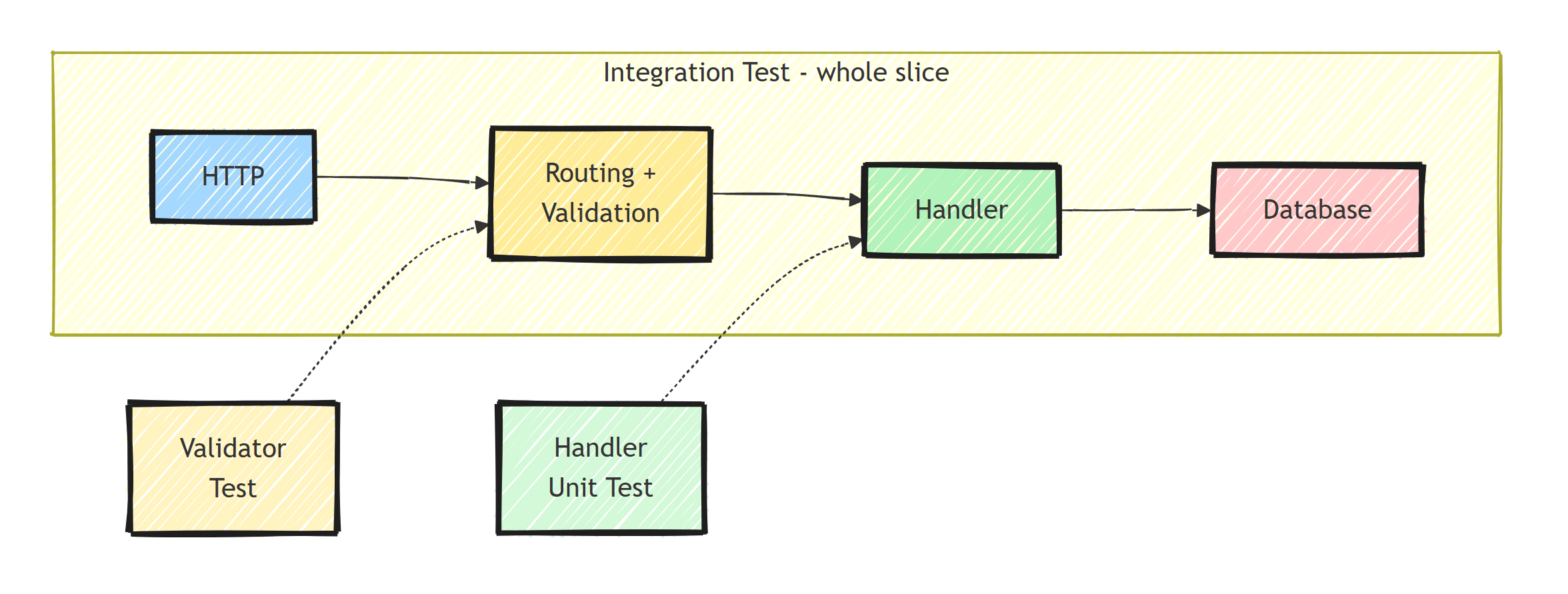
- Validator tests: input validation rules. Pure logic, run in microseconds.
- Handler unit tests: business logic in isolation. Fast, no HTTP.
- Integration tests: the full HTTP pipeline against a real database. Slower, but they prove the slice works.
Because a slice is a complete feature, integration tests here carry more weight than in layered architectures. Don't be afraid to have plenty of them; that's what I do instead of the classic test pyramid. A slice test that goes HTTP-to-database catches serialization bugs, validation wiring, and query errors in one shot.
Summary
Testing vertical slices in .NET:
- Organize tests by feature, not by layer
- Unit test handlers with in-memory DbContext for fast feedback
- Unit test validators separately, since they're pure logic
- Integration test with WebApplicationFactory for full HTTP pipeline
- Use Testcontainers for realistic database tests
- Lean on integration tests: a slice test proves the whole feature works
Thanks for reading, and stay awesome!
Frequently Asked Questions
How do you test vertical slices in .NET?
Organize tests by feature, not layer. Unit test the handler and validator directly for fast feedback, then add integration tests through WebApplicationFactory that exercise the whole slice: routing, validation, handler, and database.
Should vertical slice tests use mocks?
Less than layered architectures do. Because a slice owns its whole flow, the most valuable test runs the slice end to end against a real or containerized database. Mocks remain useful for external services like payment gateways or email.
Do I need separate test projects per slice?
No. One test project that mirrors the Features folder layout works well, with PlaceOrderTests next to GetOrderTests.
Are integration tests too slow for vertical slices?
Not if you share the expensive setup. Start one database container per test suite with Testcontainers, reset data between tests with Respawn, and individual tests run in milliseconds.


