
I replaced a $120-a-year transcription subscription with a .NET app that uses AssemblyAI to turn recordings into text and SRT subtitles. A coding agent helped build the first version in under an hour. The app processes recordings in the background and stops uncertain submissions for review to avoid duplicate charges.
By now, we've all seen examples of AI models being wrong in ways that make it seem like they're right. And the problem isn't that the model isn't good enough or "smart" enough. It's that you need the right harness governing the model. Building an agent harness that survives production delivers a complete architectural overview in just 13 minutes - read the full breakdown.
Advent of Agents: 31 Days of Running AI Agents Securely
Google Cloud's Advent of Agents Season 3 starts Oct 1, with one production problem a day.
Topics include giving every agent its own identity, keeping agent memory isolated across tenants,
sandboxing agent-generated code, and shutting down a runaway agent.
Each day has a short video and code you can build with your coding agent.
Get day 1 in your inbox (it's free).
I paid $120 a year for a transcription tool.
Every lesson I record for my courses needs subtitles. With TurboScribe, I'd upload a recording and download an SRT file when it was ready. It worked well enough that building a replacement never felt worth the time.
This month, I finally built it with a coding agent. The first version was running on my server in under an hour.
Why I Never Built It Before
I didn't need to build the speech recognition myself. AssemblyAI already provides an API for that. There are plenty of speech-to-text APIs to choose from.
But I'd still need a UI, sign-in, somewhere to store recordings, and a way to deploy it all. That looked like days of work to replace a $120-a-year subscription, with maintenance on top.
So I kept paying.
What AI Changed
I've spent a lot of this year working with coding agents.
I described an app for one user, me, and put the scope in AGENTS.md:
No speculative multi-user roles, billing, event buses, or microservices.
I kept adding features, and ten days later the repo had 165 commits.
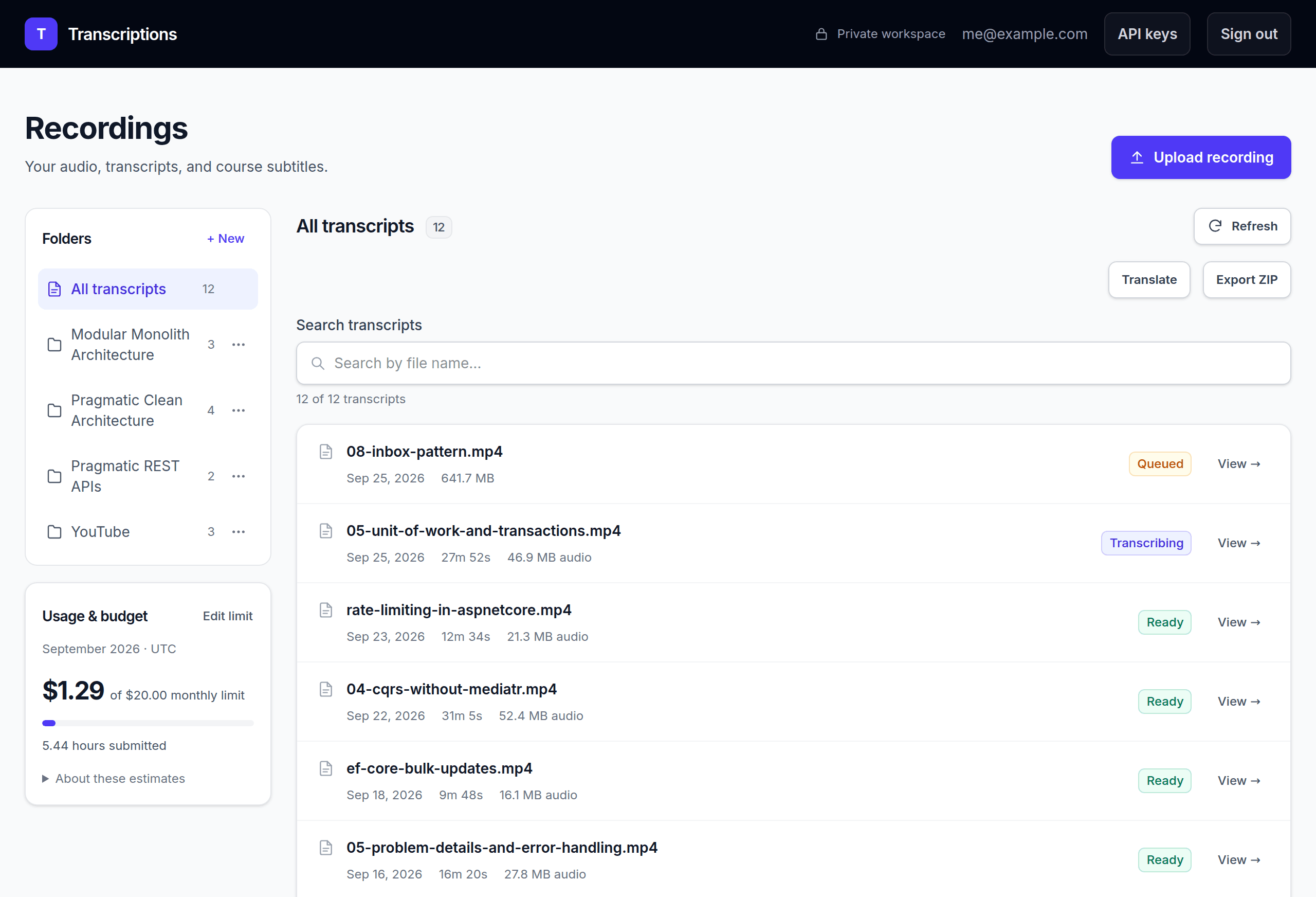
The app now translates subtitles into 30 languages and exports a whole course as a ZIP file. My course platform can also send new lessons through its API.
From Recording to Subtitles
The integration has three steps: upload the audio, submit a job, and poll until it finishes. Then you download the subtitles.
Create a project with dotnet new console -n TranscriptionDemo --framework net10.0 and put this in Program.cs.
Set ASSEMBLYAI_API_KEY in your terminal, then run dotnet run -- lesson.mp3 from the project directory:
using System.Net.Http.Json;
using System.Text.Json;

using var http = new HttpClient { BaseAddress = new("https://api.eu.assemblyai.com/") };
http.DefaultRequestHeaders.Add(
    "Authorization", Environment.GetEnvironmentVariable("ASSEMBLYAI_API_KEY"));

// 1. Upload the audio file
using var audio = new StreamContent(File.OpenRead(args[0]));
audio.Headers.ContentType = new("application/octet-stream");
using var upload = await http.PostAsync("v2/upload", audio);
var uploaded = await upload.EnsureSuccessStatusCode()
    .Content.ReadFromJsonAsync<JsonElement>();

// 2. Submit a transcription job
using var submit = await http.PostAsJsonAsync("v2/transcript", new
{
    audio_url = uploaded.GetProperty("upload_url").GetString(),
    speech_models = new[] { "universal-3-5-pro" },
    language_code = "en"
});
var job = await submit.EnsureSuccessStatusCode()
    .Content.ReadFromJsonAsync<JsonElement>();
var id = job.GetProperty("id").GetString();

// 3. Poll until the job is done
while (job.GetProperty("status").GetString() is "queued" or "processing")
{
    await Task.Delay(TimeSpan.FromSeconds(15));
    job = await http.GetFromJsonAsync<JsonElement>($"v2/transcript/{id}");
}

if (job.GetProperty("status").GetString() != "completed")
{
    throw new InvalidOperationException(job.GetProperty("error").GetString());
}

var srt = await http.GetStringAsync($"v2/transcript/{id}/srt");
await File.WriteAllTextAsync("subtitles.srt", srt);
The Authorization header takes the raw API key, with no Bearer prefix.
A 200 OK only tells you the status check succeeded. The status field tells you whether transcription worked.
Each run submits a paid job, so start with a short clip.
The Part That Still Needed an Engineer
Transcribing a long lesson takes minutes, too long for a web request to wait.
So the app follows the async API pattern. The upload request saves the job in PostgreSQL and returns right away. A background worker processes it while the UI reads the saved status.
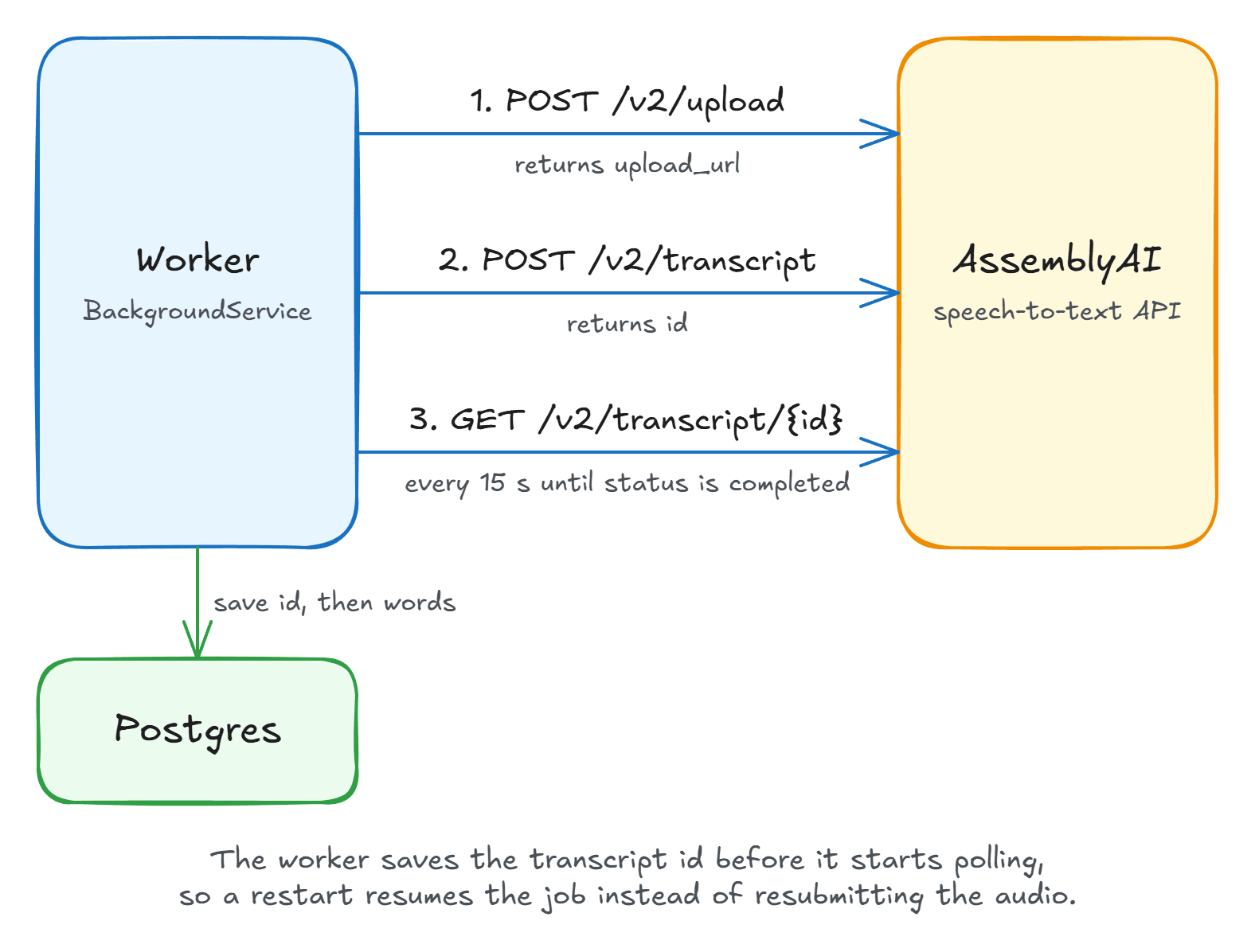
Now suppose the connection drops after the worker submits a job, before the response arrives. AssemblyAI may already be processing it, and retrying could mean paying for the same audio twice.
The worker saves a "submission started" marker before the paid call, then saves the returned job ID. After a crash, it checks what it saved:
- A job ID: resume polling that job.
- Only the marker: wait for me to check the provider dashboard.
- Neither: submit the job.
The marker doesn't recover a missing job ID. It stops the worker from creating another charge while I'm still unsure what happened.
It's the same thinking behind idempotent APIs. Polling is safe to repeat. Automatic HTTP retries on submission can create duplicate jobs.
The agent wrote the fix, but I still had to identify the failure and ask for it.
What It Costs
At the time of writing, AssemblyAI's Universal-3.5 Pro costs $0.21 per audio hour.
Say I release 104 ten-minute videos and two ten-hour courses in a year. That's 37 hours and 20 minutes of audio, or about $7.84 a year to transcribe it all once. That excludes translation, repeat processing, hosting, and taxes.
I deploy it with Dokploy on a VPS I already pay for, so the extra hosting cost is small. I may need a bigger server as I add more personal apps.
Maintenance is harder to price. If the API changes or a deployment fails, that's my time to spend. A stable API helps, but backups, dependency updates, and deployment problems still need attention.
My Claude Max 20x plan, which I use for Claude Code, costs $200 a month. Avoiding the next $120 annual TurboScribe renewal covers 60% of the Claude bill for the month I built this, before the app's running costs. After a year's estimated base transcription costs, that's still about 56% of one month's Claude subscription, before hosting, maintenance, and other usage.
What This Means for SaaS
I left TurboScribe because building something for my workflow became affordable.
That puts pressure on tools whose main value is a convenient interface to an API. A developer may now be willing to build the small part they actually use.
I'm still paying AssemblyAI for speech recognition, though. I've only replaced the application around it. For my volume of audio, paying per hour is much cheaper than a flat subscription.
I'm optimistic about where this is going. More of these small tools are worth building, and I can change mine as my workflow changes.
A subscription may still be the better deal if a team depends on the tool or you can't maintain it yourself.
Look at a subscription you use for one narrow task. Try building that workflow, then decide whether you want to own the maintenance.
Thanks for reading.
And stay awesome!
Frequently Asked Questions
Is it worth building your own replacement for a SaaS tool?
It can be worth it when you need a narrow workflow, an API handles the core functionality, and you can maintain the app. A coding agent can reduce the initial work, but you still own hosting and fixes. Compare those ongoing costs with the subscription price.
How do you integrate a speech-to-text API in .NET?
With HttpClient, upload the audio to AssemblyAI, submit a transcription job with the returned upload URL, and poll the job until its status is completed or error. Then download the text or request GET /v2/transcript/{id}/srt for subtitles. In a web app, save the job to the database and process it in a background worker.
Is it safe to retry a transcription request after a timeout?
Not automatically. A submission timeout does not tell you whether the provider accepted the paid job. Save a submission-started marker before the call and the job ID after it succeeds. On restart, poll a saved job ID, or stop for a manual check when only the marker exists.
How much does AssemblyAI transcription cost?
At the time of writing, Universal-3.5 Pro costs $0.21 per audio hour. An estimated 37 hours 20 minutes of audio per year would cost about $7.84 to transcribe once. Optional speaker labels add $0.02 per hour, bringing that to $8.59. Both estimates exclude translation, repeat processing, hosting, and taxes. Check the AssemblyAI pricing page for current rates.
