
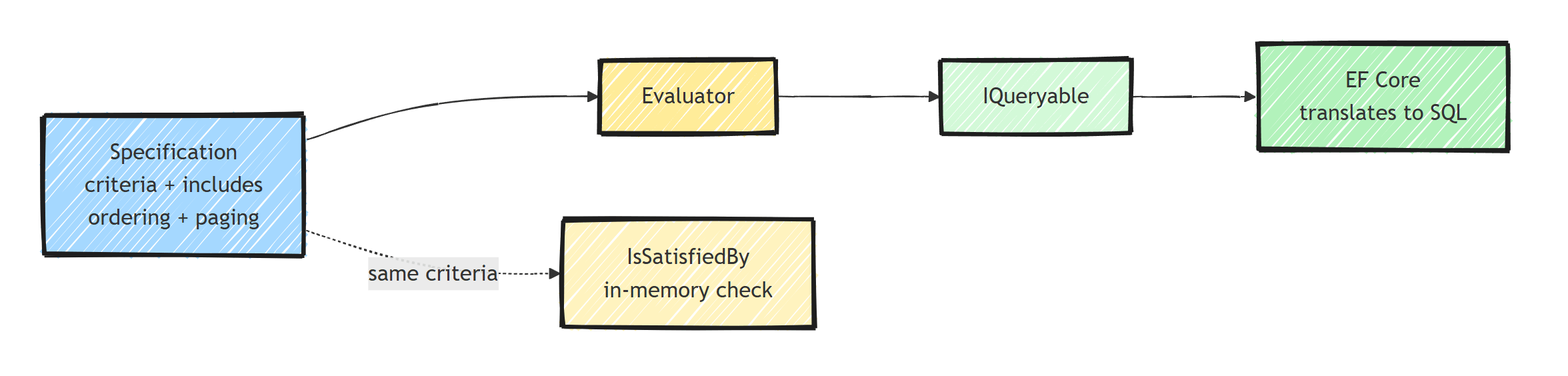
The Specification pattern packages reusable query criteria, includes, sorting, and paging into a named object.
In C#, expression trees let an EF Core evaluator apply those criteria to an IQueryable before SQL execution.
Use specifications when several use cases share meaningful query rules; keep one-off queries as ordinary LINQ.
What Is the Specification Pattern?
The Specification pattern encapsulates a query condition (and optionally sorting, paging, and includes) into a reusable object.
Instead of writing the same .Where() clause in multiple places:
// Duplicated everywhere
var activeOrders = await dbContext.Orders
    .Where(o => o.Status != OrderStatus.Cancelled && o.CreatedAt > cutoffDate)
    .ToListAsync();
You encapsulate it:
var spec = new ActiveOrdersSpecification(cutoffDate);
var activeOrders = await repository.ListAsync(spec);
The specification holds the criteria. The repository applies it.
The Base Specification
The custom implementation below targets .NET 8 or later and uses System.Linq.Expressions and Microsoft.EntityFrameworkCore.
Its Order, Customer, and response types represent your existing application model; the evaluator works with any mapped entity.
public abstract class Specification<T> where T : class
{
    public Expression<Func<T, bool>>? Criteria { get; protected init; }

    public List<Expression<Func<T, object>>> Includes { get; } = new();

    public List<string> IncludeStrings { get; } = new();

    public Expression<Func<T, object>>? OrderBy { get; protected init; }

    public Expression<Func<T, object>>? OrderByDescending { get; protected init; }

    public Expression<Func<T, object>>? ThenBy { get; protected init; }

    public int? Take { get; private set; }

    public int? Skip { get; private set; }

    public bool IsPagingEnabled { get; private set; }

    protected void AddInclude(Expression<Func<T, object>> include)
    {
        Includes.Add(include);
    }

    protected void AddInclude(string includeString)
    {
        IncludeStrings.Add(includeString);
    }

    protected void ApplyPaging(int skip, int take)
    {
        ArgumentOutOfRangeException.ThrowIfNegative(skip);
        ArgumentOutOfRangeException.ThrowIfNegativeOrZero(take);

        Skip = skip;
        Take = take;
        IsPagingEnabled = true;
    }
}
Writing Specifications
Active Orders
public sealed class ActiveOrdersSpecification : Specification<Order>
{
    public ActiveOrdersSpecification(DateTime cutoffDate)
    {
        Criteria = order =>
            order.Status != OrderStatus.Cancelled &&
            order.CreatedAt > cutoffDate;

        OrderByDescending = order => order.CreatedAt;
    }
}
Order by Customer With Line Items
public sealed class OrdersByCustomerSpecification : Specification<Order>
{
    public OrdersByCustomerSpecification(Guid customerId, int page, int pageSize)
    {
        ArgumentOutOfRangeException.ThrowIfNegativeOrZero(page);
        ArgumentOutOfRangeException.ThrowIfNegativeOrZero(pageSize);

        Criteria = order => order.CustomerId == customerId;

        AddInclude(order => order.LineItems);

        OrderByDescending = order => order.CreatedAt;
        ThenBy = order => order.Id;

        ApplyPaging(checked((page - 1) * pageSize), pageSize);
    }
}
ThenBy(order => order.Id) makes the page ordering unique when several orders share a timestamp.
EF Core pagination guidance requires a fully unique ordering; offset paging can still skip or repeat rows when concurrent changes shift the result set.
Single Order by ID
public sealed class OrderByIdSpecification : Specification<Order>
{
    public OrderByIdSpecification(Guid orderId)
    {
        Criteria = order => order.Id == orderId;

        AddInclude(order => order.LineItems);
        AddInclude(order => order.Customer);
    }
}
Applying Specifications to EF Core
Create an evaluator that converts specifications into LINQ queries:
public static class SpecificationEvaluator
{
    public static IQueryable<T> GetQuery<T>(
        IQueryable<T> query,
        Specification<T> specification,
        bool criteriaOnly = false) where T : class
    {
        if (specification.Criteria is not null)
        {
            query = query.Where(specification.Criteria);
        }

        if (criteriaOnly)
        {
            return query;
        }

        foreach (var include in specification.Includes)
        {
            query = query.Include(include);
        }

        foreach (var includeString in specification.IncludeStrings)
        {
            query = query.Include(includeString);
        }

        if (specification.OrderBy is not null && specification.OrderByDescending is not null)
        {
            throw new InvalidOperationException("Choose one primary ordering.");
        }

        IOrderedQueryable<T>? ordered = specification.OrderBy is not null
            ? query.OrderBy(specification.OrderBy)
            : specification.OrderByDescending is not null
                ? query.OrderByDescending(specification.OrderByDescending)
                : null;

        if (specification.ThenBy is not null)
        {
            if (ordered is null)
                throw new InvalidOperationException("ThenBy requires a primary ordering.");

            ordered = ordered.ThenBy(specification.ThenBy);
        }

        query = ordered ?? query;

        if (specification.IsPagingEnabled)
        {
            if (ordered is null)
                throw new InvalidOperationException("Paging requires an ordering.");

            query = query.Skip(specification.Skip!.Value)
                         .Take(specification.Take!.Value);
        }

        return query;
    }
}
Repository Integration
The repository applies specifications through the evaluator:
public interface IRepository<T> where T : class
{
    Task<T?> FirstOrDefaultAsync(Specification<T> specification, CancellationToken cancellationToken = default);
    Task<List<T>> ListAsync(Specification<T> specification, CancellationToken cancellationToken = default);
    Task<int> CountAsync(Specification<T> specification, CancellationToken cancellationToken = default);
}

public class Repository<T> : IRepository<T> where T : class
{
    private readonly AppDbContext _dbContext;

    public Repository(AppDbContext dbContext)
    {
        _dbContext = dbContext;
    }

    public async Task<T?> FirstOrDefaultAsync(
        Specification<T> specification,
        CancellationToken cancellationToken = default)
    {
        return await SpecificationEvaluator
            .GetQuery(_dbContext.Set<T>().AsQueryable(), specification)
            .FirstOrDefaultAsync(cancellationToken);
    }

    public async Task<List<T>> ListAsync(
        Specification<T> specification,
        CancellationToken cancellationToken = default)
    {
        return await SpecificationEvaluator
            .GetQuery(_dbContext.Set<T>().AsQueryable(), specification)
            .ToListAsync(cancellationToken);
    }

    public async Task<int> CountAsync(
        Specification<T> specification,
        CancellationToken cancellationToken = default)
    {
        return await SpecificationEvaluator
            .GetQuery(_dbContext.Set<T>(), specification, criteriaOnly: true)
            .CountAsync(cancellationToken);
    }
}
CountAsync applies only the filter, so a paged specification returns the total matching count rather than the size of the current page.
Register the repository in Program.cs after registering your provider-backed AppDbContext:
builder.Services.AddScoped(typeof(IRepository<>), typeof(Repository<>));
Using Specifications in Handlers
public class GetOrderByIdQueryHandler : IQueryHandler<GetOrderByIdQuery, OrderResponse>
{
    private readonly IRepository<Order> _repository;

    public GetOrderByIdQueryHandler(IRepository<Order> repository)
    {
        _repository = repository;
    }

    public async Task<Result<OrderResponse>> Handle(
        GetOrderByIdQuery query,
        CancellationToken cancellationToken)
    {
        var spec = new OrderByIdSpecification(query.OrderId);

        var order = await _repository.FirstOrDefaultAsync(spec, cancellationToken);

        if (order is null)
        {
            return Result.Failure<OrderResponse>(OrderErrors.NotFound(query.OrderId));
        }

        return new OrderResponse(
            order.Id,
            order.Customer.Name,
            order.TotalAmount.Amount,
            order.Status.ToString());
    }
}
Composing Specifications
You can combine the criteria of two specifications with a logical operator. This version deliberately leaves includes, sorting, and paging out of composition; merging those options needs a separate policy:
public static class SpecificationExtensions
{
    public static Specification<T> And<T>(
        this Specification<T> left,
        Specification<T> right) where T : class
    {
        return new AndSpecification<T>(left, right);
    }
}

public sealed class AndSpecification<T> : Specification<T> where T : class
{
    public AndSpecification(Specification<T> left, Specification<T> right)
    {
        var param = Expression.Parameter(typeof(T));
        Expression leftBody = left.Criteria is null
            ? Expression.Constant(true)
            : new ReplaceParameter(left.Criteria.Parameters[0], param).Visit(left.Criteria.Body)!;
        Expression rightBody = right.Criteria is null
            ? Expression.Constant(true)
            : new ReplaceParameter(right.Criteria.Parameters[0], param).Visit(right.Criteria.Body)!;

        var combined = Expression.AndAlso(leftBody, rightBody);

        Criteria = Expression.Lambda<Func<T, bool>>(combined, param);
    }

    private sealed class ReplaceParameter(
        ParameterExpression original,
        ParameterExpression replacement) : ExpressionVisitor
    {
        protected override Expression VisitParameter(ParameterExpression node) =>
            node == original ? replacement : base.VisitParameter(node);
    }
}
Usage:
public sealed class HighValueOrdersSpecification : Specification<Order>
{
    public HighValueOrdersSpecification(decimal minimumAmount)
    {
        Criteria = order => order.TotalAmount.Amount >= minimumAmount;
    }
}
var activeSpec = new ActiveOrdersSpecification(cutoffDate);
var highValueSpec = new HighValueOrdersSpecification(minimumAmount: 1000);
var combined = activeSpec.And(highValueSpec);
The visitor gives both predicates the same parameter before combining their bodies. The resulting expression still has to contain operations your EF Core provider can translate; an expression tree does not make arbitrary C# methods SQL-compatible.
Reusing Specifications In Memory
The criteria is just an expression tree, so you can also evaluate it against objects you already have:
public abstract class Specification<T> where T : class
{
    private Func<T, bool>? _compiledCriteria;

    public bool IsSatisfiedBy(T entity)
    {
        if (Criteria is null)
        {
            return true;
        }

        _compiledCriteria ??= Criteria.Compile();

        return _compiledCriteria(entity);
    }

    // ... rest of the base class
}
The same ActiveOrdersSpecification can filter a database query or check an already-loaded order.
In-memory evaluation applies only Criteria; it does not load includes or apply sorting and paging.
Keep provider-only operations such as EF.Functions.Like out of criteria that must also run in memory, and account for database collation and null semantics.
Note the cached compiled delegate: Expression.Compile() is expensive, so compile once per specification instance, not per call.
Watch Out for Entity-Shaped Reads
A generic repository plus specifications makes it easy to load full entities (with includes) for read-only screens. That means change tracking overhead and over-fetching.
For pure read scenarios, two adjustments:
- Add an
AsNoTrackingflag to the specification and apply it in the evaluator so EF Core skips change tracking - Better yet, skip the domain model entirely for queries and project straight to a response DTO with
Select
If most of your queries end up as projections, that's a signal you're drifting toward CQRS. On the query side, specifications stop pulling their weight.
Ardalis.Specification Library
If you'd rather not maintain your own implementation, the Ardalis.Specification NuGet package provides all of this:
dotnet add package Ardalis.Specification
dotnet add package Ardalis.Specification.EntityFrameworkCore
public sealed class ActiveOrdersSpec : Ardalis.Specification.Specification<Order>
{
    public ActiveOrdersSpec(DateTime cutoffDate)
    {
        Query
            .Where(o => o.Status != OrderStatus.Cancelled)
            .Where(o => o.CreatedAt > cutoffDate)
            .OrderByDescending(o => o.CreatedAt)
            .Include(o => o.LineItems);
    }
}
It includes EF Core integration, paging support, and a fluent API.
When to Use the Specification Pattern
Use it when:
- Multiple handlers need the same query logic
- You want to keep repositories generic and simple
- Query conditions are complex and reusable
- You need to compose filters dynamically
- Domain code needs the same rule for in-memory checks (
IsSatisfiedBy)
Skip it when:
- Queries are simple one-liners
- Each query is unique to a single handler
- You're using CQRS with direct projections (queries bypass the domain model)
Summary
The Specification pattern extracts query logic into reusable, composable objects.
Combined with EF Core and a generic repository, it removes duplicated .Where() clauses from your handlers.
Build your own for learning, or use Ardalis.Specification for production.
Thanks for reading.
And stay awesome!
Frequently Asked Questions
What is the specification pattern in C#?
The specification pattern encapsulates a query condition, and optionally sorting, paging, and includes, into a reusable object. A repository or evaluator translates the specification into a LINQ query, so the same criteria can be reused across handlers.
Does the specification pattern work with EF Core?
Yes. Specifications retain expression trees so EF Core can translate supported operations into SQL. A small evaluator applies criteria, includes, ordering, and paging to an IQueryable. Arbitrary C# methods and provider-specific operations still need translation support.
Should I build my own specification implementation or use a library?
Build a minimal one to understand the mechanics, but for production use Ardalis.Specification. It ships EF Core integration, paging, caching hooks, and a fluent API that is well tested.
When is the specification pattern overkill?
When queries are simple one-liners, when each query is unique to a single handler, or when your read side uses CQRS with direct projections. In those cases plain LINQ in the handler is simpler.
Can specifications be used outside of database queries?
Yes. The same criteria expression can be compiled and evaluated in memory with an IsSatisfiedBy method, which lets domain code reuse the rule for validation without touching the database.
