
Getting started with microservices in .NET takes more than separately deployed APIs: each service owns its own database, services communicate through a message broker or resilient HTTP calls, an API gateway gives clients one entry point, and OpenTelemetry traces cross every service boundary. The example below builds those pieces into a small but complete system, then uses the same details to decide whether the architecture is justified.
Microservices look simple on an architecture diagram: a few boxes and arrows, each service doing one thing. The diagram leaves out most of the work.
When Do Microservices Make Sense?
Microservices split a system into independently deployable services, each owning its own data and communicating over the network. They mostly solve organizational scaling problems, and only a few technical ones. They make sense when:
- Multiple teams need to deploy independently
- Different parts of the system have different scaling requirements
- You need technology diversity (rarely a good reason on its own)
They don't make sense when:
- You have a small team (under 15 developers)
- Your domain isn't well understood
- You don't have the infrastructure to support them
Start with a modular monolith. Extract microservices when you have specific reasons. If you want the conceptual foundation first, I covered the core ideas in Understanding Microservices.
Architecture Overview
Three services, each owning its own database, coordinating through a message broker:
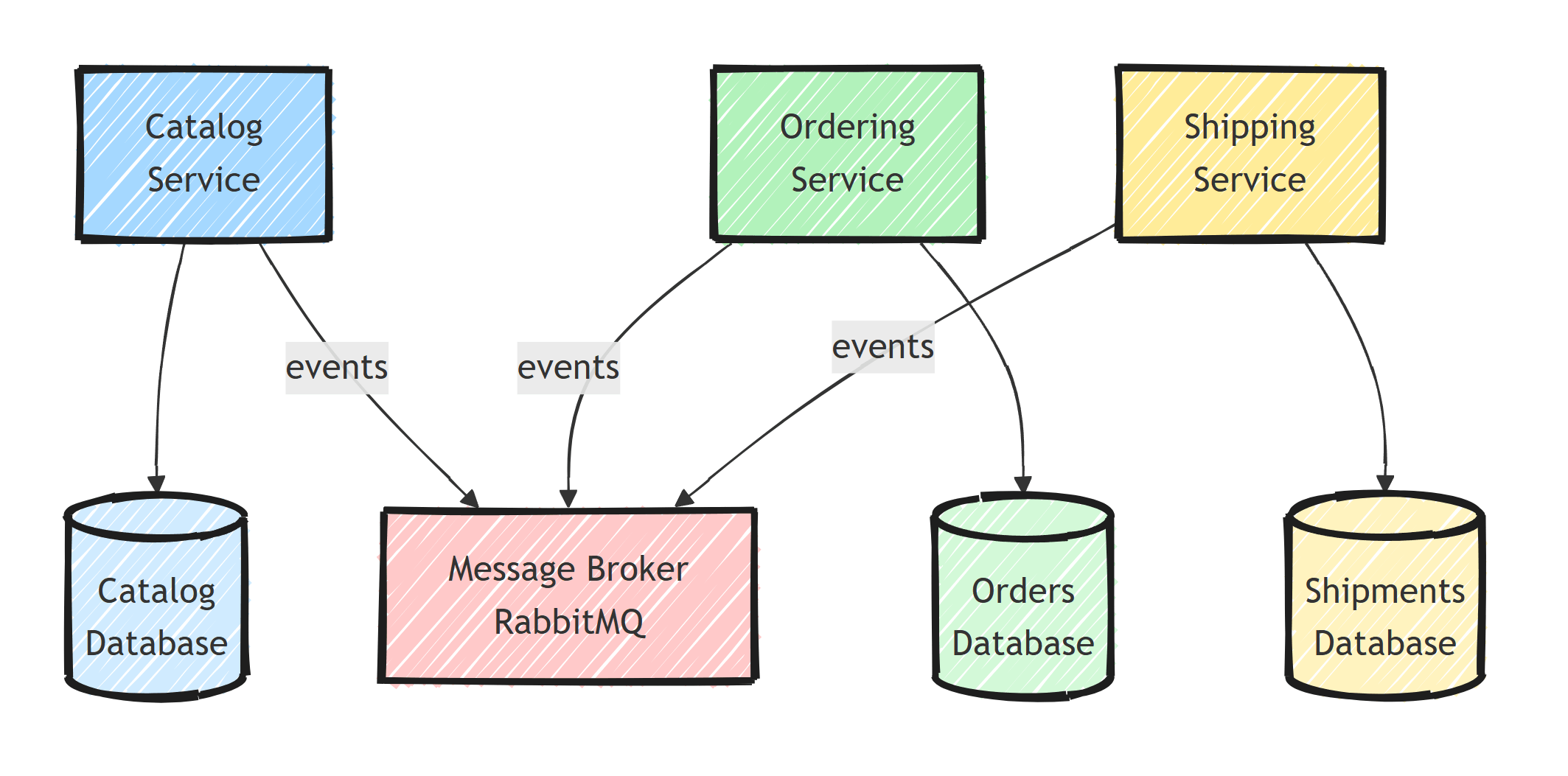
Key principles:
- Each service owns its data (no shared databases)
- Services communicate via async messaging (events)
- Synchronous calls (HTTP/gRPC) only when necessary
Building the Catalog Service
Project Structure
dotnet new webapi -n Catalog.Api
dotnet add Catalog.Api package Microsoft.EntityFrameworkCore
dotnet add Catalog.Api package Npgsql.EntityFrameworkCore.PostgreSQL
dotnet add Catalog.Api package MassTransit.RabbitMQ
Domain
public class Product
{
    public Guid Id { get; private set; }
    public string Name { get; private set; } = string.Empty;
    public string Description { get; private set; } = string.Empty;
    public decimal Price { get; private set; }
    public int StockQuantity { get; private set; }

    public static Product Create(string name, string description, decimal price, int stock)
    {
        return new Product
        {
            Id = Guid.NewGuid(),
            Name = name,
            Description = description,
            Price = price,
            StockQuantity = stock
        };
    }

    public bool HasSufficientStock(int quantity) => StockQuantity >= quantity;

    public void ReserveStock(int quantity)
    {
        if (!HasSufficientStock(quantity))
            throw new InvalidOperationException("Insufficient stock");

        StockQuantity -= quantity;
    }
}
API Endpoints
var builder = WebApplication.CreateBuilder(args);

builder.Services.AddDbContext<CatalogDbContext>(options =>
    options.UseNpgsql(builder.Configuration.GetConnectionString("CatalogDb")));

builder.Services.AddMassTransit(x =>
{
    x.AddConsumers(typeof(Program).Assembly);
    x.UsingRabbitMq((context, cfg) =>
    {
        cfg.Host(new Uri(
            builder.Configuration.GetConnectionString("RabbitMq")!));
        cfg.ConfigureEndpoints(context);
    });
});

var app = builder.Build();

app.MapGet("/api/products", async (CatalogDbContext db) =>
    Results.Ok(await db.Products.ToListAsync()));

app.MapGet("/api/products/{id:guid}", async (Guid id, CatalogDbContext db) =>
{
    var product = await db.Products.FindAsync(id);
    return product is null ? Results.NotFound() : Results.Ok(product);
});

app.MapPost("/api/products", async (
    CreateProductRequest request,
    CatalogDbContext db) =>
{
    var product = Product.Create(
        request.Name, request.Description, request.Price, request.Stock);

    db.Products.Add(product);
    await db.SaveChangesAsync();

    return Results.Created($"/api/products/{product.Id}", product);
});

app.Run();
Building the Ordering Service
Integration Events
Shared between services (typically as a NuGet package or shared project):
// Shared contracts
public record OrderPlacedEvent(
    Guid OrderId,
    Guid CustomerId,
    List<OrderItemDto> Items,
    DateTime OccurredAt);

public record OrderItemDto(
    Guid ProductId,
    int Quantity,
    decimal UnitPrice);
Order Placement
app.MapPost("/api/orders", async (
    PlaceOrderRequest request,
    OrderingDbContext db,
    IPublishEndpoint publisher) =>
{
    var order = Order.Create(request.CustomerId);

    foreach (var item in request.Items)
    {
        order.AddLineItem(item.ProductId, item.Quantity, item.UnitPrice);
    }

    db.Orders.Add(order);
    await db.SaveChangesAsync();

    await publisher.Publish(new OrderPlacedEvent(
        order.Id,
        order.CustomerId,
        order.LineItems.Select(li => new OrderItemDto(
            li.ProductId, li.Quantity, li.UnitPrice)).ToList(),
        DateTime.UtcNow));

    return Results.Created($"/api/orders/{order.Id}", order);
});
In this code, the database write and the publish are two separate operations. If the process crashes between them, the order exists but the event is lost. For production, publish through the outbox pattern: store the event in the same database transaction as the order, then relay it to the broker afterwards. It's one of the data consistency patterns for microservices.
Service Communication
Asynchronous (Events)
Placing an order writes to the Ordering database and publishes an event; the Shipping service reacts to it independently, with no direct call between the two:
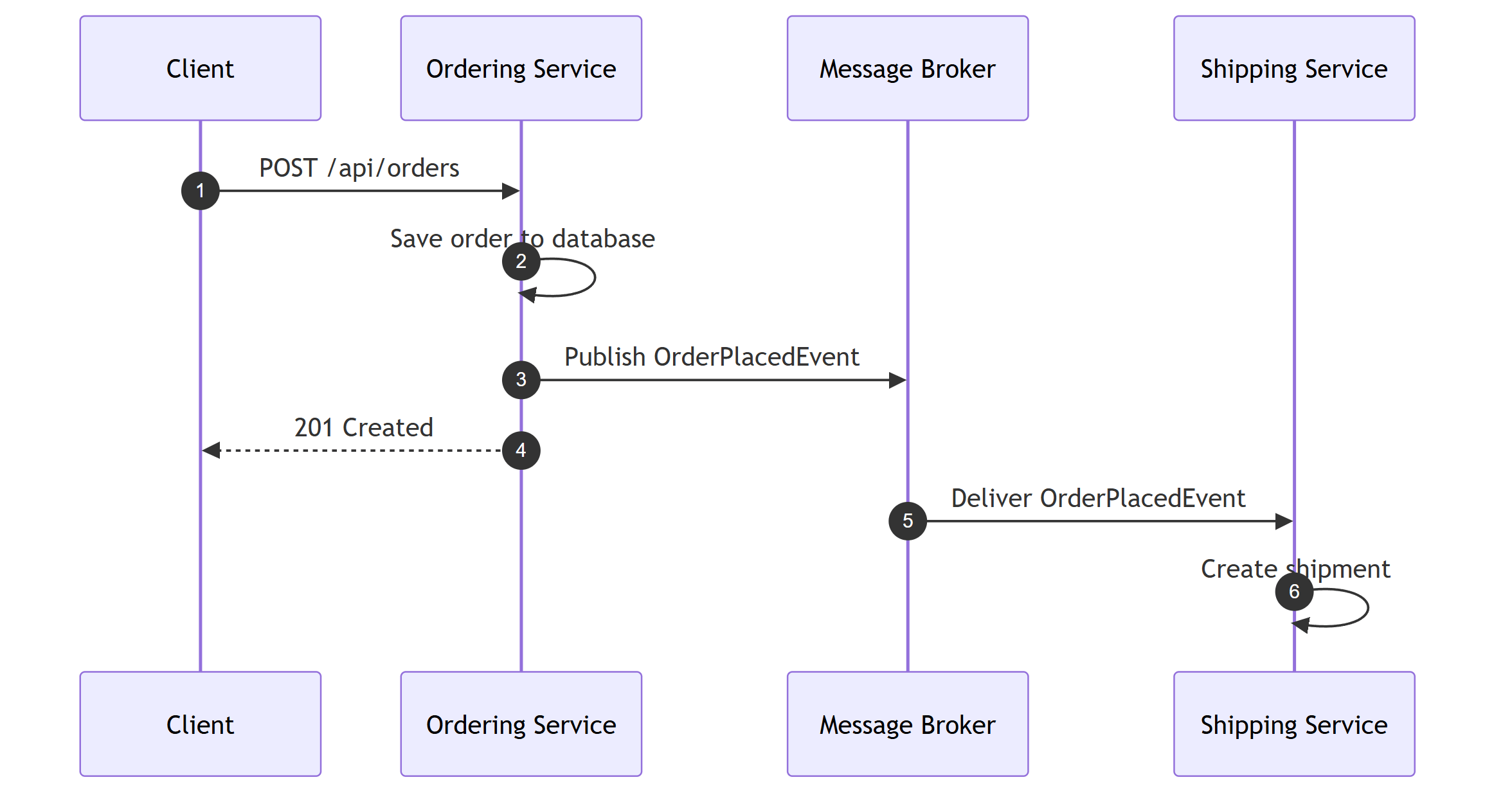
The Shipping service handles the OrderPlacedEvent:
public class OrderPlacedConsumer : IConsumer<OrderPlacedEvent>
{
    private readonly ShippingDbContext _db;
    private readonly ILogger<OrderPlacedConsumer> _logger;

    public OrderPlacedConsumer(ShippingDbContext db, ILogger<OrderPlacedConsumer> logger)
    {
        _db = db;
        _logger = logger;
    }

    public async Task Consume(ConsumeContext<OrderPlacedEvent> context)
    {
        var message = context.Message;

        _logger.LogInformation(
            "Creating shipment for order {OrderId}", message.OrderId);

        var shipment = Shipment.Create(message.OrderId, message.CustomerId);
        _db.Shipments.Add(shipment);
        await _db.SaveChangesAsync();
    }
}
Synchronous (HTTP with Resilience)
When you need request-response between services, wrap the call in resilience patterns so a slow dependency can't cascade:
builder.Services.AddHttpClient<ICatalogClient, CatalogClient>(client =>
{
    client.BaseAddress = new Uri(
        builder.Configuration["Services:CatalogApi"]!);
})
.AddStandardResilienceHandler();

public class CatalogClient : ICatalogClient
{
    private readonly HttpClient _httpClient;

    public CatalogClient(HttpClient httpClient) => _httpClient = httpClient;

    public async Task<ProductDto?> GetProductAsync(Guid productId)
    {
        var response = await _httpClient.GetAsync($"/api/products/{productId}");

        if (response.StatusCode == HttpStatusCode.NotFound)
            return null;

        response.EnsureSuccessStatusCode();

        return await response.Content.ReadFromJsonAsync<ProductDto>();
    }
}
Hardcoding service URLs works for a demo, but not once instances scale or move. That's the job of service discovery.
API Gateway
An API Gateway sits in front of your microservices, giving clients a single entry point. Use YARP (I walk through a full setup in Implementing an API Gateway With YARP):
dotnet new webapi -n ApiGateway
dotnet add ApiGateway package Yarp.ReverseProxy
var builder = WebApplication.CreateBuilder(args);
builder.Services.AddReverseProxy()
    .LoadFromConfig(builder.Configuration.GetSection("ReverseProxy"));

var app = builder.Build();
app.MapReverseProxy();
app.Run();
{
  "ReverseProxy": {
    "Routes": {
      "catalog": {
        "ClusterId": "catalog-cluster",
        "Match": { "Path": "/api/products/{**catch-all}" }
      },
      "ordering": {
        "ClusterId": "ordering-cluster",
        "Match": { "Path": "/api/orders/{**catch-all}" }
      }
    },
    "Clusters": {
      "catalog-cluster": {
        "Destinations": {
          "default": { "Address": "http://localhost:5001" }
        }
      },
      "ordering-cluster": {
        "Destinations": {
          "default": { "Address": "http://localhost:5002" }
        }
      }
    }
  }
}
Containerization
Each service gets its own Dockerfile:
FROM mcr.microsoft.com/dotnet/aspnet:10.0 AS base
WORKDIR /app
EXPOSE 8080
FROM mcr.microsoft.com/dotnet/sdk:10.0 AS build
WORKDIR /src
COPY ["Catalog.Api/Catalog.Api.csproj", "Catalog.Api/"]
RUN dotnet restore "Catalog.Api/Catalog.Api.csproj"
COPY . .
RUN dotnet publish "Catalog.Api/Catalog.Api.csproj" -c Release -o /app/publish
FROM base AS final
COPY /app/publish .
ENTRYPOINT ["dotnet", "Catalog.Api.dll"]
Orchestrate with Docker Compose:
services:
  catalog-api:
    build:
      context: .
      dockerfile: Catalog.Api/Dockerfile
    ports:
      - "5001:8080"
    environment:
      ConnectionStrings__CatalogDb: "Host=postgres;Database=catalog;Username=postgres;Password=postgres"
      ConnectionStrings__RabbitMq: "amqp://guest:guest@rabbitmq:5672"
    depends_on:
      - postgres
      - rabbitmq

  ordering-api:
    build:
      context: .
      dockerfile: Ordering.Api/Dockerfile
    ports:
      - "5002:8080"
    environment:
      ConnectionStrings__OrdersDb: "Host=postgres;Database=orders;Username=postgres;Password=postgres"
      ConnectionStrings__RabbitMq: "amqp://guest:guest@rabbitmq:5672"
    depends_on:
      - postgres
      - rabbitmq

  shipping-api:
    build:
      context: .
      dockerfile: Shipping.Api/Dockerfile
    ports:
      - "5003:8080"
    environment:
      ConnectionStrings__ShippingDb: "Host=postgres;Database=shipping;Username=postgres;Password=postgres"
      ConnectionStrings__RabbitMq: "amqp://guest:guest@rabbitmq:5672"
    depends_on:
      - postgres
      - rabbitmq

  postgres:
    image: postgres:17
    environment:
      POSTGRES_PASSWORD: postgres
    volumes:
      - pgdata:/var/lib/postgresql/data

  rabbitmq:
    image: rabbitmq:4-management
    ports:
      - "5672:5672"
      - "15672:15672"

  jaeger:
    image: jaegertracing/all-in-one:latest
    ports:
      - "16686:16686"

  prometheus:
    image: prom/prometheus:latest
    ports:
      - "9090:9090"
    volumes:
      - ./prometheus.yml:/etc/prometheus/prometheus.yml

volumes:
  pgdata:
Jaeger receives traces over OTLP gRPC on port 4317 (inside the compose network) and serves its UI on http://localhost:16686.
Prometheus works the other way around: it scrapes each service's /metrics endpoint (we'll expose it in the next section), so it needs a prometheus.yml next to the compose file:
scrape_configs:
  - job_name: 'services'
    scrape_interval: 15s
    static_configs:
      - targets: ['catalog-api:8080', 'ordering-api:8080', 'shipping-api:8080']
Observability
Add OpenTelemetry to each service:
dotnet add Catalog.Api package OpenTelemetry.Extensions.Hosting
dotnet add Catalog.Api package OpenTelemetry.Instrumentation.AspNetCore
dotnet add Catalog.Api package OpenTelemetry.Instrumentation.Http
dotnet add Catalog.Api package OpenTelemetry.Instrumentation.EntityFrameworkCore
dotnet add Catalog.Api package OpenTelemetry.Exporter.OpenTelemetryProtocol
dotnet add Catalog.Api package OpenTelemetry.Exporter.Prometheus.AspNetCore --prerelease
Traces are pushed to Jaeger over OTLP.
Metrics use the pull model instead: the service exposes a /metrics endpoint, and Prometheus scrapes it.
builder.Services.AddOpenTelemetry()
    .WithTracing(tracing =>
    {
        tracing
            .AddAspNetCoreInstrumentation()
            .AddHttpClientInstrumentation()
            .AddEntityFrameworkCoreInstrumentation()
            .AddSource("MassTransit")
            .AddOtlpExporter(opts =>
                opts.Endpoint = new Uri("http://jaeger:4317"));
    })
    .WithMetrics(metrics =>
    {
        metrics
            .AddAspNetCoreInstrumentation()
            .AddHttpClientInstrumentation()
            .AddPrometheusExporter();
    });

var app = builder.Build();

app.MapPrometheusScrapingEndpoint();
Distributed traces follow requests across service boundaries automatically.
Open the Jaeger UI at http://localhost:16686 to see a single trace span the Ordering service, RabbitMQ, and the Shipping service.
Summary
Start with a modular boundary and extract a service only when independent ownership, deployment, or scaling pays for the distributed-systems cost. Give the service its own data model, choose communication per interaction, and put external routing behind an API gateway. Run each service in its own container and add OpenTelemetry so you can follow one request across every service.
Frequently Asked Questions
Should I start with microservices or a monolith?
Start with a modular monolith unless you already have the team size and operational maturity that microservices demand. A well-structured monolith with clear module boundaries can be split into services later, when you have concrete scaling or organizational reasons.
Does each microservice need its own database?
Yes. Database-per-service is the defining constraint of the architecture. If two services share a database, they are coupled at the schema level and cannot be deployed or scaled independently, which defeats the purpose.
How do microservices communicate in .NET?
Preferably asynchronously through a message broker like RabbitMQ using a library such as MassTransit. Synchronous HTTP or gRPC calls are used when the caller needs an immediate answer, and they should be wrapped with resilience handlers (retry, circuit breaker, timeout).
What infrastructure do you need to run .NET microservices?
At minimum: containers (Docker), a message broker, a database per service, an API gateway such as YARP, centralized logging, and distributed tracing with OpenTelemetry. Kubernetes or a managed container platform comes into play as the number of services grows.
How many developers do you need for microservices?
There is no hard number, but microservices pay off when multiple teams need to deploy independently. With fewer than roughly 15 developers, the operational overhead usually outweighs the benefits and a modular monolith is the better choice.


