
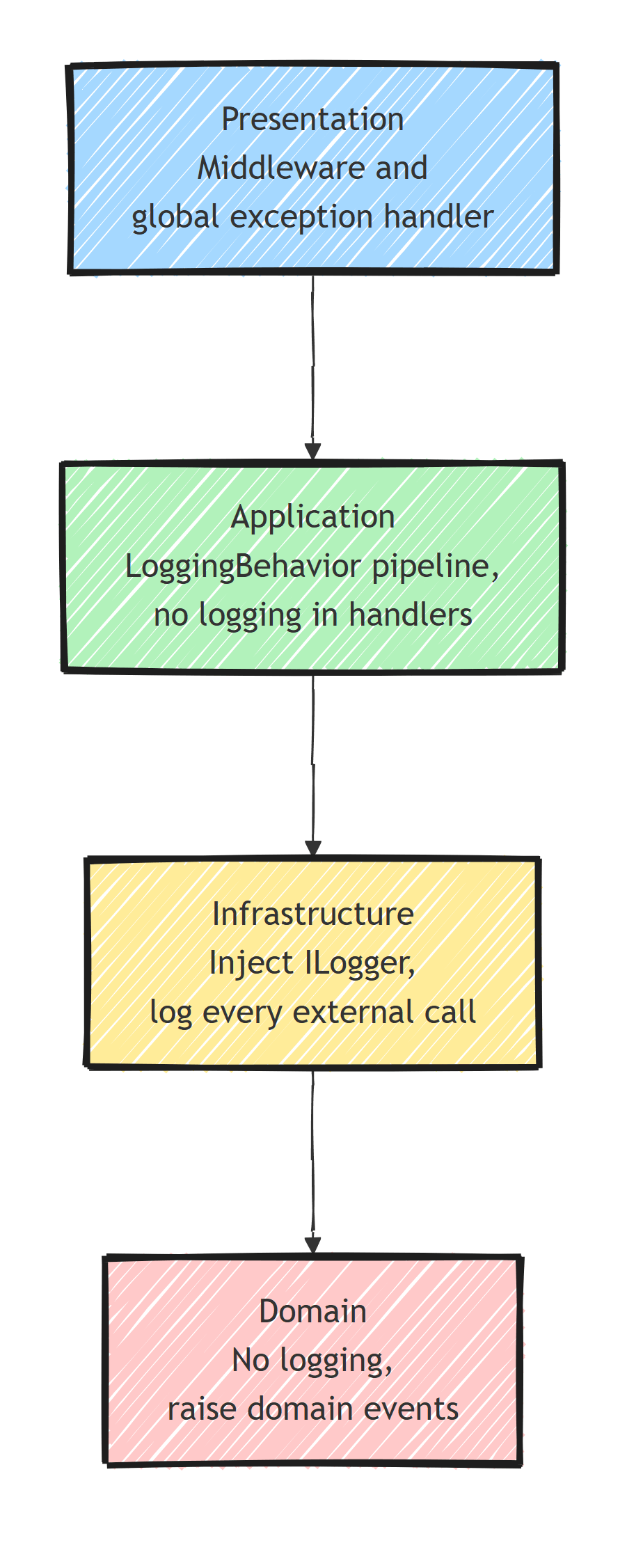
In Clean Architecture, each layer has a different logging job. The domain doesn't log at all (it raises domain events instead), the application logs through a single pipeline behavior, infrastructure logs external interactions directly, and the presentation layer logs through middleware and a global exception handler.
Ask five developers where logging belongs and you'll get five answers, from ILogger in every entity to nothing outside middleware.
The strategy below uses one pipeline behavior for every use case, logs freely in infrastructure, and keeps the domain observable through events instead of ILogger.
The Logging Dilemma
You want observability: structured logging, trace IDs, and request timings.
You also want clean domain logic without ILogger scattered everywhere.
In Clean Architecture, logging has clear boundaries.
Where to Log (And Where Not To)
- Domain: don't log. Raise domain events instead, and log in their handlers.
- Application: log minimally, through a
LoggingBehaviorpipeline behavior rather than inside handlers. - Infrastructure: log freely. Inject
ILoggerdirectly and record every external interaction. - Presentation: log through HTTP request/response middleware and the global exception handler.
The Domain layer should never reference ILogger. Domain entities don't need to know about logging infrastructure.
Pipeline Behavior: Log Every Use Case
A single MediatR pipeline behavior can log every command and query automatically:
public class LoggingBehavior<TRequest, TResponse>
    : IPipelineBehavior<TRequest, TResponse>
    where TRequest : IRequest<TResponse>
{
    private readonly ILogger<LoggingBehavior<TRequest, TResponse>> _logger;

    public LoggingBehavior(
        ILogger<LoggingBehavior<TRequest, TResponse>> logger)
    {
        _logger = logger;
    }

    public async Task<TResponse> Handle(
        TRequest request,
        RequestHandlerDelegate<TResponse> next,
        CancellationToken ct)
    {
        var requestName = typeof(TRequest).Name;

        _logger.LogInformation(
            "Handling {RequestName} {@Request}",
            requestName,
            request);

        var stopwatch = Stopwatch.StartNew();
        var response = await next();
        stopwatch.Stop();

        if (stopwatch.ElapsedMilliseconds > 500)
        {
            _logger.LogWarning(
                "Long-running request: {RequestName} took {ElapsedMs}ms",
                requestName,
                stopwatch.ElapsedMilliseconds);
        }

        if (response is Result { IsFailure: true } result)
        {
            _logger.LogError(
                "Handled {RequestName} with error {ErrorCode} in {ElapsedMs}ms",
                requestName,
                result.Error.Code,
                stopwatch.ElapsedMilliseconds);
        }
        else
        {
            _logger.LogInformation(
                "Handled {RequestName} in {ElapsedMs}ms",
                requestName,
                stopwatch.ElapsedMilliseconds);
        }

        return response;
    }
}
Register it in the Application layer's DI:
services.AddMediatR(config =>
{
    config.RegisterServicesFromAssembly(assembly);
    config.AddOpenBehavior(typeof(LoggingBehavior<,>));
    config.AddOpenBehavior(typeof(ValidationBehavior<,>));
});
Now every command and query is logged (entry, exit, duration, and failed results) without touching a single handler. The behavior doesn't catch exceptions. Those propagate to the global exception handler, so each failure gets logged exactly once.
Structured Properties
Enrich your logs with contextual properties using structured logging:
_logger.LogInformation(
    "Handling {RequestName} with {UserId} {@Request}",
    requestName,
    currentUser.UserId,
    request);
Structured properties make logs searchable. You can find all requests from a specific user or all executions of PlaceOrderCommand.
Be careful with {@Request}. This destructures the entire request object. If a command contains sensitive data (passwords, tokens), you'll log it.
[JsonIgnore] won't help here, because Serilog uses its own destructuring, not System.Text.Json.
Use the Destructurama.Attributed package to mask properties:
public sealed record LoginCommand(
    string Email,
    [property: NotLogged] string Password) : ICommand<TokenResponse>;
Or configure a destructuring policy in your Serilog setup. The safest default: log the request name, not the request body, and opt in to logging specific properties. I cover this and other pitfalls in 5 Serilog best practices.
Infrastructure Layer Logging
The Infrastructure layer is where you log external interactions:
public class EmailService : IEmailService
{
    private readonly ILogger<EmailService> _logger;
    private readonly SmtpClient _client;

    public EmailService(ILogger<EmailService> logger, SmtpClient client)
    {
        _logger = logger;
        _client = client;
    }

    public async Task SendAsync(
        string to, string subject, string body, CancellationToken ct)
    {
        _logger.LogInformation(
            "Sending email to {Recipient} with subject {Subject}",
            to,
            subject);

        await _client.SendMailAsync(
            new MailMessage("[email protected]", to, subject, body), ct);

        _logger.LogInformation(
            "Email sent to {Recipient}", to);
    }
}
Log before and after external calls. Don't log and rethrow failures here: the exception propagates to the global exception handler, which logs it once with full details. When a third-party service fails, these entries show which call failed and why.
Request/Response Logging Middleware
Log HTTP requests at the API layer with middleware:
public class RequestLoggingMiddleware
{
    private readonly RequestDelegate _next;
    private readonly ILogger<RequestLoggingMiddleware> _logger;

    public RequestLoggingMiddleware(
        RequestDelegate next,
        ILogger<RequestLoggingMiddleware> logger)
    {
        _next = next;
        _logger = logger;
    }

    public async Task InvokeAsync(HttpContext context)
    {
        var stopwatch = Stopwatch.StartNew();

        try
        {
            await _next(context);
        }
        finally
        {
            stopwatch.Stop();

            _logger.LogInformation(
                "HTTP {Method} {Path} responded {StatusCode} in {ElapsedMs}ms",
                context.Request.Method,
                context.Request.Path,
                context.Response.StatusCode,
                stopwatch.ElapsedMilliseconds);
        }
    }
}
Or use Serilog's built-in request logging:
app.UseSerilogRequestLogging(options =>
{
    options.EnrichDiagnosticContext = (diagnosticContext, httpContext) =>
    {
        diagnosticContext.Set("UserId",
            httpContext.User.FindFirstValue(ClaimTypes.NameIdentifier));
    };
});
Domain Events Instead of Logging
Instead of injecting ILogger into domain entities, raise domain events:
public class Order : AggregateRoot
{
    public OrderStatus Status { get; private set; }
    public string? CancellationReason { get; private set; }

    public void Cancel(string reason)
    {
        if (Status == OrderStatus.Shipped)
            throw new DomainException("Cannot cancel a shipped order.");

        Status = OrderStatus.Cancelled;
        CancellationReason = reason;

        // Don't log here - raise an event
        RaiseDomainEvent(new OrderCancelledDomainEvent(Id, reason));
    }
}
Handle the event in the Application or Infrastructure layer where logging is appropriate:
public class OrderCancelledEventHandler
    : INotificationHandler<OrderCancelledDomainEvent>
{
    private readonly ILogger<OrderCancelledEventHandler> _logger;

    public OrderCancelledEventHandler(
        ILogger<OrderCancelledEventHandler> logger)
    {
        _logger = logger;
    }

    public Task Handle(
        OrderCancelledDomainEvent notification, CancellationToken ct)
    {
        _logger.LogInformation(
            "Order {OrderId} cancelled. Reason: {Reason}",
            notification.OrderId,
            notification.Reason);

        return Task.CompletedTask;
    }
}
The Order entity has no dependency on ILogger, and the event handler writes the log entry.
Error Logging
Log exceptions in the global error handler:
public class GlobalExceptionHandler : IExceptionHandler
{
    private readonly ILogger<GlobalExceptionHandler> _logger;

    public GlobalExceptionHandler(ILogger<GlobalExceptionHandler> logger)
    {
        _logger = logger;
    }

    public async ValueTask<bool> TryHandleAsync(
        HttpContext httpContext,
        Exception exception,
        CancellationToken ct)
    {
        _logger.LogError(
            exception,
            "Unhandled exception: {Message}",
            exception.Message);

        httpContext.Response.StatusCode = 500;
        await httpContext.Response.WriteAsJsonAsync(new ProblemDetails
        {
            Status = 500,
            Title = "Internal Server Error"
        }, ct);

        return true;
    }
}
Log the full exception with stack trace. Return a generic message to the client.
Log Levels
Match the log level to the situation:
Trace: detailed diagnostic info (never in production)Debug: development-time debuggingInformation: normal operations, use case executionWarning: slow requests, degraded performanceError: unhandled exceptions, failed operationsCritical: application startup failures, data corruption
Key Takeaways
Logging in Clean Architecture follows the dependency rule:
- Domain layer: No logging. Raise domain events instead.
- Application layer: Pipeline behaviors for automatic use case logging.
- Infrastructure layer: Direct
ILoggerinjection for external integrations. - Presentation layer: Middleware for HTTP request/response logging.
- Global error handler: Catches and logs all unhandled exceptions.
Use structured logging everywhere, and enrich entries with correlation IDs and user context.
Thanks for reading, and stay awesome!
Frequently Asked Questions
Should the domain layer have logging in Clean Architecture?
No. Domain entities should never reference ILogger. Raise domain events for meaningful occurrences and log in the event handlers, which live in the application or infrastructure layer.
How do you log every use case without touching handlers?
With a MediatR pipeline behavior (or a handler decorator). One LoggingBehavior logs entry, exit, duration, and failures for every command and query automatically.
Is it safe to log the whole request object with Serilog?
Not by default. Destructuring with the @ operator serializes every property, including passwords and tokens. Use Serilog destructuring policies or the Destructurama.Attributed package to mask sensitive fields, or log only selected properties.
What log level should I use for slow requests?
Warning. Information is for normal operations, Warning for degraded behavior like slow or retried requests, Error for failed operations, and Critical for startup failures or data corruption.
Where should exceptions be logged in Clean Architecture?
In the global exception handler at the presentation boundary. Log the full exception with stack trace there, and return a generic Problem Details response to the client. Avoid logging the same exception at multiple layers.


