
You can turn off cloud CI for pull requests and still block merges on a green check.
Run the build and tests locally, post a signoff commit status with Basecamp's gh-signoff extension, and make GitHub require that status to merge.
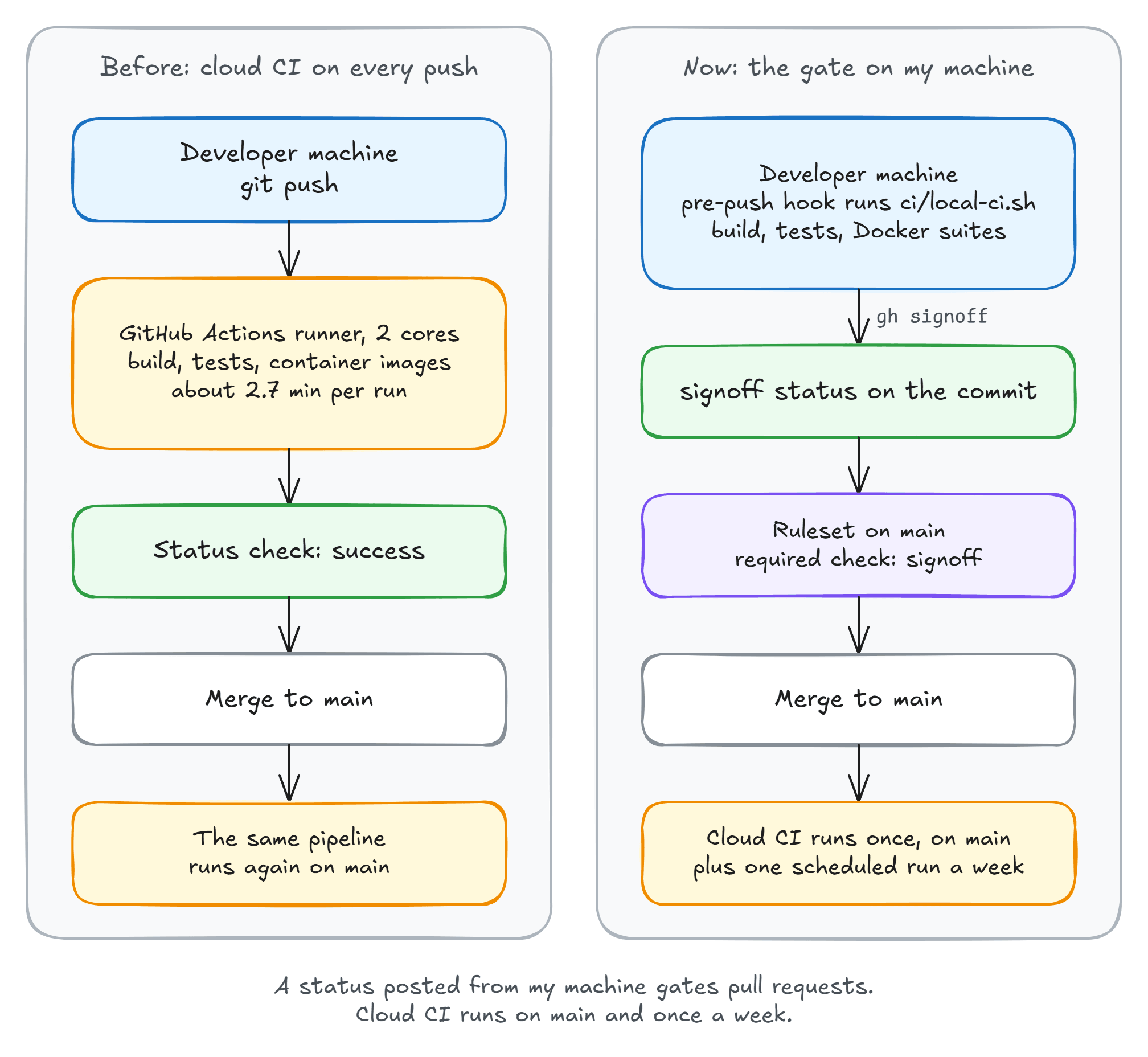
My repo has merged 833 pull requests this way since June, with cloud CI running only on main.
Here are short one-paragraph versions of both Datadog placements. Each keeps the headline, the three main points and the CTA, and stays under 225 characters (not counting the URL).
The real benefits of end-to-end observability:** Datadog's eBook shows how real teams reduce MTTR, cut tooling costs, and align business and engineering KPIs by unifying their stack. Get the eBook →: Datadog's eBook shows how real teams reduce MTTR, cut tooling costs, and align business and engineering KPIs by unifying their stack. Get the eBook →:** Datadog's eBook shows how real teams reduce MTTR, cut tooling costs, and align business and engineering KPIs by unifying their stack. Get the eBook →
Catch AI bugs before production:** Datadog's free Developer Toolkit for the AI Era helps you detect flaky tests, instrument LLM calls, and roll out AI features safely with feature flags and DORA metrics. Get the toolkit →: Datadog's free Developer Toolkit for the AI Era helps you detect flaky tests, instrument LLM calls, and roll out AI features safely with feature flags and DORA metrics. Get the toolkit →:** Datadog's free Developer Toolkit for the AI Era helps you detect flaky tests, instrument LLM calls, and roll out AI features safely with feature flags and DORA metrics. Get the toolkit →
Check the tracking source: Both links use utm_source=milan-netweekly-r, so website clicks will be reported as newsletter clicks. If Datadog wants the website tracked separately, ask them for website-specific links.
In June this year, the GitHub Actions bill for the Katabench repo was growing, and waiting for CI was seriously slowing down my work.
Every pull request ran the .NET build, the tests, and the container image builds.
And it would run the same steps again on every merge to main.
In the 19 days before I changed it, that workflow ran 588 times for pull requests alone, about 2.7 minutes each on a 2-core runner.
I turned the pull_request trigger off and moved the gate to my own machine.
Four months and 833 merged pull requests later, I haven't looked back.
What DHH Did With HEY
In April 2024, DHH wrote that 37signals was moving continuous integration back to developer machines. The remote CI run for HEY, their email app, took about five and a half minutes. His Linux desktop ran the same checks in less than half that time.
I found this idea quite interesting while searching for solutions to my slow CI problem.
His argument was about cores. A developer machine has far more of them than a rented CI runner, so the same suite finishes faster. He was also clear that this doesn't fit a codebase the size of Shopify or GitHub.
That still leaves the green check on the pull request. GitHub calls it a status check: a named pass or fail mark on one commit.
Basecamp released gh-signoff, an extension for the GitHub CLI that posts one from your terminal.
I gave it a try.
The Gate Is a Shell Script
The smallest version of my local gate, ci/local-ci.sh in a .NET repo:
#!/bin/sh
set -eu

marker="$(git rev-parse --git-dir)/ci-passed"

if [ "$(cat "$marker" 2>/dev/null)" = "$(git rev-parse HEAD)" ]; then
  echo "gate already passed for $(git rev-parse --short HEAD)"
else
  dotnet build MyApp.slnx -c Release -warnaserror
  dotnet test tests/MyApp.Tests -c Release --no-build
  dotnet format MyApp.slnx --verify-no-changes
  git rev-parse HEAD > "$marker"
fi

if [ "${1:-}" = "--signoff" ]; then
  gh signoff
fi
Here is what each part does, if shell scripts are new to you.
The first line runs the file with sh, which ships with Linux, macOS, and Git for Windows.
set -eu stops the script at the first failing command or unset variable, so gh signoff only runs when every check passed.
$(...) runs a command and pastes its output into the line, so marker is the path of ci-passed inside the .git folder.
The if compares the hash in that file with the current commit, and 2>/dev/null hides the error when the file doesn't exist yet.
When they match, the script skips the checks.
Otherwise the three dotnet commands run, and > writes the commit hash into the marker file.
${1:-} is the script's first argument, or empty when there was none.
With --signoff, it ends by posting the status.
Put whatever your existing CI runs in here, especially integration tests using Docker.
Let Git Run It Before Every Push
A git hook is a script that git runs at a fixed point.
pre-commit runs before git creates a commit, and pre-push runs before it sends your commits to GitHub.
If the hook exits with an error, git cancels the commit or the push.
Git reads hooks from .git/hooks, which isn't committed, so a fresh clone has none.
The fix is a committed folder and one config line per clone:
git config core.hooksPath .githooks
With that in place, .githooks/pre-push runs the gate:
#!/bin/sh
exec sh ci/local-ci.sh
Run chmod +x .githooks/pre-push before committing it, or git skips the hook.
Notice that the hook doesn't pass --signoff.
At that point the commit only exists on my machine, and gh signoff refuses to post a status for a commit GitHub doesn't have yet.
So I push first, and the hook runs the checks on the way out.
Then I run sh ci/local-ci.sh --signoff, which finds the marker from the hook run, skips the checks, and posts the status.
GitHub sees the commits and the status, but never the hook.
It can't tell whether the hook ran before the push, and git push --no-verify skips it.
So the hook catches my mistakes early, but it can't protect the branch. That job belongs to a rule on GitHub's side.
One Required Check
GitHub can refuse to merge a pull request until named checks pass on its latest commit. That setting is a branch protection rule, or in its newer form, a ruleset.
A workflow job posts a status check when it finishes, and anyone with push access can post one through the API without running anything.
That is all gh signoff does.
You can set up the gate with two commands:
gh extension install basecamp/gh-signoff
gh signoff install
install creates a ruleset on main that requires a status named signoff and blocks force pushes.
The required-check rule, as the GitHub API returns it:
{
  "type": "required_status_checks",
  "parameters": {
    "required_status_checks": [{ "context": "signoff" }],
    "strict_required_status_checks_policy": true
  }
}
The strict flag is the setting GitHub calls "Require branches to be up to date before merging".
With it on, GitHub won't merge my pull request if main has moved since I signed off.
I have to rebase, run the gate again, and post a new signoff.
That's extra work with several branches open, but the checks always ran on the code that gets merged.
This is how the pull request shows the status:

The status belongs to one commit. If you push another commit, GitHub will block the pull request until the signoff gate runs on the new commit.
What Still Runs in the Cloud
Here's what the trigger block looks like in my workflow file:
on:
  push:
    branches: [main]
  schedule:
    - cron: '0 6 * * 1'
  workflow_dispatch:
There is no pull_request trigger anymore.
The pipeline runs once per merge to main, on a clean runner with none of my caches, my SDK, or my Docker images.
It's the one run that doesn't take my word for it, and it checks the exact commit that landed on main.
The merge run can't block a bad signoff, because it starts after the merge.
If something slipped through, main goes red and I fix it right away.
That is the cost of this setup.
A signoff status proves that someone with push access posted it, and GitHub records who.
The script posts it only after a green run, but anyone with push access can type gh signoff on its own, and a repository admin can bypass the ruleset outright.
On my repo that's me and my coding agents, whose instructions forbid --no-verify and a signoff outside the script.
A team has to agree on the same rule.
The schedule entry runs the pipeline every Monday, even when nothing was merged that week.
My pipeline scans the container images, so that run is how I find out about a new CVE in a base image.
And we've had plenty of CVEs disclosed recently. In October alone, .NET shipped security patches and an out-of-band fix twelve days later for a Brotli decoder bug, and curl fixed a use-after-free in HTTP/2 uploads.
workflow_dispatch adds a Run workflow button for a full run on demand.
Summary
Running CI in the cloud on every pull request is still a good default. You get a clean machine, and nobody on the team can fake the result.
But I was paying for that with minutes of waiting on every push, plus a growing Actions bill. My test suite finishes on my machine in a few minutes, so the trade didn't make sense anymore.
A script runs the checks and ends with gh signoff, and a pre-push hook runs it before every push.
On GitHub's side, a ruleset on main requires the signoff status, and one workflow still runs in the cloud after each merge.
This setup can't handle pull requests from forks, because posting a status needs push access. If you maintain an open-source project, keep cloud CI for outside contributors and use signoff for the core team.
To try this, start with the script. Once it runs green in a few minutes, add the hook and the ruleset, then change the trigger block.
I covered the cloud version of this pipeline in an earlier issue.
Thanks for reading.
And stay awesome!
Frequently Asked Questions
Can you require a GitHub status check that no workflow posts?
Yes. A branch ruleset can require any status check by name, and the commit status API lets anyone with push access post one. The gh-signoff extension posts a status named signoff on the current commit, and gh signoff install creates the ruleset that requires it.
What does gh signoff do?
It runs no tests. It posts a success commit status named signoff on the current commit, and by default it refuses to run while the repository has uncommitted or unpushed changes, so the status lands on a commit GitHub already has. Run it at the end of a script that stops on the first failing check.
What is a git hook?
A script that git runs at a fixed point, such as pre-commit before a commit is created or pre-push before commits leave your machine. A non-zero exit cancels the commit or the push. Git reads hooks from .git/hooks, which is not committed, so teams commit a folder such as .githooks and point git at it with git config core.hooksPath. A hook only runs on the machine that has it, and --no-verify skips it, so it cannot replace a check on GitHub's side.
Is local CI safe without a clean machine?
The local run uses your SDK, Docker, and package cache, so keep one cloud run on the merge to main as the backstop. It checks the exact commit that landed, on a clean runner, after the merge. The other risk is trust: a signoff proves only that someone with push access posted it, so the team has to agree never to post one without running the gate.
Does local signoff work for open-source projects?
Not for outside contributors. Posting a commit status needs push access to the repository, so the author of a pull request from a fork cannot sign it off. Keep cloud CI for fork pull requests and use signoff for the core team.
How much cloud CI did the switch remove?
In the 19 days before the switch, the .NET and Docker workflow ran 588 times for pull requests, about 2.7 minutes each on a 2-core runner, and again on every merge. Since June 28, 2026, it has run zero times for a pull request across 833 merged pull requests, and once per merge to main.
