

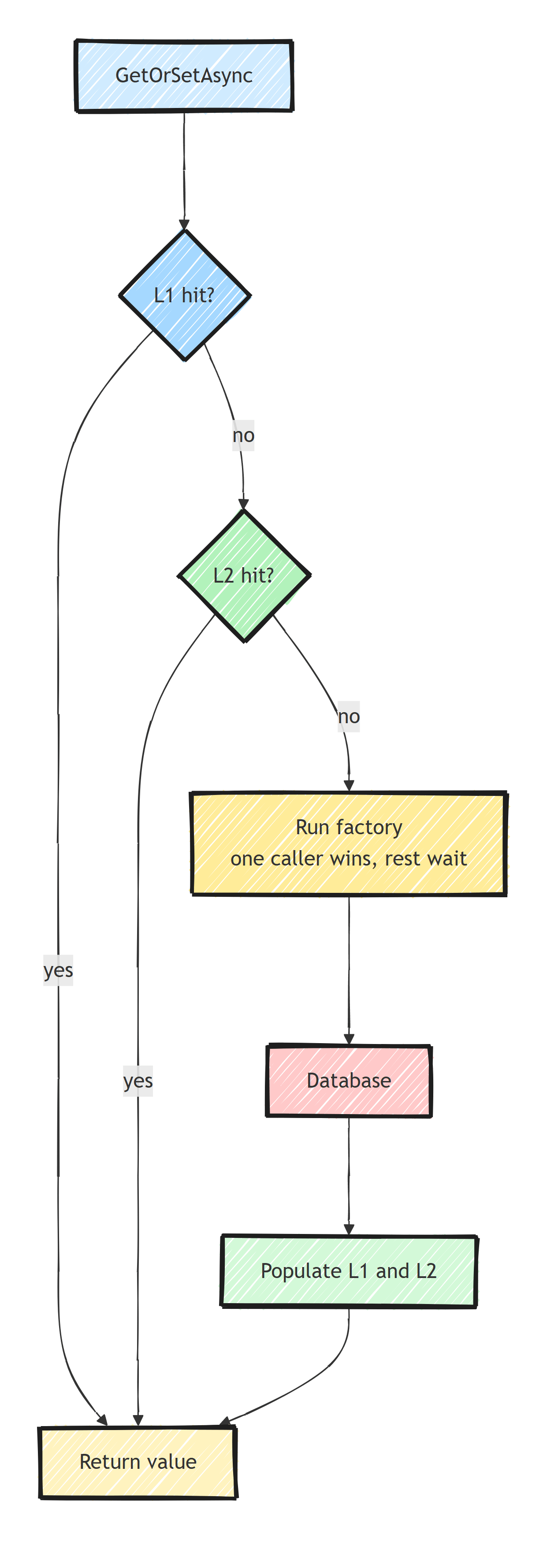
Multi-level caching combines a fast in-memory L1 cache in each application instance with a shared distributed L2 cache like Redis: reads hit L1 first, fall back to L2, and only then hit the database. FusionCache packages that model for .NET, with the L1, the L2, a backplane for cross-instance invalidation, stampede protection, and fail-safe built in.
Every caching setup I have inherited followed the same arc.
Someone added IMemoryCache because reads were slow.
Then the app scaled to two instances, values went stale on one of them, and someone bolted Redis on.
A hand-rolled IMemoryCache plus Redis setup is easy to write.
The naive version skips three hard problems, and you only find out during an incident.
The Progression Everyone Follows
Step one: no cache, so every read goes to the database.
Step two: in-memory caching. Reads take nanoseconds, but the cache is per-instance. With one instance, this works well.
Step three: you scale out, and each instance has its own private copy of the data. So you add Redis as a shared cache. Now everyone reads the same values, but every read pays a network round trip, so you keep the memory cache in front of it.
That is a two-level cache, and it comes with three problems you did not budget for.
The Three Hard Parts
1. Cross-Instance Invalidation
Instance A updates a product and refreshes its own memory cache and Redis. Instance B still has the old product in its memory cache and serves it until the entry expires.
Users see different data depending on which instance the load balancer picks. Support tickets say "it works when I refresh twice".
The fix is a backplane: a pub/sub channel that broadcasts "key X changed" to every instance so they evict their local copies. Hand-rolled caches usually leave it out, and I wrote about the underlying problem in solving distributed cache invalidation.
2. Cache Stampede
A popular key expires at peak traffic. Fifty concurrent requests all miss the cache at the same instant, and all fifty execute the same expensive database query at once. The database, which the cache existed to protect, gets hammered precisely when it is busiest.
The fix is request coalescing: one caller runs the factory, the other forty-nine wait for its result. Getting this right yourself means a lock striping scheme and careful async coordination, and it is easy to get wrong. I dug into the failure mode in cache stampede prevention.
3. The Source Is Down
The database goes away for thirty seconds during a failover. Every cache miss now throws, and users see errors for anything that is not already cached.
When the factory fails, you can return a 500 or serve the value you had five minutes ago. For most read paths, slightly stale data is better than an error. That behavior is called fail-safe, and it has to be designed in.
What Is FusionCache?
FusionCache is a mature open-source caching library that packages exactly this model:
- L1: an in-memory cache, always on.
- L2: an optional distributed cache (Redis via
IDistributedCache). - Backplane: eviction notifications across instances, typically over Redis pub/sub.
- Stampede protection and fail-safe built in.
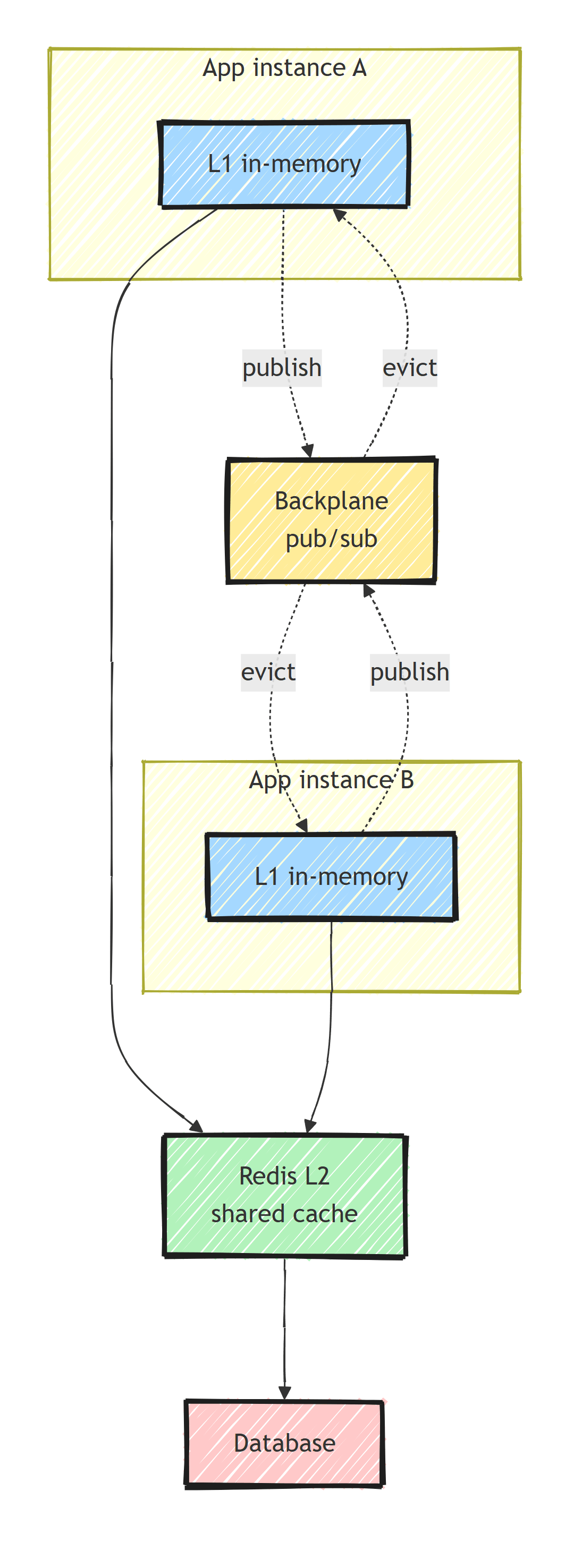
It sits in the same space as Microsoft's HybridCache, but it is more feature-complete today (fail-safe, soft timeouts, adaptive caching), and it can even act as a HybridCache implementation if you want the abstraction.
Install the packages:
dotnet add package ZiggyCreatures.FusionCache
dotnet add package ZiggyCreatures.FusionCache.Serialization.SystemTextJson
dotnet add package ZiggyCreatures.FusionCache.Backplane.StackExchangeRedis
dotnet add package Microsoft.Extensions.Caching.StackExchangeRedis
The Whole Setup
Here is the complete registration: L1 always on, and the Redis L2 plus backplane added only when a connection string is configured.
public static IServiceCollection AddAppCache(
    this IServiceCollection services, IConfiguration configuration)
{
    var options = ResolveOptions(configuration);

    var fusion = services.AddFusionCache()
        .WithDefaultEntryOptions(new FusionCacheEntryOptions
        {
            Duration = options.DefaultDuration,
            IsFailSafeEnabled = true,                       // serve stale if the factory errors
            FailSafeMaxDuration = options.FailSafeMaxDuration
        });

    // Only add the L2 when Redis is configured. With none, the cache is L1-only:
    // fully functional, just per-instance.
    if (!string.IsNullOrWhiteSpace(options.RedisConnectionString))
    {
        services.AddStackExchangeRedisCache(redis =>
        {
            redis.Configuration = options.RedisConnectionString;
            redis.InstanceName = options.InstanceName + ":";
        });

        fusion
            .WithSerializer(new FusionCacheSystemTextJsonSerializer())
            .WithRegisteredDistributedCache()               // the Redis L2
            .WithBackplane(new RedisBackplane(new RedisBackplaneOptions
            {
                Configuration = options.RedisConnectionString // evict L1 across instances
            }));
    }

    return services;
}
And the read side. This one call gives you L1 lookup, L2 fallback, stampede-protected factory execution, and fail-safe:
var product = await cache.GetOrSetAsync(
    $"product:{id}",
    async ct => await db.Products.FindAsync([id], ct),
    token: ct);
The call sites stay this simple no matter which levels are configured.
What Each Piece Buys You
The Backplane Fixes the Two-Instance Bug
Walk through the failure without it.
Instance A runs SetAsync("product:42", updated).
A's memory cache is fresh, Redis is fresh, and B's memory cache still holds the old value for however long its L1 duration is.
With the backplane, A's write publishes a notification, B receives it and evicts product:42 from its L1, and B's next read pulls the fresh value from Redis.
The stale window shrinks from "the full cache duration" to "one pub/sub hop", which is milliseconds.
You write no code for this.
Every Set, Remove, and Expire participates automatically.
Stampede Protection Is Automatic
When 50 concurrent callers request the same expired key, FusionCache lets exactly one of them per instance execute the factory. The other 49 wait on the in-flight operation and get the same result.
Your database sees one query instead of fifty.
There is nothing to configure, because GetOrSetAsync always works this way.
Fail-Safe Is a Product Decision in Config
With IsFailSafeEnabled = true, FusionCache keeps logically expired entries around (up to FailSafeMaxDuration) instead of discarding them.
When a factory throws (database down, timeout, transient failure), it returns the stale value instead of propagating the exception.
The setting encodes a product decision, for example that serving product listings up to one hour stale is better than an error page. Different keys can make different calls via per-entry options.
You can pair it with soft timeouts so a slow database does not make users wait:
var product = await cache.GetOrSetAsync(
    $"product:{id}",
    async ct => await db.Products.FindAsync([id], ct),
    opt => opt.SetFailSafe(true).SetFactoryTimeouts(TimeSpan.FromMilliseconds(200)),
    token: ct);
If a stale value exists and the factory takes longer than 200 ms, the caller gets the stale value now and the factory completes in the background and refreshes the cache.
Writes, Removes, and the Eager Refresh Trick
The write side matters just as much for consistency:
// After updating the product in the database:
await cache.SetAsync($"product:{id}", updated, token: ct);
// Or, if you'd rather let the next read repopulate:
await cache.RemoveAsync($"product:{id}", token: ct);
Both propagate through every level: L1 on this instance, L2 in Redis, and (via the backplane) an eviction notification to every other instance's L1. Compare that with the hand-rolled version, where each write site has to remember three explicit steps, and one forgotten backplane publish reintroduces the stale-instance bug.
FusionCache also supports eager refresh.
Set EagerRefreshThreshold = 0.9f and when a request arrives after 90% of an entry's lifetime has passed, FusionCache serves the still-valid cached value instantly and refreshes it in the background.
Hot keys effectively never expire in front of a user, which removes the latency spike that otherwise hits the first request after expiration.
Deciding what to cache is still up to you. Cache things that are read often and can tolerate brief staleness, and leave the rest alone. I go deeper on that decision in when to cache.
Graceful Degradation Comes Free
Look back at the registration code. If no Redis connection string is configured, the app still has a fully functional L1 cache. Cross-instance consistency is weaker, but the cache works.
That conditional is convenient for local development. It also means the caching layer degrades instead of becoming a hard dependency. If Redis has an outage, FusionCache can keep serving from L1 and skip the distributed layer, because caching is an optimization, never the source of truth.
This "work with what infrastructure is present" shape applies well beyond caching, and I wrote it up as a standalone pattern in designing for graceful degradation.
Summary
The failure modes of hand-rolled IMemoryCache plus Redis only show up once you have multiple instances under load.
- Without a backplane, every update leaves stale L1 copies on other instances.
- Stampede protection coalesces concurrent misses on an expiring hot key into one factory call per instance instead of fanning them out to the database.
- Fail-safe turns "database blipped" from an outage into bounded staleness. Decide per key what staleness you can afford.
- FusionCache gives you all three, plus an L1-only degraded mode that keeps working when Redis is absent or down.
If you already have the hand-rolled version, compare the incidents it has caused with the lines of code GetOrSetAsync replaces.
Frequently Asked Questions
What is multi-level caching in .NET?
Multi-level caching combines a fast in-memory L1 cache in each application instance with a shared distributed L2 cache like Redis. Reads hit L1 first for speed, fall back to L2 to stay consistent across instances, and only then hit the database.
What is a cache backplane and why do I need one?
A backplane is a notification channel, typically Redis pub/sub, that broadcasts cache changes to every application instance. Without it, updating a value on one instance leaves stale copies in the in-memory caches of all other instances until they expire.
How does FusionCache prevent cache stampede?
FusionCache coalesces concurrent requests for the same key. When an entry expires under load, only one caller per instance executes the factory against the database while the rest wait for that result. This is built in and requires no configuration.
What happens in FusionCache when the database is down?
With fail-safe enabled, FusionCache keeps expired entries around for a configurable window and serves the stale value instead of throwing when the factory fails. You trade a bounded amount of staleness for staying up during an outage.
Do I need Redis to use FusionCache?
No. Without a distributed cache configured, FusionCache runs as a fully functional L1 in-memory cache. You can add the Redis L2 and backplane later without changing any call sites.


