

Minimal APIs and Clean Architecture are a natural fit: the endpoint receives HTTP, dispatches a command or query to the Application layer, and maps the result back to an HTTP response. Minimal APIs strip endpoint definitions down to plain functions, and Clean Architecture moves the logic those functions shouldn't contain into the Application and Domain layers.
Here's how to organize the endpoints, validate requests with endpoint filters, and return Problem Details.
Why Minimal APIs With Clean Architecture?
Minimal APIs give you a lightweight, low-ceremony way to define HTTP endpoints in ASP.NET Core.
Clean Architecture gives you a structured way to organize business logic independently from infrastructure.
Together, they keep the Presentation layer thin. Your Minimal API endpoints become simple adapters that translate HTTP requests into commands/queries and return HTTP responses.
The Architecture
An HTTP request flows through the Minimal API endpoint into an Application layer command or query, and the result flows back out as an HTTP response:
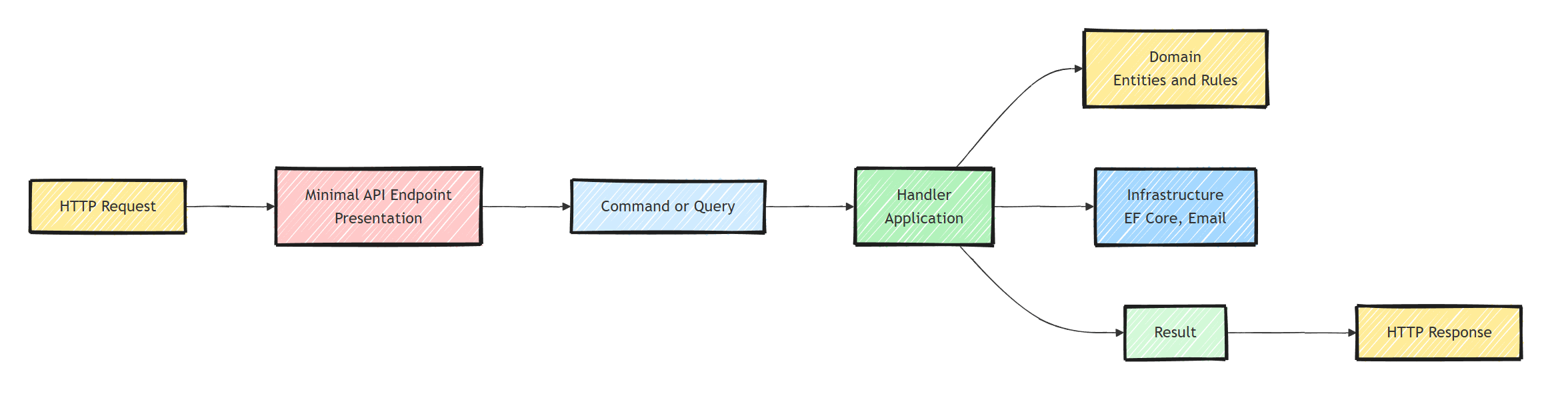
The Api project is a thin coordination layer. It has two jobs:
- Map HTTP requests to Application layer commands and queries
- Map Application layer results back to HTTP responses
Defining an Endpoint
Here's a Minimal API endpoint that calls a command handler:
app.MapPost("/api/orders", async (
    PlaceOrderRequest request,
    ICommandHandler<PlaceOrderCommand, Guid> handler,
    CancellationToken cancellationToken) =>
{
    var command = new PlaceOrderCommand(request.CustomerId, request.Items);

    var result = await handler.Handle(command, cancellationToken);

    return result.IsSuccess
        ? Results.Created($"/api/orders/{result.Value}", new { id = result.Value })
        : result.ToProblemDetails();
});
The endpoint:
- Receives the HTTP request
- Creates a command from the request body
- Passes it to the handler (from the Application layer)
- Returns an appropriate HTTP response
The endpoint has no business logic and makes no database calls. It only translates the request and the response.
One note on wiring: the endpoint resolves ICommandHandler<PlaceOrderCommand, Guid> straight from DI.
That works when your handlers are registered against these interfaces (a single Scrutor assembly scan handles it).
If you're using MediatR, inject ISender and call Send instead; the shape of the endpoint stays the same.
Organizing Endpoints
Minimal APIs can get messy if you dump everything into Program.cs. Organize them using static classes:
public static class OrderEndpoints
{
    public static void MapOrderEndpoints(this IEndpointRouteBuilder app)
    {
        var group = app.MapGroup("/api/orders")
            .WithTags("Orders");

        group.MapPost("", PlaceOrder);
        group.MapGet("{orderId:guid}", GetOrderById);
        group.MapPut("{orderId:guid}/cancel", CancelOrder);
        group.MapGet("", GetOrders);
    }

    private static async Task<IResult> PlaceOrder(
        PlaceOrderRequest request,
        ICommandHandler<PlaceOrderCommand, Guid> handler,
        CancellationToken cancellationToken)
    {
        var command = new PlaceOrderCommand(request.CustomerId, request.Items);

        var result = await handler.Handle(command, cancellationToken);

        return result.IsSuccess
            ? Results.Created($"/api/orders/{result.Value}", new { id = result.Value })
            : result.ToProblemDetails();
    }

    private static async Task<IResult> GetOrderById(
        Guid orderId,
        IQueryHandler<GetOrderByIdQuery, OrderResponse> handler,
        CancellationToken cancellationToken)
    {
        var query = new GetOrderByIdQuery(orderId);

        var result = await handler.Handle(query, cancellationToken);

        return result.IsSuccess
            ? Results.Ok(result.Value)
            : Results.NotFound();
    }

    private static async Task<IResult> CancelOrder(
        Guid orderId,
        ICommandHandler<CancelOrderCommand> handler,
        CancellationToken cancellationToken)
    {
        var command = new CancelOrderCommand(orderId);

        var result = await handler.Handle(command, cancellationToken);

        return result.IsSuccess
            ? Results.NoContent()
            : result.ToProblemDetails();
    }

    private static async Task<IResult> GetOrders(
        [AsParameters] GetOrdersRequest request,
        IQueryHandler<GetOrdersQuery, PagedList<OrderSummary>> handler,
        CancellationToken cancellationToken)
    {
        var query = new GetOrdersQuery(request.Page, request.PageSize);

        var result = await handler.Handle(query, cancellationToken);

        return result.IsSuccess
            ? Results.Ok(result.Value)
            : result.ToProblemDetails();
    }
}
Then register them in Program.cs:
app.MapOrderEndpoints();
app.MapCustomerEndpoints();
app.MapProductEndpoints();
Each feature gets its own endpoint file. This follows the Screaming Architecture principle.
I shared more variations of this approach in how to structure Minimal APIs.
And if you want to skip the manual Map* calls in Program.cs, you can register Minimal API endpoints automatically with a bit of reflection.
Using Carter for Endpoint Organization
Carter provides a module system for organizing Minimal API endpoints:
public class OrderModule : ICarterModule
{
    public void AddRoutes(IEndpointRouteBuilder app)
    {
        var group = app.MapGroup("/api/orders").WithTags("Orders");

        group.MapPost("", PlaceOrder);
        group.MapGet("{orderId:guid}", GetOrderById);
    }

    private static async Task<IResult> PlaceOrder(
        PlaceOrderRequest request,
        ICommandHandler<PlaceOrderCommand, Guid> handler,
        CancellationToken cancellationToken)
    {
        var command = new PlaceOrderCommand(request.CustomerId, request.Items);
        var result = await handler.Handle(command, cancellationToken);

        return result.IsSuccess
            ? Results.Created($"/api/orders/{result.Value}", new { id = result.Value })
            : result.ToProblemDetails();
    }

    private static async Task<IResult> GetOrderById(
        Guid orderId,
        IQueryHandler<GetOrderByIdQuery, OrderResponse> handler,
        CancellationToken cancellationToken)
    {
        var query = new GetOrderByIdQuery(orderId);
        var result = await handler.Handle(query, cancellationToken);

        return result.IsSuccess ? Results.Ok(result.Value) : Results.NotFound();
    }
}
Carter auto-discovers modules and registers them:
builder.Services.AddCarter();
// ...
app.MapCarter();
Adding Endpoint Filters
Endpoint Filters are the Minimal API equivalent of action filters. Use them for cross-cutting concerns:
public class ValidationFilter<TRequest> : IEndpointFilter
{
    public async ValueTask<object?> InvokeAsync(
        EndpointFilterInvocationContext context,
        EndpointFilterDelegate next)
    {
        var request = context.Arguments.OfType<TRequest>().FirstOrDefault();

        if (request is null)
        {
            return Results.BadRequest("Invalid request.");
        }

        var validator = context.HttpContext
            .RequestServices
            .GetService<IValidator<TRequest>>();

        if (validator is not null)
        {
            var validationResult = await validator.ValidateAsync(request);
            if (!validationResult.IsValid)
            {
                return Results.ValidationProblem(validationResult.ToDictionary());
            }
        }

        return await next(context);
    }
}
Apply it to endpoints:
group.MapPost("", PlaceOrder)
    .AddEndpointFilter<ValidationFilter<PlaceOrderRequest>>();
Mapping Results to HTTP Responses
Create an extension method that maps your Result pattern to Problem Details responses:
public static class ResultExtensions
{
    public static IResult ToProblemDetails(this Result result)
    {
        if (result.IsSuccess)
        {
            throw new InvalidOperationException("Cannot convert a success result to problem details.");
        }

        return Results.Problem(
            statusCode: GetStatusCode(result.Error.Type),
            title: GetTitle(result.Error.Type),
            extensions: new Dictionary<string, object?>
            {
                { "errors", new[] { result.Error } }
            });
    }

    private static int GetStatusCode(ErrorType errorType) => errorType switch
    {
        ErrorType.Validation => StatusCodes.Status400BadRequest,
        ErrorType.NotFound => StatusCodes.Status404NotFound,
        ErrorType.Conflict => StatusCodes.Status409Conflict,
        ErrorType.Forbidden => StatusCodes.Status403Forbidden,
        _ => StatusCodes.Status500InternalServerError
    };

    private static string GetTitle(ErrorType errorType) => errorType switch
    {
        ErrorType.Validation => "Bad Request",
        ErrorType.NotFound => "Not Found",
        ErrorType.Conflict => "Conflict",
        ErrorType.Forbidden => "Forbidden",
        _ => "Server Error"
    };
}
This gives you consistent Problem Details responses across all endpoints.
Minimal APIs vs Controllers
- Ceremony: Minimal APIs are just functions. Controllers need a class, a base type, and routing attributes.
- Performance: Minimal APIs are slightly faster because they skip parts of the MVC pipeline (model binding infrastructure, filters, view support).
- Testability: identical. In both cases you test the handler in the Application layer, not the HTTP adapter.
- Organization: extension methods or Carter modules for Minimal APIs; controller classes for MVC.
- OpenAPI: both work with the built-in OpenAPI document generation in .NET 9+. Minimal APIs describe metadata fluently (
WithTags,Produces), controllers use attributes. - Model binding: Minimal APIs bind from route, query, and body by convention with
[AsParameters]for grouping. Controllers use[FromBody],[FromQuery], and friends.
In a Clean Architecture setup, both approaches are thin adapters. The business logic stays in the Application layer. The choice between Minimal APIs and controllers is mostly a style preference.
I prefer Minimal APIs for new projects because they're more concise and fit the REPR pattern.
Summary
Minimal APIs and Clean Architecture complement each other. The API layer becomes a thin adapter: receive HTTP, create command/query, call handler, return HTTP response.
Organize endpoints by feature using extension methods or Carter modules. Use endpoint filters for cross-cutting concerns. Map results to Problem Details consistently.
Thanks for reading, and stay awesome!
Frequently Asked Questions
Can you use Minimal APIs with Clean Architecture?
Yes. Minimal API endpoints work as thin adapters in the Presentation layer: they translate HTTP requests into commands or queries, invoke a handler from the Application layer, and map the result back to an HTTP response.
Should Minimal API endpoints contain business logic?
No. Endpoints should only handle request and response translation. Business logic belongs in the Application and Domain layers, which keeps it testable without spinning up a web host.
How do you organize Minimal API endpoints in a large project?
Group endpoints by feature using static classes with extension methods, or use a library like Carter that auto-discovers endpoint modules. Avoid dumping every route into Program.cs.
Are Minimal APIs better than controllers for Clean Architecture?
Both work equally well because both are thin adapters over the Application layer. Minimal APIs have less ceremony and slightly better performance; controllers offer familiar conventions. The choice is mostly style preference.
How do you handle validation in Minimal APIs?
Use endpoint filters that resolve a FluentValidation validator from DI and short-circuit with a 400 ValidationProblem response, or run validation in a MediatR pipeline behavior inside the Application layer.


