
Async/await improves scalability, not raw speed: it frees threads while waiting on I/O so your server can handle more concurrent requests.
The pitfalls that hurt in practice are sync-over-async blocking that starves the thread pool, sequential awaits that could run in parallel, unnecessary state machines and task allocations on hot paths, and async void methods that can crash the process.
The fix starts with understanding which costs matter and measuring them in context. Here are the most common async/await performance pitfalls I've encountered and how to fix them.
The Cost of Async State Machines
Every time you mark a method as async, the compiler generates a state machine. This state machine tracks where the method is in its execution and handles continuations. For hot paths, this overhead adds up.
// This generates a state machine even though it doesn't need one
public async Task<int> GetValueAsync()
{
    return await _cache.GetAsync("key");
}

// This avoids the state machine overhead
public Task<int> GetValueAsync()
{
    return _cache.GetAsync("key");
}
When your method only wraps another async call, you can elide the async/await keywords entirely. The returned task goes straight to the caller without the state machine overhead.
Be careful with this optimization. If you have a using statement or a try/catch block, you must keep the async/await keywords to ensure proper resource disposal and exception handling.
Avoiding Unnecessary Task Allocations With ValueTask
Every Task<T> is a heap allocation. For methods that frequently complete synchronously, like cache lookups, this creates garbage collection pressure.
// Allocates a Task<T> every time, even when the cache hits
public async Task<Product> GetProductAsync(int id)
{
    if (_cache.TryGetValue(id, out var product))
    {
        return product;
    }

    product = await _repository.GetByIdAsync(id);
    _cache.Set(id, product);
    return product;
}

// Uses ValueTask to avoid allocation on the synchronous path
public async ValueTask<Product> GetProductAsync(int id)
{
    if (_cache.TryGetValue(id, out var product))
    {
        return product;
    }

    product = await _repository.GetByIdAsync(id);
    _cache.Set(id, product);
    return product;
}
ValueTask<T> is a struct, so it avoids heap allocation when the result is available synchronously.
Never await a ValueTask<T> more than once, and never use .Result or .GetAwaiter().GetResult() on one before it completes.
Do You Need ConfigureAwait(false)?
By default, await captures the current SynchronizationContext and posts the continuation back to it. In ASP.NET Core, there's no synchronization context, so this isn't a problem. But in library code that might run in UI frameworks, it matters.
// Take the HttpClient as a dependency - never new one up per call
public async Task<string> FetchDataAsync(HttpClient client, string url)
{
    // In library code, always use ConfigureAwait(false)
    var response = await client.GetAsync(url).ConfigureAwait(false);
    var content = await response.Content.ReadAsStringAsync().ConfigureAwait(false);
    return content;
}
In library code, adding ConfigureAwait(false) avoids unnecessary context switches and potential deadlocks. If you're writing application-level ASP.NET Core code, it doesn't buy you anything, so don't clutter your handlers with it. Reserve it for reusable libraries.
Since .NET 8, there's also ConfigureAwait(ConfigureAwaitOptions.ForceYielding) and friends, which give you finer control over continuation behavior when you need it.
The Dangers of Sync-Over-Async
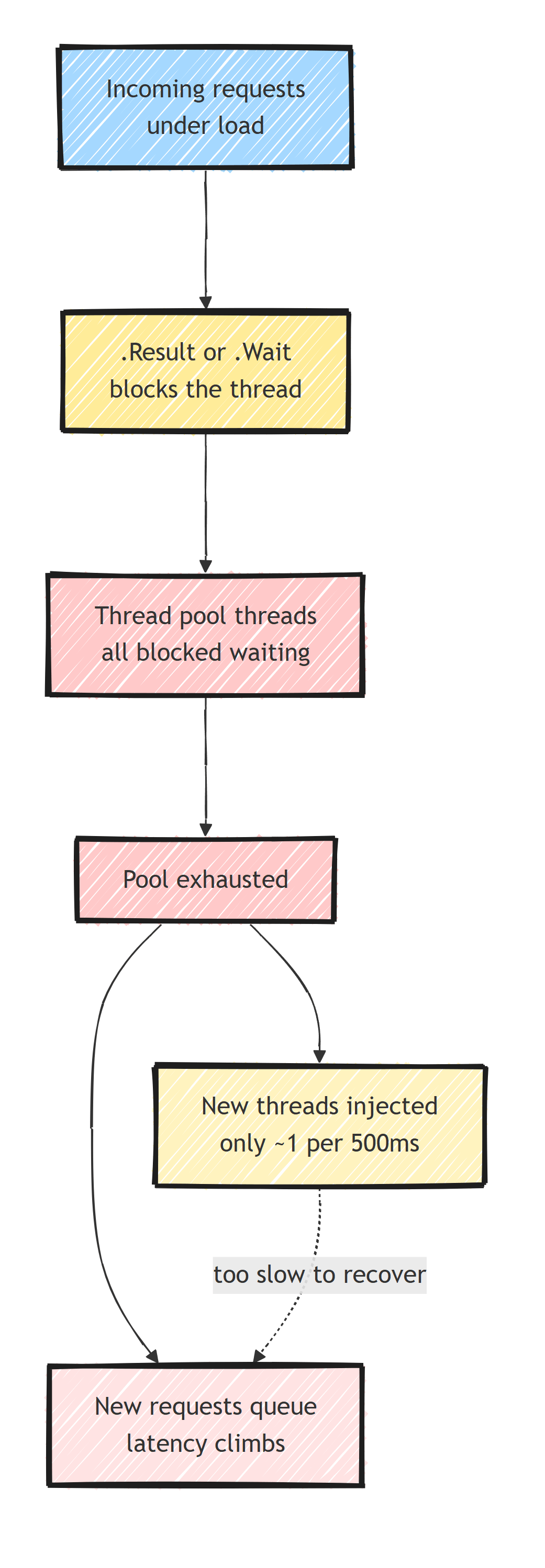
One of the worst performance pitfalls is calling .Result or .Wait() on a task. This blocks the calling thread and can lead to thread pool starvation under load.
// NEVER do this - blocks the thread and risks deadlocks
public Product GetProduct(int id)
{
    return _repository.GetByIdAsync(id).Result;
}

// Instead, go async all the way
public async Task<Product> GetProductAsync(int id)
{
    return await _repository.GetByIdAsync(id);
}
Thread pool starvation happens when all available threads are blocked waiting for async operations. The thread pool tries to inject new threads, but the classic injection rate is only about one new thread every 500ms once you're above the minimum thread count. .NET 6 added blocked-thread detection that injects faster when it sees pool threads stuck in Task.Wait, but it does not remove the blocking. Under high concurrency, requests queue up and latency climbs.
If you must bridge sync and async code, use Task.Run as a last resort, but it still consumes a thread pool thread.
Parallel Execution With Task.WhenAll
A common mistake is awaiting tasks sequentially when they could run in parallel.
// Sequential - each call waits for the previous one
public async Task<OrderSummary> GetOrderSummaryAsync(int orderId)
{
    var order = await _orderService.GetOrderAsync(orderId);
    var customer = await _customerService.GetCustomerAsync(order.CustomerId);
    var shipping = await _shippingService.GetShippingAsync(orderId);

    return new OrderSummary(order, customer, shipping);
}

// Parallel - customer and shipping calls run concurrently once the order loads
public async Task<OrderSummary> GetOrderSummaryAsync(int orderId)
{
    var orderTask = _orderService.GetOrderAsync(orderId);

    // We need the order first for CustomerId, but shipping is independent
    var order = await orderTask;

    var customerTask = _customerService.GetCustomerAsync(order.CustomerId);
    var shippingTask = _shippingService.GetShippingAsync(orderId);

    await Task.WhenAll(customerTask, shippingTask);

    // Both tasks are complete here, so awaiting them just unwraps the results
    return new OrderSummary(order, await customerTask, await shippingTask);
}
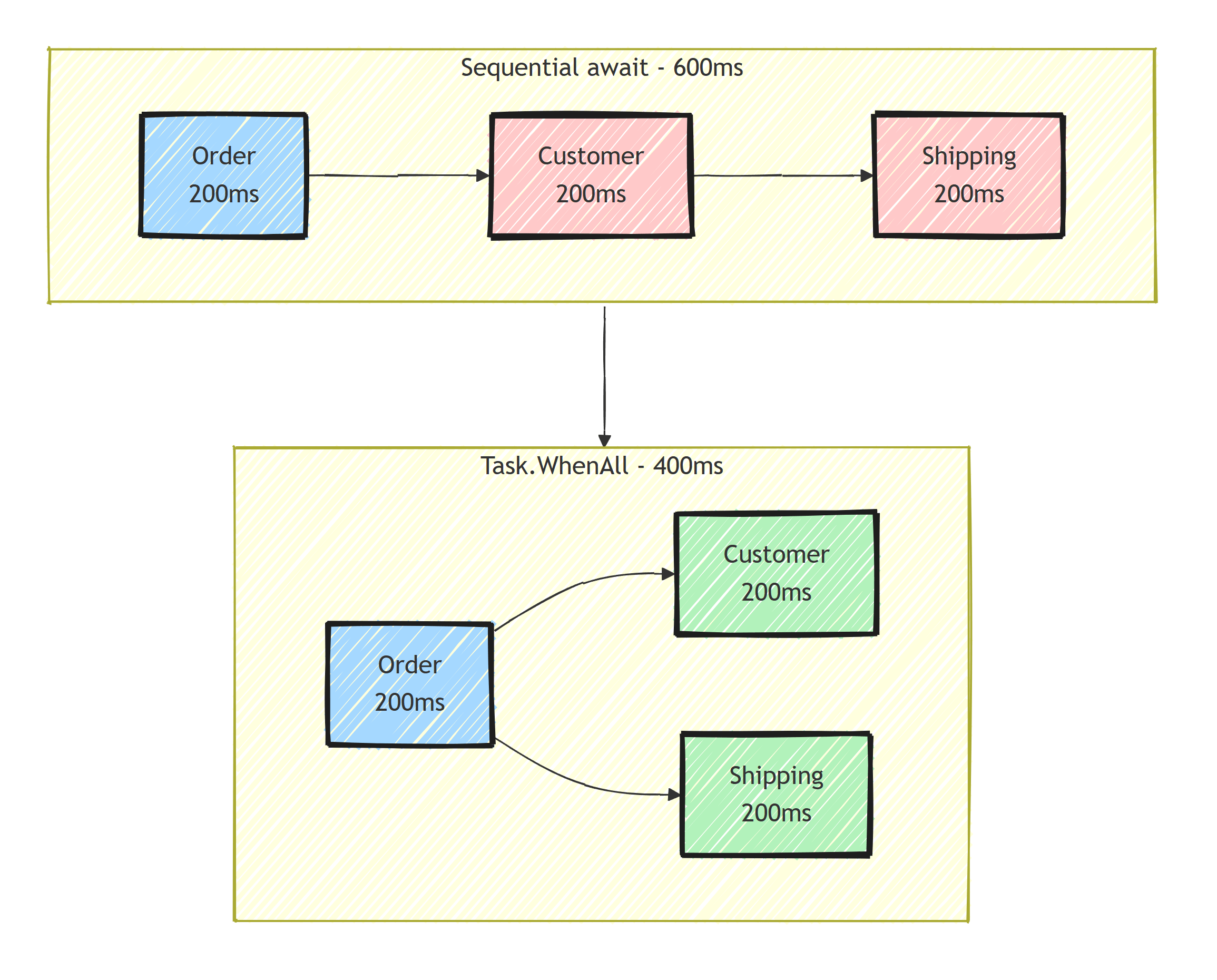
Use Task.WhenAll when you have independent async operations. In the diagram above, that cuts the response time from 600ms to 400ms. If you want to understand what the compiler does behind the scenes, see my guide on async/await fundamentals.
Never run parallel queries against the same EF Core DbContext. It is not thread-safe, and Task.WhenAll over two queries on one context will throw (or worse, corrupt state). I cover the right way to do this in parallelizing EF Core queries.
Avoid Async Void
async void methods are fire-and-forget. They don't return a task, so you can't await them, and exceptions thrown inside them crash the process.
// Dangerous - exceptions will crash the process
public async void SendNotification(string userId)
{
    await _notificationService.SendAsync(userId);
}

// Safe - returns a Task that can be awaited
public async Task SendNotificationAsync(string userId)
{
    await _notificationService.SendAsync(userId);
}
The only acceptable use of async void is in event handlers for UI frameworks. In all other cases, return Task or ValueTask.
Cancellation Token Propagation
Failing to propagate cancellation tokens means your async operations can't be cancelled when a request is aborted. This wastes resources on work that nobody needs.
public async Task<List<Product>> SearchProductsAsync(
    string query,
    CancellationToken cancellationToken = default)
{
    var results = await _dbContext.Products
        .Where(p => p.Name.Contains(query))
        .ToListAsync(cancellationToken);

    return results;
}
Always accept and propagate CancellationToken parameters. ASP.NET Core automatically provides cancellation tokens linked to the request lifecycle.
Streaming Large Data Sets With IAsyncEnumerable
When returning large collections, loading everything into a list first holds the whole result set in memory, and the caller gets nothing until the last row arrives.
Use IAsyncEnumerable<T> to stream results.
// Loads everything into memory first
public async Task<List<LogEntry>> GetLogsAsync(DateTime from, DateTime to)
{
    return await _dbContext.Logs
        .Where(l => l.Timestamp >= from && l.Timestamp <= to)
        .ToListAsync();
}

// Streams results as they become available
public async IAsyncEnumerable<LogEntry> GetLogsAsync(
    DateTime from,
    DateTime to,
    [EnumeratorCancellation] CancellationToken cancellationToken = default)
{
    await foreach (var log in _dbContext.Logs
        .Where(l => l.Timestamp >= from && l.Timestamp <= to)
        .AsAsyncEnumerable()
        .WithCancellation(cancellationToken))
    {
        yield return log;
    }
}
This helps most for API endpoints that return large datasets. Streaming trades memory for connection lifetime: the database connection stays open while the consumer enumerates.
For long-running work, returning 202 Accepted and processing in the background often beats holding the request open. I cover that approach in building async APIs the right way.
Benchmarking Async Code
Before optimizing, measure. Use BenchmarkDotNet to compare different async implementations.
[MemoryDiagnoser]
public class AsyncBenchmarks
{
    [Benchmark(Baseline = true)]
    public async Task<int> WithAsyncAwait()
    {
        return await Task.FromResult(42);
    }

    [Benchmark]
    public ValueTask<int> WithValueTask()
    {
        return ValueTask.FromResult(42);
    }

    [Benchmark]
    public Task<int> WithTaskElision()
    {
        return Task.FromResult(42);
    }
}
The results show whether each change makes a measurable difference.
Key Takeaways
Measure before you optimize.
- Elide async/await when a method only wraps another async call to avoid state machine overhead
- Use
ValueTask<T>for methods that frequently complete synchronously - Add
ConfigureAwait(false)in library code to avoid context capture - Go async all the way instead of blocking on
.Resultor.Wait() - Use
Task.WhenAllfor independent parallel operations - Avoid
async voidexcept in UI event handlers - Always propagate
CancellationTokenso aborted requests stop their work - Use
IAsyncEnumerable<T>for streaming large data sets
Frequently Asked Questions
Does async/await make code faster?
No. Async/await improves scalability. It frees threads while waiting on I/O so your server can handle more concurrent requests, but each individual operation carries a small state machine overhead.
When should I use ValueTask instead of Task in C#?
Use ValueTask for hot-path methods that frequently complete synchronously, such as cache lookups. It avoids a heap allocation on the synchronous path. Stick with Task for methods that almost always complete asynchronously.
Do I need ConfigureAwait(false) in ASP.NET Core?
Not for application code. ASP.NET Core has no SynchronizationContext, so there is nothing to capture. Use ConfigureAwait(false) in reusable library code that might run in UI frameworks or older ASP.NET.
Why is calling .Result or .Wait() on a Task bad?
It blocks a thread pool thread until the task completes. Under load this causes thread pool starvation, where all threads are blocked and new requests queue up, and in some environments it can deadlock.
Is async void ever acceptable in C#?
Only in UI event handlers where the framework requires a void signature. Everywhere else return Task or ValueTask, because async void exceptions cannot be caught by the caller and can crash the process.


