# Implementing the Saga Pattern With Wolverine
> Long-running business processes don't fit neatly into a single request. Wolverine's Saga support gives you a convention-based approach to orchestrating workflows in .NET - with built-in timeout handling and compensation. Here's how to implement a user onboarding saga.
Published: 2026-04-11. Author: Milan Jovanović.
Canonical: https://milanjovanovic.tech/blog/implementing-the-saga-pattern-with-wolverine
A saga in Wolverine is a class that extends `Saga` with a `Handle` method per message type, returning new messages to move the workflow forward.
Wolverine persists the state and correlates each message to the right saga instance by convention.
A message extending `TimeoutMessage` schedules the compensation path if the expected event never arrives.
Long-running business processes don't fit neatly into a single request.
Think about user onboarding: you register the user, send a verification email, wait for them to verify, and then send a welcome email.
Each step depends on the previous one.
If the user never verifies, you need a way to handle that.
The [**Saga pattern**](https://milanjovanovic.tech/blog/implementing-the-saga-pattern-with-masstransit) breaks this into a sequence of steps, each with its own message and handler.
If a step fails or times out, the saga runs [compensation logic](https://en.wikipedia.org/wiki/Compensating_transaction) instead of leaving the system in a broken state.
I've covered sagas with [**MassTransit**](https://milanjovanovic.tech/blog/implementing-the-saga-pattern-with-masstransit) and [**Rebus**](https://milanjovanovic.tech/blog/implementing-the-saga-pattern-with-rebus-and-rabbitmq) before.
Both work well, but their [state machine](https://en.wikipedia.org/wiki/Finite-state_machine) DSLs come with a fair amount of ceremony.
Since [MassTransit moved to a commercial license](https://milanjovanovic.tech/blog/mediatr-and-masstransit-going-commercial-what-this-means-for-you), more teams have been exploring Wolverine as an alternative.
[**Wolverine**](https://wolverinefx.net/) takes a [different approach](https://wolverinefx.net/guide/durability/sagas) - you write a class that extends `Saga`, define `Handle` methods for each message type, and [cascade new messages](https://wolverinefx.net/guide/handlers/cascading) from return values.
Wolverine handles routing, persistence, and correlation automatically.
## Configuring Wolverine
We need [**RabbitMQ**](https://milanjovanovic.tech/blog/event-driven-architecture-in-dotnet-with-rabbitmq) for message transport and [PostgreSQL](https://www.postgresql.org/) for durable saga state and messaging.
```csharp
var connectionString = builder.Configuration.GetConnectionString("user-mgmt");
builder.Host.UseWolverine(options =>
{
options.UseRabbitMqUsingNamedConnection("rmq")
.AutoProvision()
.UseConventionalRouting();
options.Policies.DisableConventionalLocalRouting();
options.PersistMessagesWithPostgresql(connectionString!);
});
```
- `AutoProvision` creates RabbitMQ exchanges and queues automatically
- `UseConventionalRouting` routes messages to queues based on message type names
- `DisableConventionalLocalRouting` forces all messages through RabbitMQ instead of in-process handling
- [`PersistMessagesWithPostgresql`](https://wolverinefx.net/guide/durability/postgresql) stores saga state and messages in PostgreSQL. Wolverine uses [**lightweight saga storage**](https://wolverinefx.net/guide/durability/sagas#lightweight-saga-storage) to create a table per saga type, and the [**durable messaging**](https://wolverinefx.net/guide/durability/) infrastructure ensures nothing is lost if the process crashes
Wolverine gives you **three ways to persist saga state**.
[**Lightweight storage**](https://wolverinefx.net/guide/durability/sagas#lightweight-saga-storage) (what we're using) serializes saga state as JSON in a per-saga table with zero ORM config.
[**Marten**](https://wolverinefx.net/guide/durability/marten/sagas) stores sagas as [Marten](https://martendb.io/) documents with [optimistic concurrency](https://en.wikipedia.org/wiki/Optimistic_concurrency_control) and strong-typed IDs.
[**EF Core**](https://wolverinefx.net/guide/durability/efcore/sagas) maps sagas into a flat, queryable table and lets you commit saga state with other data in a single transaction.
If you just need saga state management, lightweight storage is the simplest path.
Required packages:
```xml
```
## The Saga Messages
Before building the saga, let's define all the messages it will work with:
```csharp
public record SendVerificationEmail(Guid UserId, string Email);
public record VerificationEmailSent(Guid Id);
public record VerifyUserEmail(Guid Id);
public record SendWelcomeEmail(Guid UserId, string Email, string FirstName);
public record WelcomeEmailSent(Guid Id);
public record OnboardingTimedOut(Guid Id) : TimeoutMessage(5.Minutes());
```
`OnboardingTimedOut` extends Wolverine's [`TimeoutMessage`](https://wolverinefx.net/guide/durability/sagas#timeout-messages), which automatically schedules a delayed delivery.
When the saga starts, Wolverine will deliver this message after 5 minutes.
If the user hasn't verified by then, the saga compensates.
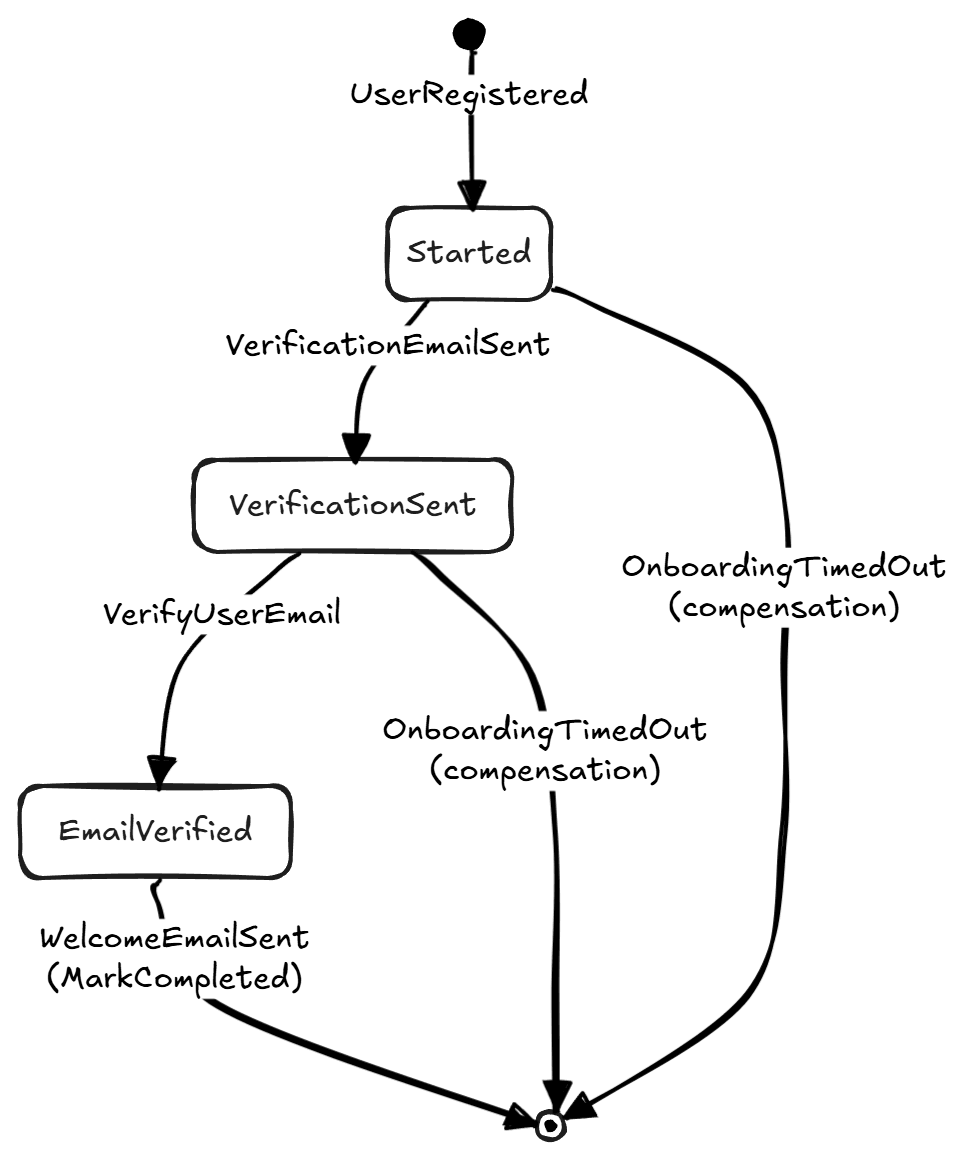
## The Saga State Diagram
Here's how the saga transitions between states:
## Building the Saga
Here's the complete saga class:
```csharp
public class UserOnboardingSaga : Saga
{
public Guid Id { get; set; }
public string Email { get; set; } = string.Empty;
public string FirstName { get; set; } = string.Empty;
public string LastName { get; set; } = string.Empty;
public bool IsVerificationEmailSent { get; set; }
public bool IsEmailVerified { get; set; }
public bool IsWelcomeEmailSent { get; set; }
public DateTime StartedAt { get; set; }
// Step 1: Start the saga when UserRegistered is published
public static (
UserOnboardingSaga,
SendVerificationEmail,
OnboardingTimedOut) Start(
UserRegistered @event,
ILogger logger)
{
logger.LogInformation(
"Starting onboarding for user {UserId}", @event.Id);
var saga = new UserOnboardingSaga
{
Id = @event.Id,
Email = @event.Email,
FirstName = @event.FirstName,
LastName = @event.LastName,
};
return (
saga,
new SendVerificationEmail(saga.Id, saga.Email),
new OnboardingTimedOut(saga.Id));
}
// Step 2: Verification email was sent
public void Handle(
VerificationEmailSent @event,
ILogger logger)
{
logger.LogInformation(
"Verification email sent for user {UserId}", Id);
IsVerificationEmailSent = true;
}
// Step 3: User verified their email
public SendWelcomeEmail Handle(
VerifyUserEmail command,
ILogger logger)
{
logger.LogInformation("Email verified for user {UserId}", Id);
IsEmailVerified = true;
return new SendWelcomeEmail(Id, Email, FirstName);
}
// Step 4: Welcome email sent - onboarding complete
public void Handle(
WelcomeEmailSent @event,
ILogger logger)
{
logger.LogInformation("Onboarding complete for user {UserId}", Id);
IsWelcomeEmailSent = true;
MarkCompleted();
}
// Compensation: timeout handler
public void Handle(
OnboardingTimedOut timeout,
ILogger logger)
{
if (IsEmailVerified)
{
logger.LogInformation(
"Timeout ignored - email already verified for user {UserId}",
Id);
return;
}
logger.LogWarning(
"Onboarding timed out for user {UserId} - email not verified",
Id);
MarkCompleted();
}
// NotFound: messages arriving for completed/deleted sagas
public static void NotFound(
VerifyUserEmail command,
ILogger logger)
{
logger.LogWarning(
"Verify email received but saga {Id} no longer exists",
command.Id);
}
public static void NotFound(
OnboardingTimedOut timeout,
ILogger logger)
{
logger.LogInformation(
"Timeout received for already-completed saga {Id}",
timeout.Id);
}
}
```
A few things worth calling out.
**Starting the saga.** `Start` is a static factory that returns a tuple: the saga instance, a `SendVerificationEmail` command, and a [scheduled](https://wolverinefx.net/guide/messaging/message-bus#scheduling-message-delivery-or-execution) `OnboardingTimedOut` message. Wolverine persists the saga and delivers the messages for you.
**Handling messages.** Wolverine [**correlates messages**](https://wolverinefx.net/guide/durability/sagas#saga-message-identity) to the correct saga instance by looking for a `[SagaIdentity]` attribute, then `{SagaTypeName}Id`, then `Id`. Return `void` to update state silently, or return a message to cascade a new command.
> **Warning:** Do not call `IMessageBus.InvokeAsync()` within a saga handler to execute a command on that same saga. You'll be acting on stale or missing data. Use cascading messages (return values) for subsequent work.
**Completing the saga.** `MarkCompleted()` tells Wolverine to delete the saga state from PostgreSQL.
**Concurrency.** Wolverine applies [optimistic concurrency control](https://en.wikipedia.org/wiki/Optimistic_concurrency_control) to saga state by default. If two messages for the same saga arrive at the same time, one succeeds and the other retries automatically.
**Timeout and compensation.** `OnboardingTimedOut` fires 5 minutes after the saga started. If the user verified, we ignore it. Otherwise, we compensate and end the saga. This is the key advantage over fire-and-forget workflows.
**NotFound handlers.** Static [`NotFound` methods](https://wolverinefx.net/guide/durability/sagas#when-sagas-are-not-found) handle messages for sagas that no longer exist. You **must** have one for any message type that could arrive after the saga is deleted. The timeout `NotFound` handler matters most: in the happy path, the saga completes before the timeout fires.
## The Sequence Flow
Here's the happy path where the user verifies before the timeout:
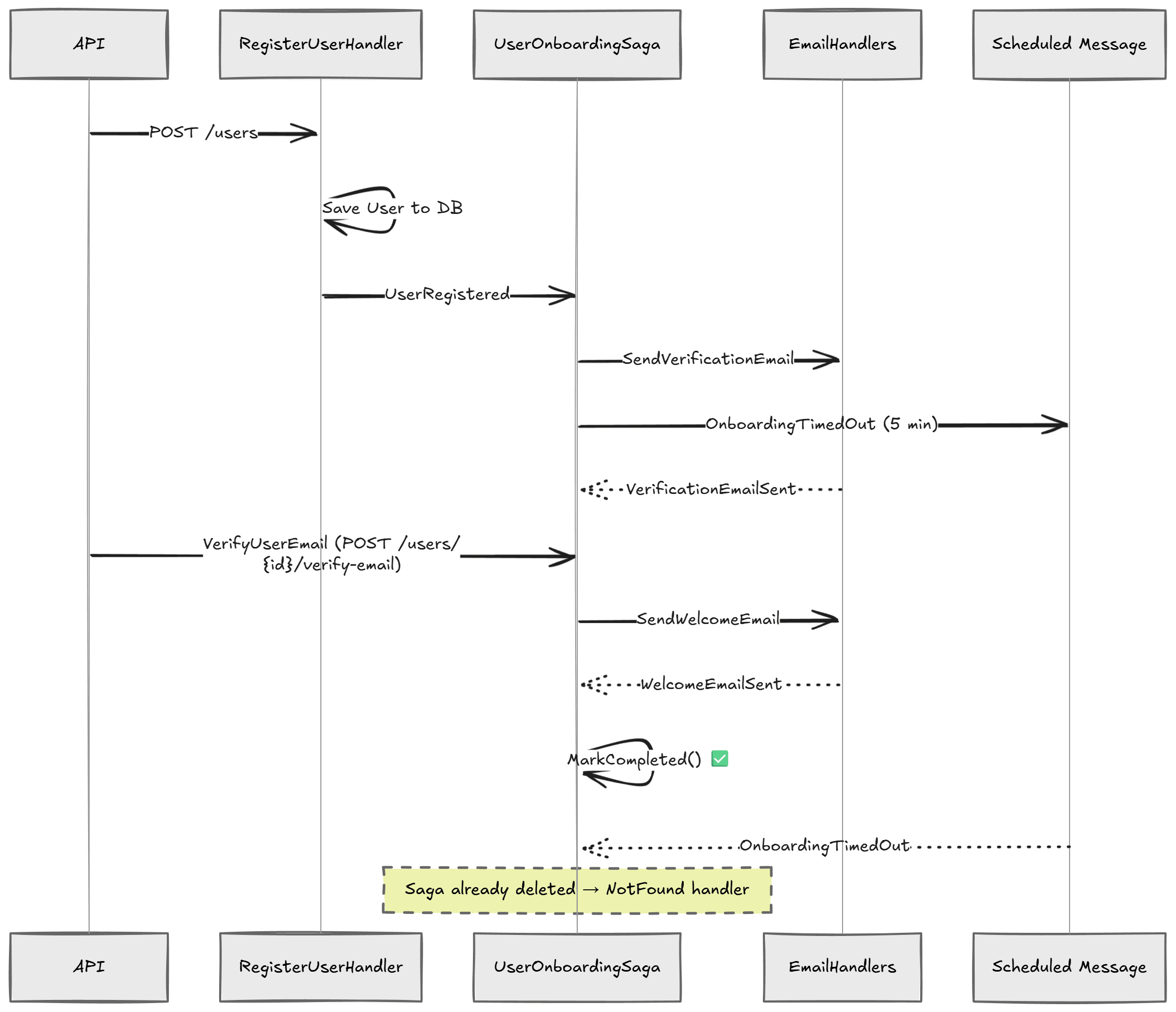
If the user never verifies, the `VerifyUserEmail` message never arrives.
After 5 minutes, `OnboardingTimedOut` fires and the saga compensates.
## Summary
Wolverine's `Saga` base class gives you a convention-driven way to implement long-running workflows:
- **`Start` methods** create and initialize the saga from a triggering event
- **`Handle` methods** process messages and cascade new commands via return values
- **`TimeoutMessage`** schedules delayed compensation without external schedulers
- **`MarkCompleted()`** cleans up the saga state when the workflow is done
- **`NotFound` handlers** gracefully handle messages for sagas that no longer exist
The Saga pattern shines when you have multi-step processes with potential failures.
Instead of hoping everything goes right, you design for the cases where it doesn't.
What I really like about Wolverine's approach is how little code you need.
You skip the state machine DSL and explicit correlation config entirely.
If you want to go deeper on orchestrating distributed workflows and building real-world sagas,
check out [**Modular Monolith Architecture**](https://milanjovanovic.tech/modular-monolith-architecture).
Hope this was useful. See you next week.
---
## Frequently asked questions
### What is the saga pattern?
The saga pattern breaks a long-running business process into a sequence of steps, each with its own message and handler. If a step fails or times out, the saga runs compensation logic instead of leaving the system in a broken state.
### How does Wolverine implement sagas?
You write a class extending the Saga base class, define Handle methods for each message type, and cascade new messages by returning them from handlers. Wolverine handles routing, persistence, and correlation automatically, with no state machine DSL or explicit correlation config.
### Why use Wolverine instead of MassTransit for sagas?
MassTransit and Rebus sagas work well, but their state machine DSLs carry a fair amount of ceremony. Wolverine needs much less code, skipping the DSL and correlation config entirely. After MassTransit moved to a commercial license, more teams began exploring Wolverine as an alternative.
### How do saga timeouts work in Wolverine?
A message extending TimeoutMessage is automatically scheduled for delayed delivery when the saga starts. If the expected event never arrives before it fires, the timeout handler runs compensation logic and completes the saga. No external scheduler is required.
### How does Wolverine persist saga state?
Three ways: lightweight storage serializes saga state as JSON in a per-saga table with zero ORM config, Marten stores sagas as documents with optimistic concurrency, and EF Core maps sagas into a flat, queryable table. Lightweight storage is the simplest path for plain saga state.
### What are NotFound handlers in Wolverine sagas?
Static NotFound methods handle messages that arrive for sagas that no longer exist. You must define one for any message type that can arrive after the saga is deleted, especially timeouts, since in the happy path the saga completes before the timeout fires.