# Building Fast Serverless APIs With Minimal APIs on AWS Lambda
> Learn how to deploy ASP.NET Core Minimal APIs to AWS Lambda with just one library and a single line of code. We'll explore the setup process, measure real-world performance including cold start times, and discuss when serverless makes sense for your APIs.
Published: 2025-10-11. Author: Milan Jovanović.
Canonical: https://milanjovanovic.tech/blog/building-fast-serverless-apis-with-minimal-apis-on-aws-lambda
You can run ASP.NET Core Minimal APIs on AWS Lambda by installing `Amazon.Lambda.AspNetCoreServer.Hosting` and adding one line to `Program.cs`.
The same code still runs on Kestrel locally.
In my tests a cold start took just over 2 seconds, while warm requests came back in about 150 ms.
Have you ever wondered if you could host a tiny .NET API without running servers 24/7?
You can!
AWS Lambda lets you run code on-demand, and with the [Amazon.Lambda.AspNetCoreServer.Hosting](https://www.nuget.org/packages/Amazon.Lambda.AspNetCoreServer.Hosting) library,
you can plug an ASP.NET Core [Minimal APIs](https://learn.microsoft.com/en-us/aspnet/core/fundamentals/minimal-apis) straight into [AWS Lambda](https://aws.amazon.com/lambda/).
In this article we'll set up a minimal API, deploy it, and discuss how it performs.
Don't worry if you're new to serverless, I'll keep everything simple enough to follow along.
## Getting Your Minimal APIs Lambda-Ready
Let's start with the basics. You need just three things to turn your [**Minimal API**](https://milanjovanovic.tech/blog/minimal-apis-dotnet) into a Lambda function.
First, create your API:
```bash
dotnet new webapi -n MyLambdaApi
cd MyLambdaApi
```
Second, add Amazon's hosting package:
```powershell
Install-Package Amazon.Lambda.AspNetCoreServer.Hosting
```
Third, add one line to your `Program.cs`:
```csharp {4}
var builder = WebApplication.CreateBuilder(args);
// This line does all the Lambda magic
builder.Services.AddAWSLambdaHosting(LambdaEventSource.HttpApi);
var app = builder.Build();
app.MapGet("/", () => "Hello from Lambda!");
app.Run();
```
That's it.
Your API now runs both locally (for testing) and in Lambda (for production).
When you run locally, it uses [Kestrel](https://learn.microsoft.com/en-us/aspnet/core/fundamentals/servers/kestrel) like normal.
When you deploy the app to AWS, Lambda takes over.
## Ship It to AWS
You'll need the [Lambda tools](https://github.com/aws/aws-extensions-for-dotnet-cli) installed:
```bash
dotnet tool install -g Amazon.Lambda.Tools
```
Then deploy with one command:
```bash
dotnet lambda deploy-function
```
The tool asks you a few questions (like the function name, which IAM role to use).
Pick the defaults if you're just testing.
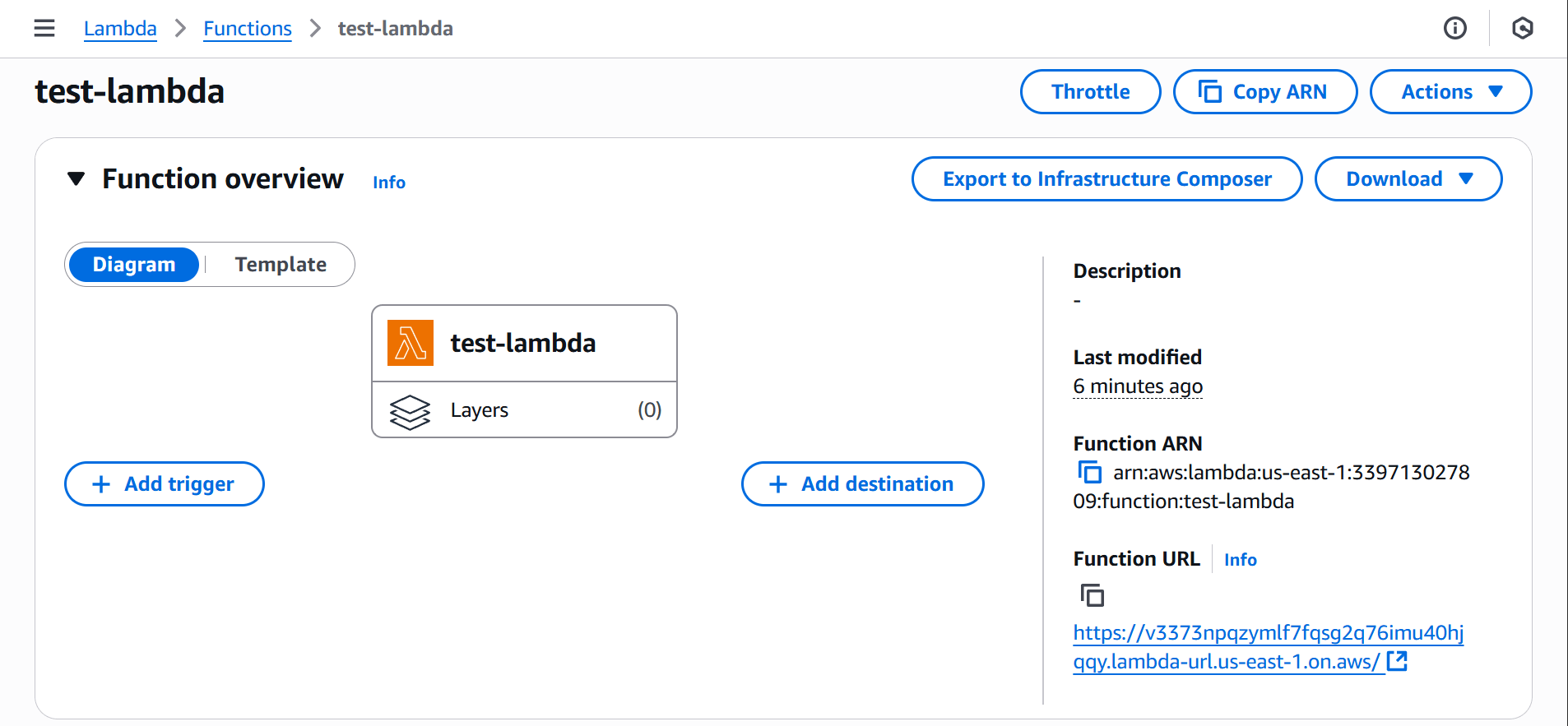
In a minute or two, your API is live with a URL like: `https://[abc123xyz].lambda-url.[region-name].on.aws/`.
From the AWS Management Console, you can find your function with its URL and all the other details.
## Measuring Cold Starts
Here's where things become interesting (and problematic).
Lambda functions "go to sleep" when nobody uses them.
Waking them up takes time, this is the famous **"cold start" problem**.
I ran some simple tests with a basic Minimal API:
- First request (cold): 2,153 ms
- Second request (warm): 154 ms
- Third request (warm): 143 ms
- After 10 minutes idle (cold again): 2,074 ms
As you can see, the first request is slow due to the cold start.
Subsequent requests are much faster, around 150 ms.
After 10 minutes of inactivity, the function goes cold again, and the next request takes over 2 seconds.
There's an optimization feature called [SnapStart](https://docs.aws.amazon.com/lambda/latest/dg/snapstart.html) that can help reduce cold start times,
but it has its own tradeoffs and isn't always suitable for every application.
Another thing to note is that I'm in Europe, and my Lambda function is in the US East (N. Virginia) region.
This adds network latency, so your results may vary based on your location and the region you choose.
Even when warm, the latency is higher than a typical server-hosted API.
This may be acceptable for low-traffic or non-critical endpoints, but it's something to consider.
Let's move beyond a "Hello World" example to something more realistic.
## CRUD Operations Benchmark
To see how a simple API performs in the real world, I built a tiny CRUD app that creates a record, fetches it, updates it and then deletes it.
First I ran each operation once to see the raw latency.
Then I used a load-testing tool with 100 virtual users (VUs) to measure average latency under a bit more stress.
```csharp
// POST /products - Create new product
app.MapPost("/products", async (CreateProductRequest request, NpgsqlDataSource dataSource) =>
{
const string sql =
"""
INSERT INTO Products (Name, Description, Price, CreatedAt)
VALUES (@Name, @Description, @Price, @CreatedAt)
RETURNING Id, Name, Description, Price, CreatedAt
""";
await using var connection = await dataSource.OpenConnectionAsync();
var product = await connection.QueryFirstAsync(sql, new
{
request.Name,
request.Description,
request.Price,
CreatedAt = DateTime.UtcNow
});
return Results.Created(
$"/products/{product.Id}",
new ProductResponse(
product.Id,
product.Name,
product.Description,
product.Price,
product.CreatedAt));
});
// Other endpoints omitted for brevity:
// - GET /products/{id} - Get product by ID
// - PUT /products/{id} - Update product
// - DELETE /products/{id} - Delete product
```
The application uses .NET 8, [Npgsql](https://www.npgsql.org/) and [Dapper](https://www.learndapper.com/)
to interact with a PostgreSQL database running on [Amazon RDS](https://aws.amazon.com/rds/).
You can find the source code for this example (and the previous one) in [this repository](https://github.com/m-jovanovic/minimal-apis-on-lambda).
Here are the results:
**Single-call latency**
```text
| Operation | Latency (ms) | Notes |
| ---------- | ------------ | ------------------------------- |
| Create | 537 | Cold start plus object creation |
| Read | 134 | Simple GET of the new record |
| Update | 140 | Changing one property |
| Delete | 167 | Removing the record |
```
The create call took half a second because it included a cold start and initialization overhead.
Once the function was warmed up, the other operations completed in under two hundred milliseconds.
**Load test with 100 virtual users**
During the load test, I simulated 100 clients hitting the API at once.
AWS automatically scaled the Lambda function to handle the traffic, and average latencies dropped because the functions were already warm.
Here are the averages:
- **CREATE avg**: 129 ms
- **READ avg**: 132 ms
- **UPDATE avg**: 152 ms
- **DELETE avg**: 144 ms
These numbers show that once your function is up and running, Lambda can respond quite quickly even when many users are making requests.
Of course, actual times will vary depending on what your API does and how it stores data.
Remember that each of these operations involves network calls to the database, which adds latency.
Overall, I don't find these numbers bad for a serverless setup.
## Summary
Hosting minimal APIs in AWS Lambda is **surprisingly straightforward**.
With one library and a single method call, your ASP.NET Core code can run "without servers".
You pay only for the compute you use.
Also, the AWS Lambda free tier includes one million free requests per month, which is great for testing and light usage.
However, there are tradeoffs.
Because of cold starts and the overhead of starting the .NET runtime, latency isn't as low as hosting on a dedicated server.
If your API is mission-critical or requires sub-100 ms responses at all times, you may need to look at provisioned concurrency, containers, or a traditional host.
Lambda shines for small, [**event-driven**](https://milanjovanovic.tech/blog/event-driven-architecture-in-dotnet-with-rabbitmq) or intermittent workloads that don't justify a full-time server.
But it's less suitable for latency-sensitive or heavy, long-running applications.
For occasional or low-traffic API endpoints, though, **Lambda** offers a **cost-effective** and **simple** option.
That's all for today.
See you next week.
---
## Frequently asked questions
### Can you run ASP.NET Core Minimal APIs on AWS Lambda?
Yes. Install the Amazon.Lambda.AspNetCoreServer.Hosting NuGet package and add builder.Services.AddAWSLambdaHosting(LambdaEventSource.HttpApi) to Program.cs. The same code runs locally on Kestrel for testing, and Lambda takes over when you deploy to AWS.
### How do you deploy a .NET Minimal API to AWS Lambda?
Install Amazon.Lambda.Tools as a global dotnet tool, then run dotnet lambda deploy-function. The tool asks a few questions, like the function name and IAM role, and within a minute or two the API is live behind a Lambda function URL.
### How bad are AWS Lambda cold starts for .NET APIs?
In the tests for this issue, a basic .NET 8 Minimal API took just over 2 seconds on a cold start, warm requests ran around 150 ms, and the function went cold again after about 10 minutes of inactivity.
### How can you reduce AWS Lambda cold start times for .NET?
SnapStart is an optimization feature that can reduce cold start times, though it has tradeoffs and does not suit every application. If your API is mission-critical or needs sub-100 ms responses at all times, consider provisioned concurrency, containers, or a traditional host instead.
### How does a serverless .NET API perform under load?
In a load test with 100 virtual users against a CRUD API using Dapper and PostgreSQL on Amazon RDS, AWS scaled the Lambda function automatically and warm average latencies came in around 130 to 150 ms per operation, including the database round trips.
### When is AWS Lambda a good choice for hosting an API?
Lambda shines for small, event-driven, or intermittent workloads that do not justify a full-time server: you pay only for the compute you use, and the free tier included one million requests per month. It is less suitable for latency-sensitive or heavy, long-running applications.