# How to Build a Modular Monolith in .NET Step by Step
> Build a working Modular Monolith skeleton in .NET: three modules, each with its own schema and DbContext, cross-module calls that go through Contracts projects only, and an in-process event bus. Architecture tests fail the build the moment someone crosses a boundary.
Published: 2026-08-13. Author: Milan Jovanović.
Canonical: https://milanjovanovic.tech/blog/build-modular-monolith-dotnet-step-by-step
To build a Modular Monolith in .NET, give each module its own Domain, Application, Infrastructure, and Contracts projects, reference other modules through Contracts only, isolate data with a schema and DbContext per module, and connect modules with an in-process event bus.
Architecture tests then fail the build the moment someone crosses a boundary.
Every article about Modular Monoliths tells you to build "well-defined modules with clear boundaries".
Almost none of them show you the csproj files.
This one does.
## What Are We Building?
A **Modular Monolith** is a single deployable application divided into modules with explicit boundaries, where each module owns its domain, data, and public API.
We're building one with three modules: **Catalog**, **Ordering**, and **Shipping**, communicating through integration events and module interfaces.
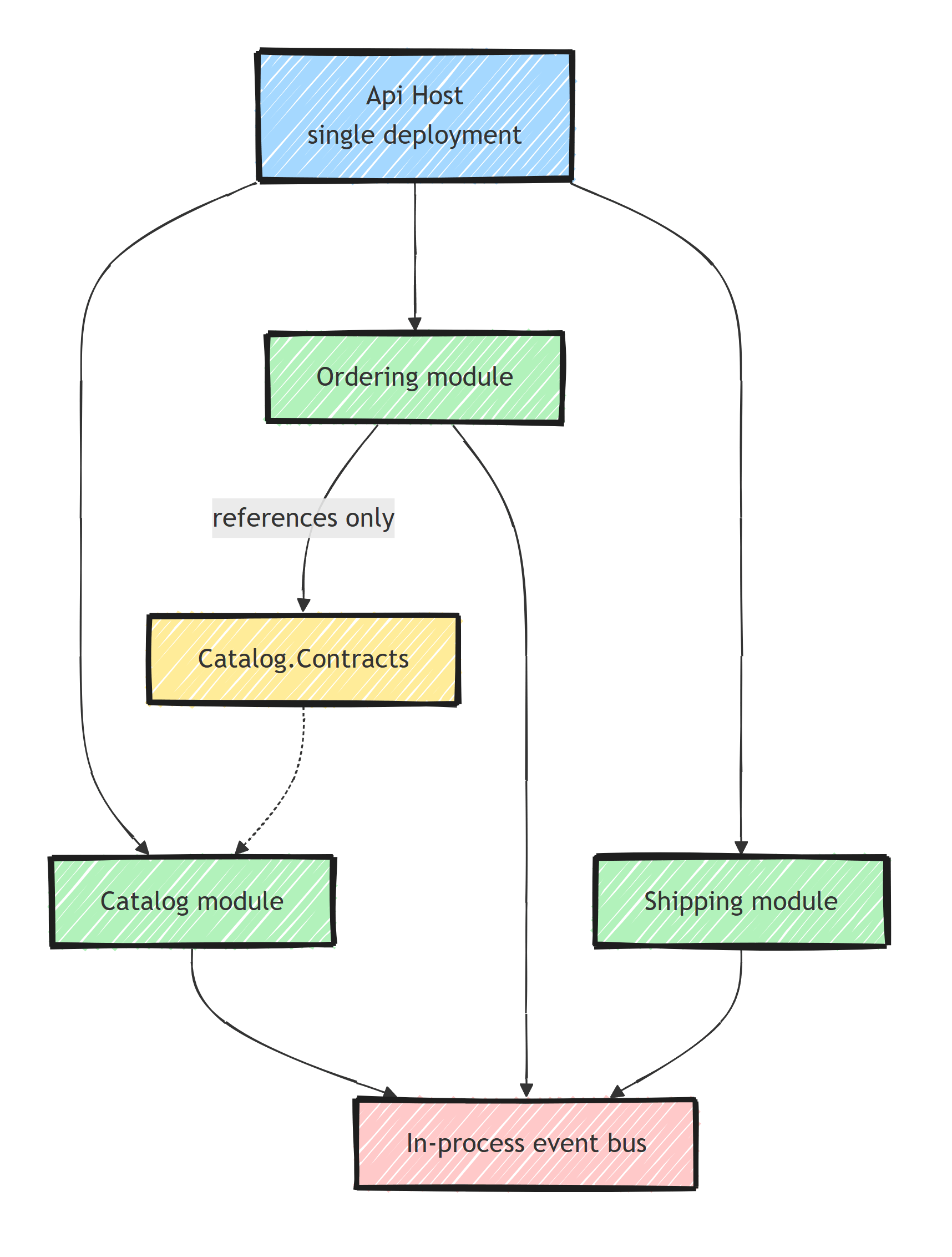
If you're not sure this architecture is the right fit, start with [**What Is a Modular Monolith?**](https://milanjovanovic.tech/blog/what-is-a-modular-monolith) and come back. This article is the hands-on part: by the end, you'll have a working skeleton you can grow into a production system.
## Step 1: Solution Structure
```
src/
Api/ ← Host application (single deployment)
Common/
Common.Application/ ← Shared abstractions
Common.Infrastructure/ ← Shared infrastructure
Modules/
Catalog/
Catalog.Application/
Catalog.Domain/
Catalog.Infrastructure/
Catalog.Contracts/
Ordering/
Ordering.Application/
Ordering.Domain/
Ordering.Infrastructure/
Ordering.Contracts/
Shipping/
Shipping.Application/
Shipping.Domain/
Shipping.Infrastructure/
Shipping.Contracts/
```
Create the solution:
```bash
dotnet new sln -n ModularMonolith
# Host
dotnet new webapi -n Api -o src/Api
# Common
dotnet new classlib -n Common.Application -o src/Common/Common.Application
dotnet new classlib -n Common.Infrastructure -o src/Common/Common.Infrastructure
# Catalog module
dotnet new classlib -n Catalog.Application -o src/Modules/Catalog/Catalog.Application
dotnet new classlib -n Catalog.Domain -o src/Modules/Catalog/Catalog.Domain
dotnet new classlib -n Catalog.Infrastructure -o src/Modules/Catalog/Catalog.Infrastructure
dotnet new classlib -n Catalog.Contracts -o src/Modules/Catalog/Catalog.Contracts
```
Repeat for Ordering and Shipping.
## Step 2: Project References
Each module follows [**Clean Architecture**](https://milanjovanovic.tech/blog/clean-architecture-vs-onion-vs-hexagonal) internally:
```xml
```
Cross-module references go through **Contracts only**:
```xml
```
The host references all Infrastructure projects:
```xml
```
The Contracts project contains only what a module is willing to expose: the module's public interface, integration event records, and simple DTOs.
No entities, no DbContext, no handlers.
If it compiles without referencing anything else in the module, it belongs in Contracts.
## Step 3: Database per Module
Each module gets its own schema using [**separate DbContexts**](https://milanjovanovic.tech/blog/modular-monolith-data-isolation):
```csharp
// Catalog.Infrastructure/CatalogDbContext.cs
public class CatalogDbContext(DbContextOptions options)
: DbContext(options)
{
public DbSet Products { get; set; }
public DbSet Categories { get; set; }
protected override void OnModelCreating(ModelBuilder modelBuilder)
{
modelBuilder.HasDefaultSchema("catalog");
modelBuilder.ApplyConfigurationsFromAssembly(
typeof(CatalogDbContext).Assembly);
}
}
```
```csharp
// Ordering.Infrastructure/OrderingDbContext.cs
public class OrderingDbContext(DbContextOptions options)
: DbContext(options)
{
public DbSet Orders { get; set; }
public DbSet LineItems { get; set; }
protected override void OnModelCreating(ModelBuilder modelBuilder)
{
modelBuilder.HasDefaultSchema("ordering");
modelBuilder.ApplyConfigurationsFromAssembly(
typeof(OrderingDbContext).Assembly);
}
}
```
All schemas live in the same database. Each module only accesses its own schema.
Each `DbContext` also gets its own migrations history table, so you can evolve modules independently:
```bash
dotnet ef migrations add InitialCreate \
--project src/Modules/Catalog/Catalog.Infrastructure \
--startup-project src/Api \
--context CatalogDbContext
dotnet ef migrations add InitialCreate \
--project src/Modules/Ordering/Ordering.Infrastructure \
--startup-project src/Api \
--context OrderingDbContext
```
Because the host references every Infrastructure project, you always pass `--context` to tell EF Core which module you're working with.
## Step 4: Module Registration
Each module has a registration extension method:
```csharp
// Catalog.Infrastructure/CatalogModuleRegistration.cs
public static class CatalogModuleRegistration
{
public static IServiceCollection AddCatalogModule(
this IServiceCollection services, IConfiguration config)
{
services.AddDbContext(options =>
options.UseNpgsql(
config.GetConnectionString("Database"),
o => o.MigrationsHistoryTable(
"__EFMigrationsHistory", "catalog")));
services.AddScoped();
services.AddMediatR(cfg =>
cfg.RegisterServicesFromAssembly(
typeof(GetProductsQuery).Assembly)); // Catalog.Application
return services;
}
}
```
Careful with the MediatR assembly: the handlers live in `Catalog.Application`, not in the Infrastructure project where this registration class sits.
Scanning the wrong assembly is a classic mistake, and the symptom is a runtime "no handler registered" error on the first request.
Wire everything in the host:
```csharp
// Api/Program.cs
var builder = WebApplication.CreateBuilder(args);
builder.Services.AddCatalogModule(builder.Configuration);
builder.Services.AddOrderingModule(builder.Configuration);
builder.Services.AddShippingModule(builder.Configuration);
var app = builder.Build();
app.MapCatalogEndpoints();
app.MapOrderingEndpoints();
app.MapShippingEndpoints();
app.Run();
```
## Step 5: Module Endpoints
Each module registers its own endpoints:
```csharp
// Catalog.Infrastructure/CatalogEndpoints.cs
public static class CatalogEndpoints
{
public static void MapCatalogEndpoints(this WebApplication app)
{
var group = app.MapGroup("/api/catalog")
.WithTags("Catalog");
group.MapGet("/products", async (
ISender sender, CancellationToken ct) =>
{
var result = await sender.Send(
new GetProductsQuery(), ct);
return Results.Ok(result);
});
group.MapGet("/products/{id:guid}", async (
Guid id, ISender sender, CancellationToken ct) =>
{
var result = await sender.Send(
new GetProductByIdQuery(id), ct);
return result is null
? Results.NotFound()
: Results.Ok(result);
});
group.MapPost("/products", async (
CreateProductRequest request,
ISender sender,
CancellationToken ct) =>
{
var result = await sender.Send(
new CreateProductCommand(
request.Name, request.Price), ct);
return Results.Created(
$"/api/catalog/products/{result}", result);
});
}
}
```
One gotcha: this class lives in a class library, so `Catalog.Infrastructure.csproj` needs `` to see `WebApplication` and `Results`.
## Step 6: Event Bus
Create a simple in-process event bus for integration events:
```csharp
// Common.Application/IIntegrationEvent.cs
public interface IIntegrationEvent : INotification
{
Guid EventId { get; }
DateTime OccurredOnUtc { get; }
}
// Common.Application/IEventBus.cs
public interface IEventBus
{
Task PublishAsync(T @event, CancellationToken ct = default)
where T : IIntegrationEvent;
}
// Common.Infrastructure/InProcessEventBus.cs
public class InProcessEventBus : IEventBus
{
private readonly IPublisher _publisher;
public InProcessEventBus(IPublisher publisher) =>
_publisher = publisher;
public async Task PublishAsync(
T @event, CancellationToken ct) where T : IIntegrationEvent
{
await _publisher.Publish(@event, ct);
}
}
```
The `IIntegrationEvent` marker extends MediatR's `INotification`.
That's what lets consumer modules subscribe with plain notification handlers; MediatR refuses to publish objects that don't implement `INotification`.
If you'd rather keep your contracts free of MediatR entirely, the [**shared kernel**](https://milanjovanovic.tech/blog/shared-kernel-pattern-modular-monolith) article shows a dependency-free marker with its own `IIntegrationEventHandler` abstraction.
Register the event bus:
```csharp
services.AddScoped();
```
One caveat: MediatR's `Publish` runs every handler **in the same process and scope, synchronously**.
A slow or failing consumer affects the publisher.
That's fine for a first version, but for anything critical you'll want the [**Outbox pattern**](https://milanjovanovic.tech/blog/outbox-pattern-dual-write-problem) so events are persisted with the business data and published by a background worker.
## Step 7: Cross-Module Communication
The ordering module uses the catalog module's [**public interface**](https://milanjovanovic.tech/blog/internal-vs-public-apis-in-modular-monoliths).
The contract lives in `Catalog.Contracts`, so it's the only thing other modules ever see:
```csharp
// Catalog.Contracts/ICatalogModule.cs
public interface ICatalogModule
{
Task> GetProductsAsync(
IReadOnlyCollection productIds,
CancellationToken ct = default);
}
public sealed record ProductResponse(Guid Id, string Name, decimal Price);
```
The implementation stays internal to the Catalog module (this is the `CatalogModule` class we registered in Step 4):
```csharp
// Catalog.Infrastructure/CatalogModule.cs
internal sealed class CatalogModule : ICatalogModule
{
private readonly CatalogDbContext _db;
public CatalogModule(CatalogDbContext db) => _db = db;
public async Task> GetProductsAsync(
IReadOnlyCollection productIds,
CancellationToken ct = default)
{
return await _db.Products
.Where(p => productIds.Contains(p.Id))
.Select(p => new ProductResponse(p.Id, p.Name, p.Price))
.ToListAsync(ct);
}
}
```
The integration event that Ordering publishes lives in `Ordering.Contracts`:
```csharp
// Ordering.Contracts/OrderPlacedIntegrationEvent.cs
public sealed record OrderPlacedIntegrationEvent(
Guid EventId,
DateTime OccurredOnUtc,
Guid OrderId,
Guid CustomerId,
decimal TotalAmount) : IIntegrationEvent;
```
`Ordering.Contracts` references `Common.Application` to see the `IIntegrationEvent` marker; that's the one shared dependency contracts projects are allowed.
Now the ordering module can place an order:
```csharp
// Ordering.Application/PlaceOrderHandler.cs
public sealed class PlaceOrderHandler
: IRequestHandler>
{
private readonly ICatalogModule _catalog;
private readonly OrderingDbContext _db;
private readonly IEventBus _eventBus;
public PlaceOrderHandler(
ICatalogModule catalog,
OrderingDbContext db,
IEventBus eventBus)
{
_catalog = catalog;
_db = db;
_eventBus = eventBus;
}
public async Task> Handle(
PlaceOrderCommand command, CancellationToken ct)
{
// Get product info from Catalog module
var products = await _catalog.GetProductsAsync(
command.Items.Select(i => i.ProductId).ToList(), ct);
if (products.Count != command.Items.Count)
{
return Result.Failure(new Error(
"Ordering.ProductsNotFound",
"Some products were not found."));
}
// Create order
var order = Order.Create(command.CustomerId);
foreach (var item in command.Items)
{
var product = products.First(p => p.Id == item.ProductId);
order.AddLineItem(item.ProductId, item.Quantity, product.Price);
}
_db.Orders.Add(order);
await _db.SaveChangesAsync(ct);
// Publish integration event
await _eventBus.PublishAsync(
new OrderPlacedIntegrationEvent(
Guid.NewGuid(), DateTime.UtcNow,
order.Id, order.CustomerId, order.TotalAmount), ct);
return Result.Success(order.Id);
}
}
```
One simplification to be upfront about: I'm injecting `OrderingDbContext` straight into the handler to keep the example short, but with the Step 2 project references the Application project can't actually see the Infrastructure project.
In a real module, either hide persistence behind an abstraction defined in `Ordering.Application`, or merge Application and Infrastructure into a single project per module (a perfectly valid simplification that many teams choose).
## Step 8: Enforce Module Boundaries
Use architecture tests to prevent modules from referencing each other's internals:
```csharp
[Fact]
public void OrderingModule_ShouldNotReference_CatalogInternals()
{
var result = Types
.InAssembly(typeof(OrderingDbContext).Assembly)
.Should()
.NotHaveDependencyOn("Catalog.Domain")
.And()
.NotHaveDependencyOn("Catalog.Application")
.And()
.NotHaveDependencyOn("Catalog.Infrastructure")
.GetResult();
result.IsSuccessful.Should().BeTrue();
}
```
See **Architecture Testing** for more patterns.
Project references already prevent most violations at compile time (a module can't call what it can't see).
The architecture tests catch the sneakier failures: someone adding a project reference "just this once", or reflection-based access that the compiler can't see.
## Common Pitfalls
A few things that bite teams on their first Modular Monolith:
- **A bloated Common project.** `Common.Application` should hold abstractions (`IEventBus`, base types, the result pattern), not business logic. If two modules need the same business rule, that's a boundary problem, not a code-sharing problem.
- **Shared entities.** The Ordering module must not reference `Catalog.Domain.Product`. It gets a `ProductResponse` DTO through the contract, or it stores its own copy of the data it needs (product name and price at the time of ordering).
- **Cross-schema queries.** One `DbContext` per module means EF Core won't let you join `ordering.orders` to `catalog.products`. Someone will try to do it with raw SQL. Don't. That query is a hidden coupling that will break the module boundary silently.
- **Skipping Contracts because "it's all one process anyway".** The Contracts project feels like ceremony until you extract a module. Then it becomes the API surface of your new service, for free.
## When NOT to Use This Structure
For a small CRUD application with one team and one bounded context, four projects per module is overkill.
A single project with feature folders will serve you better.
The Modular Monolith earns its structure when you have multiple distinct business capabilities, a team in the roughly 2-15 developer range, or a real chance you'll need to [**extract a module later**](https://milanjovanovic.tech/blog/when-to-extract-module-to-microservice).
If you want to see the complete approach applied to a production-grade system, my [**Modular Monolith Architecture**](https://milanjovanovic.tech/modular-monolith-architecture) course walks through every one of these steps in depth.
## Summary
Building a Modular Monolith step by step:
1. **Solution structure** - each module has Domain, Application, Infrastructure, and Contracts
2. **Contracts project** - the only cross-module dependency allowed
3. **Database per module** - separate schemas, separate DbContexts
4. **Module registration** - each module wires its own DI and endpoints
5. **Event bus** - integration events for decoupled cross-module communication
6. **Architecture tests** - enforce [**module boundaries**](https://milanjovanovic.tech/blog/module-boundaries-bounded-contexts) at build time
Start with a Modular Monolith. Extract to microservices only when you need to scale independently.
Thanks for reading, and stay awesome!
---
## Frequently asked questions
### How do you structure a modular monolith in .NET?
Create a solution with one host project and a folder per module. Each module gets its own Domain, Application, Infrastructure, and Contracts projects. Other modules may only reference the Contracts project, which keeps module internals private.
### Should each module have its own database in a modular monolith?
Each module should own its data, but that usually means a separate schema and a separate DbContext inside one shared database. A physically separate database per module is only worth it when you need independent scaling or backups.
### How do modules communicate in a modular monolith?
Synchronous calls go through a public interface exposed from the module Contracts project. Decoupled communication uses integration events published over an in-process event bus, which you can later swap for a message broker. Add the outbox pattern when event delivery must be reliable and truly asynchronous.
### How do you enforce module boundaries in .NET?
Use project references so only Contracts projects are visible across modules, and back that up with architecture tests using NetArchTest or ArchUnitNET. The tests fail the build if a module references another module internals.
### Is a modular monolith better than microservices for a new project?
For most new projects, yes. You get clear boundaries and independent modules without distributed system complexity. If a module later needs independent scaling or deployment, you can extract it into a microservice along the existing boundary.